
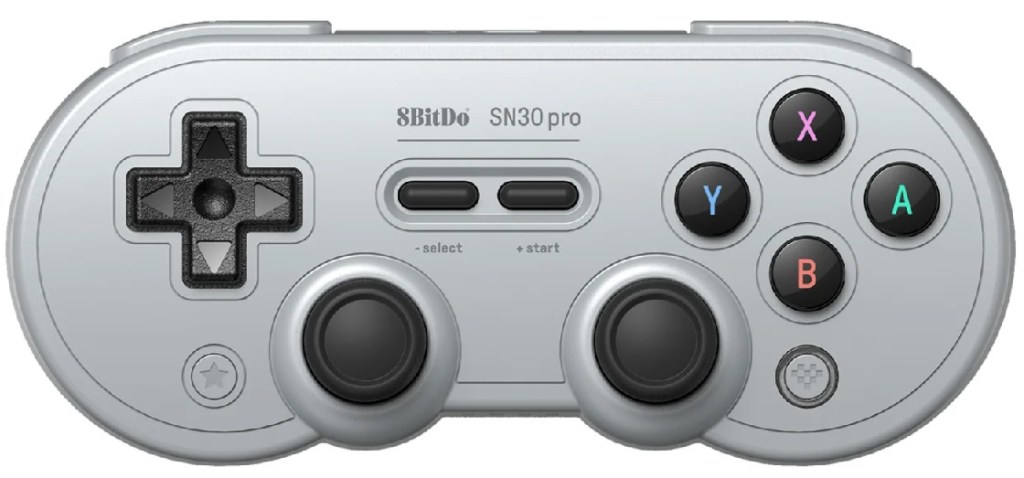
8Bitdo SN30 Pro Bluetooth Gamepad
Hardware Type: Game Controller
.
Review:
The 8Bitdo SN30 Pro is a game controller for the Nintendo Switch (but also compatible with Windows 7.0 and higher, Android 4.0 and higher, and iOS 10.7 and higher). For the purposes of this review, I used a standard-model Nintendo Switch.
The SN30 Pro is a controller that is very clearly designed to look like a classic Super Nintendo controller, with a similar size and shape, button layout, and color scheme. For those looking for an alternative to Nintendo’s official Pro controller, this can seem like a more affordable alternative, and those looking to enjoy more simple 2D games, as well as classic NES and SNES games on the Nintendo Switch Online service, this can seem ideal.
This controller has almost all of the functionality of the Pro Controller. It doesn’t have the ability to interact with Amiibo, and it can’t start the Switch on its own (players will have to use another controller to fire up the Switch before using this one). But all of the buttons on the Switch controller are here, along with a D-Pad and two analog sticks. In place of the Minus and Plus buttons are “Select” and “Start” buttons, and in place of the Capture and Home buttons are a Star button and a button with 8Bitdo’s symbol on it (though they function similarly). On the top of the controller are two sets of L and R buttons (here named simple L, L2, R, and R2), a charging port, and a sync button, along with a charging indicator light.
When first syncing the controller, players may find it awkward. It’s not a very intuitive process, as it involves pressing multiple face buttons at once (not sure why they couldn’t just have the sync button handle this). And, again, the controller won’t turn on the Switch, and players will need another controller to head into the system menus to get this one started up. Not a very elegant process.
Once you get that out of the way though, you’ll find this controller to be compatible with just about everything, save for those games that exclusively require the Joy-Cons or a touchscreen. However, it has its ups and downs.
This controller is much lighter than the Pro Controller, while still feeling pretty sturdy, which is nice. The face buttons on the right side of the controller feel great, and do an excellent job mimicking the feel of the old NES controllers. Also, I can report that this controller’s use of motion controls seems to work flawlessly. However, I had problems with just about everything else here.
Firstly, the D-Pad feels stiff. It’s fine, it’s usable, but it’s nowhere near as comfortable as the one on the Pro Controller. The two control sticks feel very good in and of themselves, but their placement at the center of the controller feels a bit awkward and unnatural for me since I’m used to playing Switch games with the offset sticks. They’re also frustratingly close together, even more so than the DualShock 4. In a way though, they’re not close enough, as their placement throws off the rest of the controller, and the lack of palm grips on this controller makes it feel uncomfortably unstable to hold this controller for more modern games that primarily use the sticks.
The face buttons on the right side, as I said, feel great, but they are placed far too high up on the controller. For most games this won’t be an issue, but for games that require you to make use of all four buttons or quickly go between them, this can cause problems, as you’ll be wrapping your thumbs farther around the controller to get to them. When I tested this game with Super Metroid on the Nintendo Switch online service, I found it to be awkward and uncomfortable to use the B button to run and hold the X button to charge the beam while shifting my thumb to the right to use the A button to jump while continuing to hold the other buttons.
The placement of the -/+ buttons is also troublesome, as their placement at the center of the controller is harder to reach for than the SNES controller thanks to the sticks getting in the way. Also, the Home and Capture buttons’ placement under the D-Pad and face buttons makes them extremely awkward to reach for during the action of a game.
Then there’s the shoulder buttons… the L and R buttons in this controller have been reduced down to uncomfortable slivers due to this controller’s small profile, and the smooth grooves in the L2 and R2 buttons make them where your fingers naturally want to rest on this controller, which isn’t really what you want in a button layout. I had to keep deliberately moving my fingers back up to those slivers because they kept wanting to move back down to the L2 and R2 buttons.
The funny thing is that the SN30 Pro is kinda’ the middle child that doesn’t enjoy the benefits of the controllers that came before and after it. The SN30, for comparison, lacks the Pro’s sticks, making it less compatible with more modern games, but the button layout is much closer to a classic Super Nintendo controller’s buttons. Meanwhile, the SN30 Pro+ adds back in the grips at the palms for better stability, spaces out and enlarges the shoulder buttons, and adds in button-mapping functionality. But the SN30 Pro is like the bastard middle child between the two, and is all the more frustrating for it.
At the very least the 8Bitdo SN30 Pro Bluetooth Gamepad still functions well enough, and it looks good, but unfortunately the devil’s in the details, and a multitude of small things make the SN30 Pro awkward and uncomfortable, and players will be better off getting a standard Pro Controller, or picking either of the other controllers in the SN30 line from 8Bitdo. But this controller is, sadly, a disappointment.
tl;dr – The 8Bitdo SN30 Pro is a Nintendo Switch controller that seeks to imitate the style of the classic Super Nintendo controller while adding in modern functionality for the Switch. Unfortunately, it’s awkward to set up the thing, missing some of the features of the Pro Controller, and its button layout makes it a great deal more uncomfortable than the Pro Controller and other controllers in its own product line. This controller is passable, but you can do better.
Grade: C+
You can support eShopperReviews on Patreon! Please click HERE to become a Sponsor!
 eShopperReviews
Leave a comment