
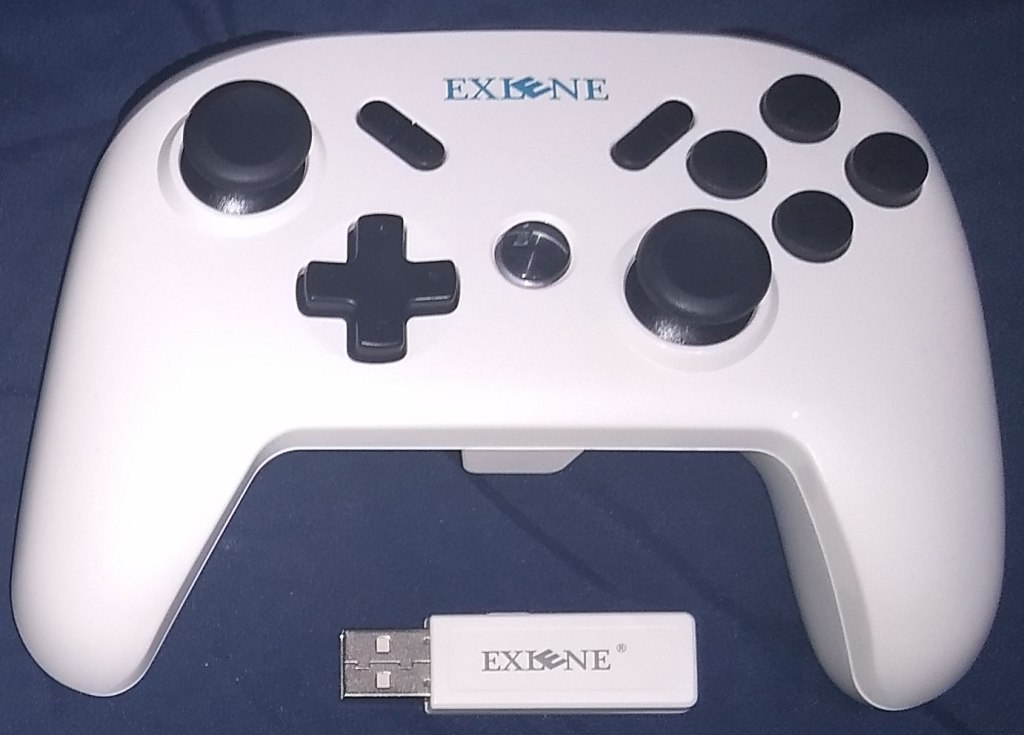
Exlene Wireless Pro Controller
Hardware Type: Game Controller
.
Review:
(Note: Review product provided by the kind folks at Exlene)
Last month, I reviewed this controller, and one of the biggest issues I noted with it was the apparent inability to adjust the controller’s rumble. In the time since, I have heard back from the folks at Exlene, who have better explained this function (something neither the website nor the supplemental materials that came with the controller did at the time of my first review). As this was a major factor in my opinions on this controller, I have opted to revisit the review now that I have this new information. There is one other factor that has also changed since my review, which I will address here as well. But since most of my opinion on the controller has not changed, neither has most of the review. I have altered only the pertinent parts of the review.
If you asked most gamers which game controller is the best on Nintendo Switch, you’d likely get one of two answers: Nintendo’s own Pro Controller, or the 8BitDo SN30 Pro+ Controller. I hear the SN30 Pro 2 is also excellent, but I haven’t gotten my hands on one just yet, so I can’t say how that stacks up. Each of these comes with a tradeoff – Nintendo’s Pro controller is one of few controller types that can wirelessly wake the Nintendo Switch from sleep mode and read Amiibo figurines, and it has an excellent form factor that makes it far more comfortable than a pair of Joy-Cons in a holder… however, it costs a whopping $70-$80. 8BitDo’s controller, on the other hand, has a more sensible $50 price tag, button-mapping, PC compatibility, macro support, analog triggers for PC gameplay… but it lacks the ability to wirelessly wake the Switch from sleep mode and read Amiibo figures.
Exlene’s Wireless Pro Controller aims to be the best of both worlds – it boasts the ability to wake the Nintendo Switch from sleep mode, read Amiibo figures, connect to PC and mobile devices, and even has a few additional features… all for a budget price of $50… on the high end. I say this because evidently this controller has a fluctuating price point – as I write this, it is currently priced at $30, which is an insanely good price for a controller with all the features this is touting. Looking over a list of these features, I felt that if it succeeded in everything it attempted, it would take the crown as the best controller on the Nintendo Switch.. So the question is… how well does it manage to do everything?
For what comes in the box, you have the controller itself, a 3-foot USB-C cable, a USB Bluetooth dongle, and a small single page of instructions with teenie-tiny text. You can see it all in this image (with a Nintendo Switch Pro controller to compare sizes). I cannot stress enough how small the text is on the instructions. It is eye-wateringly tiny. Here is a closer look at the front of the instructions with the dongle, and here’s a closer look at the back of the instructions. Sadly, this doesn’t even contain all the instructions you’ll need to operate this thing, you’ll also want to refer to the text on the company’s webpage for the controller as well, although even these two combined are still missing some vital information (but more on this later).
The form factor and button placement of Exlene’s controller is similar to Nintendo’s Pro controller (a much closer match than 8BitDo’s controller), but there are slight differences. Exlene’s Pro Controller has bigger A, X, B, and Y face buttons, the – button has been moved over to the right side and connected to the + button, the Camera button now has a connected Turbo button, and the Home button is now a large backlit centered button similar in its placement to the PlayStation button on a PlayStation 3/4 controller.
However, probably the most unexpected difference here is the ZL and ZR buttons, which jut out farther than the triggers on either of the other two controllers do. For me, this resulted in Exlene’s controller being the least comfortable out of the three, but that may just be personal preference – I had Jenn try it out and she said she actually much preferred the form factor of the Exlene controller’s ZL and ZR buttons. Oh, and while we’re on the topic of the Exlene controller’s ZL and ZR buttons, know that these are digital buttons, not analog – something that won’t matter on the Nintendo Switch, but makes a difference if you’re planning on using this controller on the PC or mobile platforms (one point in favor of 8BitDo’s controller).
Another point of contrast between Exlene’s controller and Nintendo’s is that Exlene’s controller weighs less (240g compared to 297g). In addition, its casing is a simple two-piece construction that lacks the smooth center piece and textured grips of Nintendo’s controller. The L, R, ZL, and ZR buttons also lack the contouring of Nintento’s controller, and instead have a ribbed texture for grip. The end result of all of this is that Exlene’s controller feels cheaper than Nintendo’s controller does, although I can’t say if its build is of better or worse quality (I am neither a design expert nor a structural engineer).
When it comes time to pair Exlene’s controller, it’s pretty easy after a brief bit of trial and error. Exlene’s controller doesn’t have a dedicated pairing button, but holding down the Home button for a few seconds suffices for that perfectly fine. Interestingly, the controller has different processes if you’re pairing it with a Nintendo Switch, PC, or mobile device, and a different color backlight for the home button depending on which mode you’re in.
To pair it with your Nintendo Switch you simply go into the Controller menu on your Nintendo Switch, then the “Change Grip/Order” sub-menu, then hold down the Home button on the controller – neither the dongle nor the USB-C cable is needed. From that point on, it will remain paired with your Nintendo Switch until you pair it with another device. To pair it with your Windows 7, 8, 9, 10, or Windows XP PC, you need to have that dongle plugged into the PC, and then press a pairing button on the dongle before holding down the Home button on your controller. To pair it with your mobile device, you must either hold A (for Android) or Y (for iOS) while you briefly hold down the Home button while your mobile device is in pairing mode. Of course, if you’re just looking to play with the controller wired to the device of your choice, you can simply pop in the USB-C cable and not bother with pairing.
If you’re wondering why I type this all out, it’s so you don’t have to keep referring back to all those pages of instructions I linked a moment ago. So… you’re welcome!
Getting back to the Nintendo Switch, once you have paired your Exlene controller, it acts pretty much just like a Nintendo Switch Pro Controller – holding down the Home button wakes the Nintendo Switch from sleep mode and the controller immediately registers as controller number one (I actually found this function worked even better and more reliably than on Nintendo’s own controller!). If the Nintendo Switch is already on, of course, it becomes the next assigned controller, whichever that is. The one thing Exlene’s controller lacks in this area is a lighting indicator of which controller number it is for multiplayer play – players will just have to figure it out in-game, unfortunately.
While I’m talking about the controller’s most noteworthy features, I’ll just get it out of the way now – yes, the Amiibo functions here work flawlessly too. This controller really does manage those two things that most third-party controllers simply can’t do. There’s not much to say about this – take a game into Amiibo scanning mode, pop the Amiibo on the Exlene logo, and the game quickly detects it. Easy-peasy. This controller also has gyroscopic motion control that works wonderfully, although this was less of a surprise to me than some of the other features this controller has – Exlene already demonstrated their ability to replicate this feature in my review of the Wireless GameCube Switch Controller.
I should also take the opportunity to talk about some of this controller’s more unique features. While it doesn’t have button-mapping or macro support like 8BitDo’s controller, Exlene’s controller does have a dedicated Turbo button that is surprisingly easy to use. Hold it down and press any button to make that button become a “Turbo” version of the button in question that repeatedly presses over and over again when you hold it down. Do it again to make the button an “always on” Turbo button. Do it a third time to return the button’s function to normal. Again, super-easy. Additionally, Exlene’s controller has another feature where players can hold down A, X, B, and Y to swap the buttons’ bindings with the placement typical of Xbox controllers – a useful tool for those wanting to maintain consistency when playing on PC or mobile devices and not wanting to be sabotaged by their own muscle memory.
The battery life for the controller seemed to be all-around excellent – Exlene claims it will run for 40 hours on 2 hours of charge, and with my heavy use of the controller over multiple days of play, I believe it.
Most of the flaws I’ve named for the Exlene controller are really fairly minor – its construction feels a bit cheap, I don’t personally like the form factor of the ZL and ZR buttons, the ZL and ZR buttons are digital and not analog, it’s lacking player number indicators, it doesn’t have button-mapping or macro support, and the instruction manual is terribly inadequate. All of those are really minor quibbles for a controller that’s $20-$40 cheaper than Nintendo’s controller, still has Amiibo support and the ability to wake the console, and can play on PC and mobile devices too.
Thus far, I haven’t talked too much about the controller’s rumble. As I noted above, this was one of my major issues with this controller in my original review – not only was the rumble far too strong and distracting in some games, but the advertised ability to adjust this rumble did not appear to be present. This was a huge flaw in an otherwise great controller.
I have since been informed that one can adjust the strength of the rumble, or deactivate it entirely, by holding the Turbo button and simultaneously pressing + or -. Knowing this, the rumble here actually becomes pretty good. It still lacks the subtlety of the HD Rumble feature in Nintendo’s own controllers, but so few games truly take advantage of this feature that having a more standard rumble feature is a minimal sacrifice. Plus, the ability to adjust this rumble (now that it’s clear how to actually do that) gives players a lot more freedom to customize their own experience.
In my original review, I felt this controller fell just short of that upper echelon of Nintendo Switch controllers due to that rumble issue, but now… I really don’t know. If I had to pick my favorite controller to use on the Nintendo Switch, I would still say Nintendo’s Pro Controller is still my controller of choice – I prefer its form factor and particularly its ZL and ZR buttons over Exlene’s controller. However, Exlene’s controller is $20-$40 cheaper, and is loaded with features that Nintendo’s controller doesn’t have such as turbo functionality, and PC and mobile device compatibility.
Depending on which features you value and how important saving money is to you, the Exlene Pro Controller may very well edge out the competition as the best controller overall. This controller does do everything it claims to, it does it well, and if depending on when you buy it, you can get all of this at an absurdly good price. Only a few issues with its form factor and a few other minor complaints keep it from being the unquestionable champion, but even so, at this price I’d say it’s still a must-have controller for Nintendo Switch owners.
tl;dr – Exlene Wireless Pro Controller has two features that are unusual for a third-party Nintendo Switch controller – it can wake the Nintendo Switch from sleep mode, and it can scan Amiibo figurines. It also has some nice, user-friendly extra features like turbo functionality, as well as PC and mobile device support. I don’t like the form factor quite as much as Nintendo’s own Pro Controller, and there are a few other minor issues, but otherwise this is an outstanding controller on Nintendo Switch, and at a price that ranges from the very good $50 down to a ridiculously good $30, I’d say this controller is one that needs to be in the discussion when talking about the best controllers on the Nintendo Switch.
Grade: A-
You can support eShopperReviews on Patreon! Please click HERE to become a Sponsor!
This month’s sponsors are MB, Andy Miller, Johannes, u/RamboFox, Exlene, Eli Goodman, Ilya Zverev, and Stov. Thank you for helping to keep the reviews coming!
 eShopperReviews


Leave a comment