
My Coloring Book
Genre: Art Application
Players: 1
.
Review:
(Note: This Application is included in My Coloring Books – 2 in 1 Bundle along with My Coloring Book 2)
My Coloring Book is a family-friendly Art Application released on Nintendo Switch in 2021 that gives players 144 drawings to add color to. It should be noted that this application does not allow players to create their own works from scratch, but the Nintendo Switch has other options for those looking to go that route. Rather, this is a more user-friendly experience, something that may be better-suited to a young child.
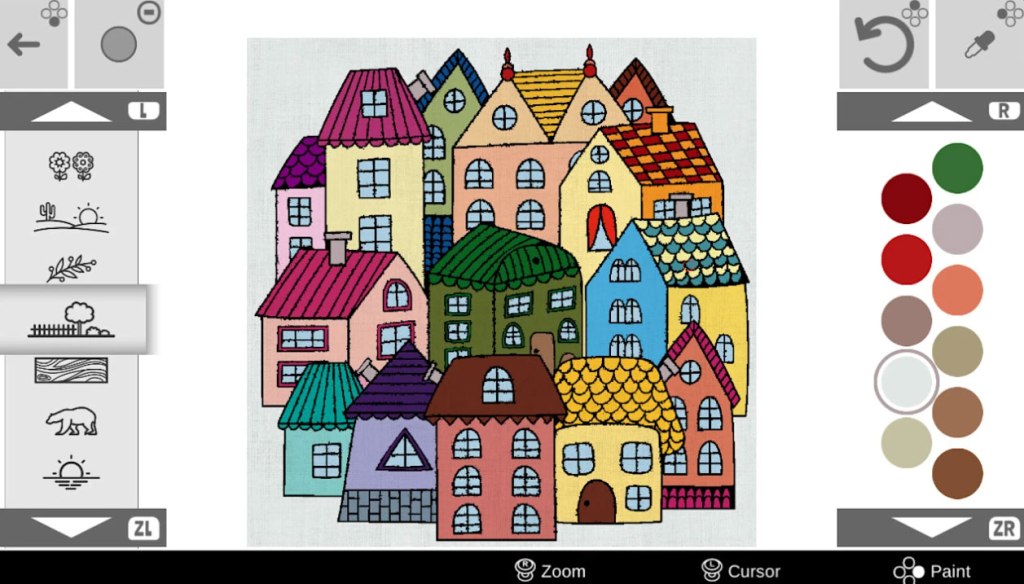
The drawings on offer here are pretty nice, and most of them are fairly intricate. They include geometric designs, floral designs, depictions of people in various scenes, depictions of animals, and even a few holiday-themed designs. By my count, there are 144 different artworks to color in, and they’re all generally nice. Likewise, players are offered a pretty wide color palette, with nearly 300 different colors to pick from, sorted in groups of 11 based on a color profile or a theme like primary colors, pastels, floral colors, arctic and tropical themes, and so on. As players are working on their coloring, the game will be backed by an acoustic guitar soundtrack that’s quite nice at first, but starts to get repetitive far too quickly.
Players are given the option to zoom in and out, select the color of their choice, select whether it will be solid or sketchy-looking, and the ability to undo the last change. Beyond that, this is simply moving a cursor around and filling whatever space you select. There is unfortunately no option to actually draw here, you’re basically limited to only working with the “paint can” tool if we were comparing this to a PC art program. Players can also save multiple copies of each work, but… that’s about it.
There is another problem here. The gamepad controls are clunky, with the cursor being far too slow. Players can thankfully opt to play the game using a touchscreen in handheld mode, though the drawings here are so intricate that players will find themselves having to zoom in to select the portion they want to fill, or else making a lot of mistakes.
Overall, My Coloring Book is a decent, but flawed, Art Program with clunky controls and an inability to draw. While it’s not terrible for a $5 price tag, it’s up against the likes of Coloring Book, a similar program that does allow players to draw, does include a blank canvas to work with, and is free to play. It’s hard for me to recommend this game over that one when Coloring Book is better in just about every way. That is, unless you specifically like the art the game lets you color in more in My Coloring Book. For most players, and most parents of aspiring artists, Coloring Book (without the “My”) is not just the cheaper way to go, it’s the better way to go.
tl;dr – My Coloring Book is a family-friendly Art Application that lets players color in an assortment of drawings. Unfortunately, the controls are somewhat clunky, and this game doesn’t allow players to draw, they can only fill in a space. It’s not terrible for $5, but the free-to-play alternative Coloring Book is all-around better and, well, free. As such, it’s hard to recommend this game.
Grade: C
You can support eShopperReviews on Patreon! Please click HERE to become a Sponsor!
This month’s sponsors are Andy Miller, Exlene, Johannes, u/RamboFox, Ilya Zverev, Connor Armstrong, Eli Goodman, K.H. Kristoffer Wulff, and Stov. Thank you for helping to keep the reviews coming!
 eShopperReviews
Leave a comment