
KORG Gadget
Genre: Music Creation Application
Players: 1-4 Co-Op (Local), 2-8 Co-Op (Local Wireless, Online)
.
Review:
KORG Gadget is a Music Creation Application that unlike many others on the Nintendo Switch is clearly no mere toy or gimmicky time-waster. Rather, this is a professional music design program coming from a well-established name in the music industry, with a wealth of tools for those who truly want to dive deep into music production.
So, full disclosure here… I am not a professional music producer. I am not a sound editor, not a professional musician… heck, I can’t even seem to get the sound settings right on my monthly YouTube podcast. As such, I could not possibly hope to provide a professional perspective on the utility of this device, other than to speculate that those who are truly interested in professional music production and editing are probably better off doing it on PC.
On the other hand, I may be better-suited to tell you how well-suited KORG Gadget is for a layman, an average person who doesn’t know what all the fancy dials and knobs on music equipment does. And in that regard, KORG Gadget is… surprisingly good, though not without its caveats.
The first caveat is one of the most obvious ones, and a barrier to entry – the price. At $48, KORG Gadget makes it clear from the start that it is not messing around, and only those with a serious interest in making music need apply here. I could criticize the price, but given that the price of other professional music production software is not likely to be much better, and the sort of tools available within the software, I can’t fault it too much for… well, knowing its worth.
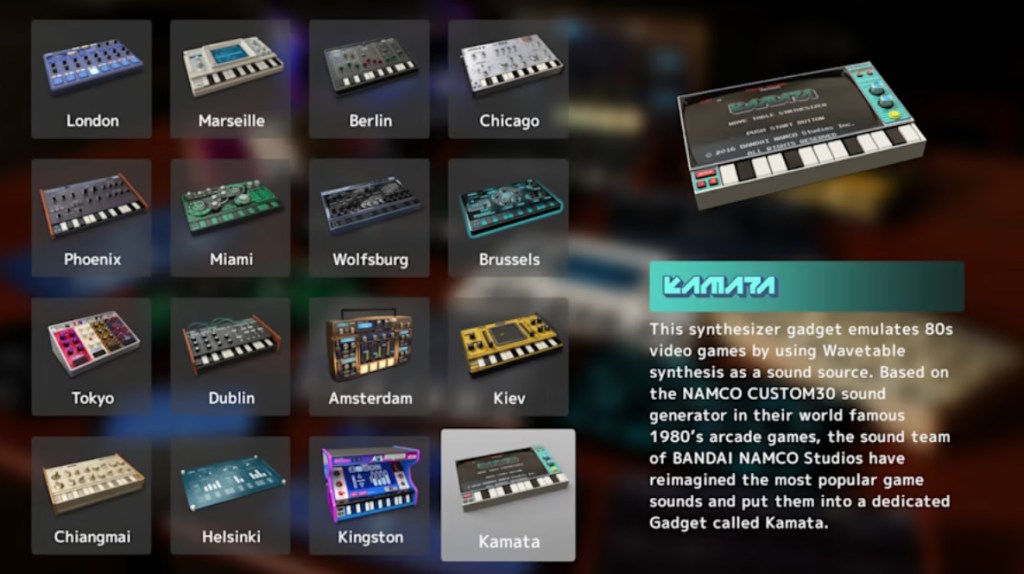
And make no mistake, KORG Gadget does not skimp on features and options. I could try listing the various features included here, but not being an industry expert I wouldn’t even know where to start. Suffice it to say, players will be provided with multiple simulated synthesizers, each with a wealth of settings and options in its own right, and players can create musical clips in each of these to play in concert, adding and dropping tracks as needed.
For the musical newbie, just seeing all the settings here is pretty intimidating, but KORG Gadget actually features a pretty decent tutorial to get you started, showing you the basics of how to use the device and put together tracks. I feel I should emphasize that there are great tutorials for how to get started, but the various tools included here have so many options and features that you’ll only feel like you’re scratching the surface if you limit yourself to what that tutorial teaches you. Thankfully, this software makes it relatively easy to move around and experiment, and you’ll really have to experiment if you want to get the most out of this software.
Also, if you want to actually create a genuine good song, be prepared to spend dozens if not hundreds of hours composing that song. Yes, you can chain together a simple melody fairly easily here, add a beat and bassline… but wanting to make an actually good, professional-sounding song will take a lot of work, exploring ideas, and trial and error. Hey, why do you think the pros make the big bucks? It’s not easy slapping together music that sounds good, and that’s not something this or any other software is going to change.
I usually talk about visuals in my reviews, but there isn’t much to speak of here – mostly everything is functional. But it’s all laid out in a sensible way and seems to work for what this app is trying to do. In terms of sound quality, there’s a wide variety of synthesized sounds to choose from, and users also have access to a selection of pre-made songs to give them an idea what they can do with the software.
Then there’s the question of “why get this on Nintendo Switch?”, one I sort of skipped past earlier in the review. It’s a fair question – if you’re looking to create and publish music, the PC is the ideal place to do it. Of course, portability is one key selling point here, but there are a few other nice features. First, this game does make use of the touchscreen in a limited fashion – it’s not used in menus, but players can use the touchscreen to place notes more directly when creating songs.
Additionally, the Nintendo Switch release of KORG Gadget has some nice multiplayer features, where multiple players can work together on composing a song. I’m not sure how functional this sort of thing is, especially if you can’t create in multiple instruments/tracks at the same time. I don’t know that music production jam sessions are a thing… but if they are, you can do them here, I guess. The game even supports multiplayer, and you can spectate another’s session, though… well, don’t expect to find any random players online these days.
As for things this software doesn’t do, that it should? I wish there were more tools to introduce newbies to the ins and outs of each of the various synthesizers and options here. I wish this software gave players a way to save their music as a WAV or MP3 file. I wish all menus supported the touchscreen. I wish this software had a user-friendly deejay software with a visualizer (something that would be a much bigger selling point on the Switch with its portability, making this software into an instant dance party accessory). And most of all, I wish this software wasn’t so darn expensive.
Of course, much of what’s in that above “wishlist” of missing features is kinda’ wanting KORG Gadget to be something it’s not. This is not software intended for casual music fans. It is not a user-friendly toy. It is not something where you’ll be able to produce a good-sounding song without sinking numerous hours into creating it. And it is probably not the best platform to be creating music on if you have access to a decent PC. However, if you want a professional music studio on the go, KORG Gadget performs that task extremely well (as far as my amateur assessment goes, anyway), with a huge wealth of options. So if you are in the small niche this software is designed to appeal to, I think you’ll be very satisfied with it.
tl;dr – KORG Gadget is a Music Creation Application that is not going to be for everyone. While it does have some decent introductory tutorials to help newbies learn the basics, this is largely a music production studio software suite for professionals, and while this may be targeting a niche audience (especially with a nasty $48 price tag), it serves that audience extremely well, with a massive wealth of options, features, and content. If you wanted to turn your Nintendo Switch into a music production studio (and actually know how to operate one), KORG Gadget is exactly what you’re looking for.
Grade: B+
You can support eShopperReviews on Patreon! Please click HERE to become a Sponsor!
This month’s sponsors are Andy Miller, Exlene, Johannes, u/RamboFox, Ilya Zverev, Connor Armstrong, Eli Goodman, K.H. Kristoffer Wulff, and Stov. Thank you for helping to keep the reviews coming!
 eShopperReviews
Leave a comment