
Game Builder Garage
Genre: Content Creation Application
Players: 1-2 Co-Op / Competitive (Local), Online Content Sharing
The Nintendo Switch 2 Difference
.
Review:
Game Builder Garage, released on Nintendo Switch in 2021, is a Content Creation Application that gives players a toolkit with which they can design their own games. The game creation tools that form this game bear some resemblance to the “Garage” tool that was included in some of the Nintendo LABO kits. However, while some have dismissed this game as “Nintendo LABO without the cardboard”, this game’s focus specifically on game creation and its expanded tool set for this purpose makes it stand apart from the creation tools included in Nintendo LABO, which was only ever a minor part of those games.
.
Game Theory
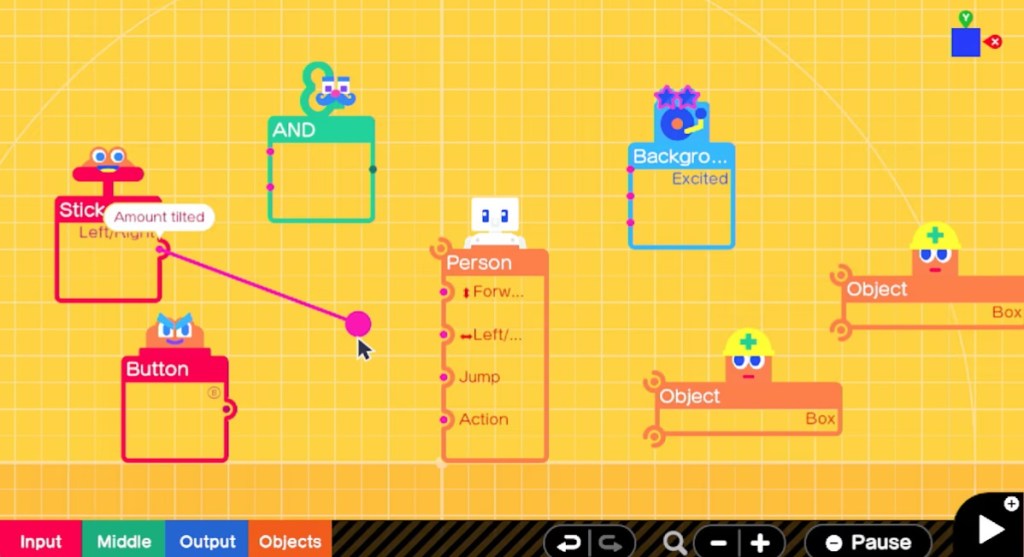
Game Builder Garage is broken up into two sections – Interactive Lessons, where you will be guided through interactive tutorials to teach you how to use this game’s visual game-building interface, and Free Programming, where you will design and share your own creations, and download works made by others.
The Interactive Lessons are considerably lengthy – expect to spend possibly a few days just working your way through all of the lessons and tests included within it (at least, expect to do so if you want to have any hope of absorbing the information you’re being given). The lessons are guided by an adorable pair of characters named Alice and Bob, and all of the different game elements you’re working with (called Nodons) are given their own voice and personality as well, which helps to keep things from getting too dry, although it also pads things out and makes them take longer than they would if the game just got straight to it.
Unfortunately, despite being extremely thorough and extensive, these tutorials could do a better job of making sure the player actually learns the information contained within. Tests in this game generally restrict the player to only changing a few parameters of a puzzle, and with so few choices the answer can often be guessed by process of elimination. Because of this, even though I breezed through these tests, I still found myself bewildered at trying to create something an earlier lesson went over.
A part of this is also due to the lessons themselves, which insist 0n making the player create each one of the included sample games from scratch, going through the motions of things they’ve done countless times before… but often not explaining the reasoning behind what they’re being directed to do for newer instructions. Why am I changing this number? Why am I using tool A instead of tool B? How would I change this to make the game do X instead of Y? What is the difference between the top-left corner connection bit on a nodon and the bottom-left corner connection bit? These are the sorts of questions that are largely left unanswered here.
.
Tools of the Trade
For the game creation tools themselves, what’s here is both extremely broad, yet oddly restrictive. Players really can create just about any sort of game they can imagine here… but will often find themselves doing so with seemingly one hand tied behind their back. Players can draw textures, but cannot import photos to use as textures. There’s a tool to have an element in the game generate endless objects… but it will only generate cubes, cylinders, and spheres and not more elaborate elements, meaning you cannot create a game with endlessly spawning enemies. There’s no function to copy multiple elements at once – at most you can copy over one at a time, and rebuild the connections between those elements.
This is all on top of the fact that the visual interface used to create the game can get crowded and difficult to parse extremely quickly, an issue made worse by the fact that you will only ever be given two view options while creating games (from the side or from the top). This leads to the inevitable situation where you’ll have multiple items stacked on top of one another no matter which perspective you’re using, making it more difficult to select the one object you’re trying to alter.
Still, even with all this game’s issues, complications, and limitations, it’s impressive the breadth of games that can be made here, although judging by others’ creations online, these games rarely have much depth – most “games” I’ve seen others pointing to online are pale recreations of a basic gameplay concept and aesthetic from another game, or something that would best be described as a “proof of concept”. There’s very little here that could qualify as an actual, full “game”, or even something we would consider a full level in an ordinary game. This isn’t the fault of the creators, though – they are severely limited by what this game will and will not allow players to do.
.
My Personal Game Builder Journey
For my part, I wanted to make an actual complete game using Game Builder Garage, and I knew that I would be facing a challenge due to these constraints. Because of memory constraints, what I made would have to be something small and endlessly-repeating, like a classic Arcade-style game… but the lack of the ability to spawn endless enemies left me with limited options in this regard. I had ideas in my head of creating a racing game with a track that randomly generated ahead of the player in an endless loop, but again, the lack of ability to generate what I wanted in-game stopped this idea in its tracks, so to speak.
I ultimately settled on a game idea involving a single room with one sort of obstacle that could be created infinitely – player-killing spheres, which would cross the room horizontally or vertically, and which the player needed to dodge. While I will admit that I was inspired by a similar room in The Legend of Zelda: A Link to the Past, I made it a point to add my own spin on this – not only would these obstacles spawn infinitely, with the player seeing how long they could last, but the game would gradually ramp up in difficulty multiple times, with the spheres generating increasingly more quickly.
Surprisingly, I encountered an issue I’ve known to be a major hurdle for real-life game designers: feature creep. See, I felt like even with the increasing speed, my game still felt too bland, so I started adding to it. I gave my character a sprint button, and to my surprise, the game automatically ensured that this came with a tradeoff of reduced maneuverability – I suppose there might have been a setting I could have changed to negate this, but I felt like it worked perfectly as-is so I kept it. I made it so that after the speed ramped up multiple times, the game would start tossing huge boulders at the middle of the screen, ensuring that players couldn’t just remain at what was previously the safest spot. I added a start screen (something most Game Builder Garage creations seem to lack), as well as an end screen, both dynamically transitioning to and from the gameplay. I added music that changed based on what was happening – the start screen, end screen, gameplay, and higher-difficulty gameplay all featured different music. Finally, I added clothes and a hairpiece to give my generic “person” avatar a little personality.
It’s easy enough for me to simply say “I added this, that, and the other”, but each of these steps required a painstaking amount of effort, testing, fiddling around with things, and re-testing. At one point, I needed to completely re-work my camera system, and then I needed to add lighting because my clever idea for an ending screen blocked out the “sun”. For a long while, my clock wouldn’t stop when my character died, despite that I was certain I had told it to. Then, my various music tracks kept playing over one another… or not playing at all.
Solving one of these issues feels truly invigorating, because it really is you overcoming a problem, and not even one designed by someone else, but simply one that developed naturally. However, at the same time it can be maddening to try and track down the source of one of these problems, in particular because the visual nature of this game’s “code” can make it harder to parse for errors than written code.
In the end, I felt like I would need to stop because I was starting to reach the limits of what this game could do – while it still had more memory to add in new objects, it was starting to look very crowded and it would become increasingly harder to edit if I continued. As such, after testing everything and deeming it working well enough, I declared my game finished and published it online. If you own Game Builder Garage and you’re curious to try it, just enter in code G 002 PM7 TRD and enjoy my creation, Dodgy Dave in Cannonball Cave!
.
The Garage’s Toolbox
Yeah, that’s right, you need to enter in a code, because while this game does allow for the sharing of your creations, you cannot send anything online or receive anything without using one of these codes. Custom-built games are not available to peruse on a searchable database in the same way that Super Mario Maker 2’s levels are. This is yet another in a long list of issues this game has.
Finally, I should address the presentation. Visually, this game uses pretty simple 3D visuals. There’s decent lighting but not fantastic, and the performance is okay, which isn’t saying much since there’s not very much going on.
In terms of sound and music, while the cutesy sounds for the Nodons are wonderful, this game otherwise isn’t anything special in the sound department, and in fact the variety of sounds to choose from feels a bit limited. Likewise, the music here is sufficient but nothing particularly memorable – although I do give the game credit for allowing players to select one of three different melodies for each of the four parts of this game’s dozen or so songs, allowing players to have some degree of variety in the music for their creations, or even have them make subtle changes as you play.
Finally, this game does allow players to make good use of the Nintendo Switch’s unique features, and the game creation interface seems to be crafted with the touchscreen in mind. However, it’s not just the creation that works well with the Nintendo Switch’s unique control inputs – games themselves can be designed to use the touchscreen, gyroscopic motion control, to interact with the rumble in different ways, and even make use of the IR sensor… if that was something you really intended to do. It’s not much of a surprise, since the Nintendo LABO games that Game Builder Garage descends from were essentially demonstrations of these features, and so their inclusion here feels somewhat grandfathered in. Oddly, this game does not allow you to incorporate inputs from multiple controllers, unless you split up a pair of Joy-Cons between two people. So… that’s frustrating.
In the end, I have mixed feelings about Game Builder Garage. On the one hand, it does a great job of letting players get creative and truly let loose with their ideas… but on the other hand, it could have done a better job ensuring that players know how to use its functions, and in so very many ways it is frustratingly limited. It isn’t anywhere near as user-friendly as games like Super Mario Maker 2 or the Little Big Planet series, and in fact I’m not sure I would consider this to be quite as versatile as the Little Big Planet games (at least, not the later ones). However, for $30 it makes for an incredibly engaging toy, and a good introduction to the ideas of programming for budding designers who are interested in getting a very simplified look at game design. As a result, Game Builder Garage is not going to be for everyone, but it certainly has some value for those who can tolerate its flaws and limitations.
tl;dr – Game Builder Garage is a Content Creation Application that acts as a “simple” game design tool, though it’s debatable just how “simple” it is. It is extremely limited in multiple ways, and even with an extremely lengthy tutorial it could stand to do better ensuring players understand how to use the tools contained within. Still, for a mere $30 this is a fun application to play around with, albeit not as versatile or user-friendly as some others that have been released elsewhere.
Grade: B
.
The Nintendo Switch 2 Difference
Game Builder Garage
Genre: Content Creation Application
Players: 1-2 Co-Op / Competitive (Local), Online Content Sharing
.
Review:
One of the initial batch of games to receive free updates on Nintendo Switch 2 when it launched in 2025, Game Builder Garage was a surprise addition to this lineup, not only because it was never a big smash hit, but also for the additions this free update adds – of all of the games included in this round of free game updates, Game Builder Garage is the only one to add mouse mode support on Nintendo Switch 2.
To be fair, the free update also improves the resolution on Nintendo Switch 2, though I honestly couldn’t see much difference myself. No, the main addition here is clearly the mouse support, which functions in menus and while you’re building out your creations. Sadly, this update doesn’t go the step farther to add the ability to design games that use mouse mode as well, but I suspect that doing so would force them to separate the game sharing so some games only work on Nintendo Switch 2, and I guess Nintendo didn’t want to go to the trouble to do that.
Still, this is a fine addition to a solid game that makes it even better on Nintendo Switch 2!
tl;dr – Game Builder Garage is a Content Creation Application that acts as a “simple” game design tool, though it’s debatable just how “simple” it is. It is extremely limited in multiple ways, and even with an extremely lengthy tutorial it could stand to do better ensuring players understand how to use the tools contained within. Still, for a mere $30 this is a fun application to play around with, albeit not as versatile or user-friendly as some others that have been released elsewhere.
Grade: B
.
You can support eShopperReviews on Patreon! Please click HERE to become a Sponsor!
This month’s sponsors are MB, Andy Miller, Johannes, u/RamboFox, Exlene, Eli Goodman, Ilya Zverev, Stov, Connor Armstrong, and K.H. Thank you for helping to keep the reviews coming!
 eShopperReviews
Leave a comment