
Fuze4 Nintendo Switch
Genre: Content Creation Application
Players: 1-4 Co-Op / Competitive (Local), Online Content Sharing
.
Review:
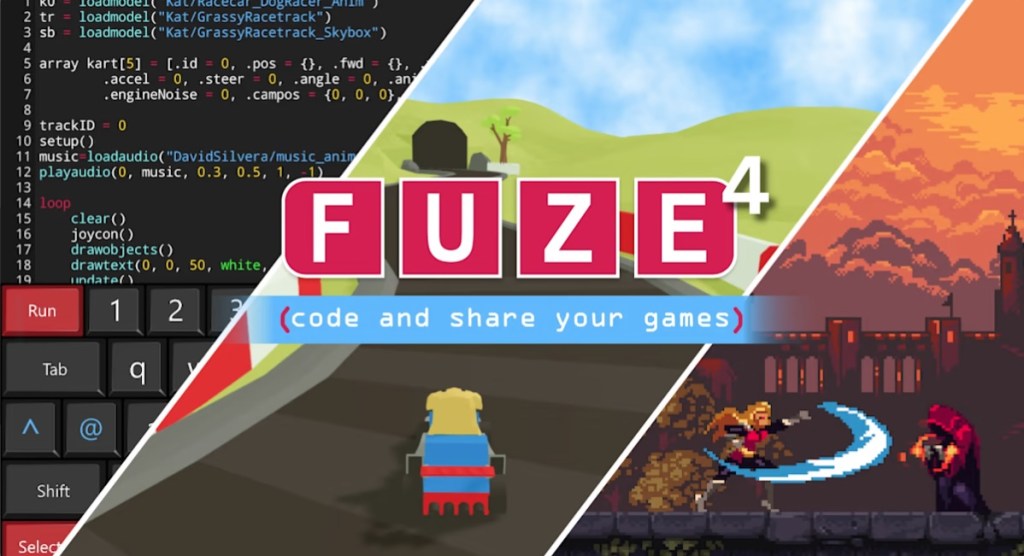
Fuze4 is a Content Creation Application released on Nintendo Switch in 2019. To be more precise, Fuze4 is a fully-fledged programming language designed with videogames in mind, supporting both 2D and 3D games. And by programming language, I mean just that – if you intend to create your own videogame using this software, you will be getting elbow-deep in code, with various commands and a general experience comparable to programming languages you would find on the PC.
So before I go on, I’m just going to say that this will not be a normal review, because I do not feel like I have the proper experience to review a programming language in any sort of knowledgeable way. I have written code in the past, but that was quite a long time ago, in a completely different programming language, and I simply do not know where to even begin comparing Fuze4 to the likes of software such as Unreal Engine, Unity, and so on. All I can do is give a very broad overview of what to expect here, and you’ll have to use your own judgment to decide whether to make the jump here.
I suppose the first question here is undoubtedly going to be why you would use a programming language on the Nintendo Switch in the first place, when programming languages are not only plentiful on the PC, but arguably better-suited to that platform, with its ready access to other applicable tools, an internet of guides and helpful instructions at your fingertips, an operating system that makes file navigation easy, and mouse and keyboard as a default input device.
At least on this last note, Fuze4 tries to make things as easy as possible by making this software compatible with a USB keyboard when docked. Unfortunately, there is no mouse support here, and while the application does include limited touchscreen support in menus when the Nintendo Switch is in handheld mode, the touchscreen isn’t used to help navigate code or to draw in the game’s texture editor.
As such, really the only benefits here are that this software lets you see your games running immediately on the Nintendo Switch, and unlike many game design software applications, Fuze4 is relatively inexpensive, priced at $20.
For those dedicated enough to dive into this programming language and learn its ins and outs, it seems to be fairly decent, allowing for both 2D and 3D games, albeit the latter are naturally going to be somewhat limited. There’s even multiple included libraries of media samples to draw from, including graphics, music, and sound clips. And for those wanting to see what Fuze4 is capable of, there are numerous sample games included here that you can play, or even pour over their code to get ideas for your own game. I should note that if these games are your primary interest, you will also find them included in the $1 Fuze Player, so if you want an idea what this software is capable of, that may be the better starting point. However, Fuze4 also allows players to download additional games from codes obtained on Fuzearena.com, an option not available in the Fuze Player.
The game’s main menu is divided into 8 sections. Code is where you’ll be, well, writing code. Media allows you to peruse the game’s included media libraries to scout potential content to use in your game. Programs is where you’ll go to load up sample game programs, or your own work-in-progress. Project returns you to your current project. Share is nominally where you’ll go to publicly share your game with others, and download their games, although this option froze my Nintendo Switch half the time I tried to use it. Tools allow you to edit your own graphics or piece together your own maps from these graphics. Settings allows you to alter the overall settings of this software for different volume levels and display modes. And Help gives players a guide to walk them through how to use the software.
On this note I should say that the included tutorials here are not especially helpful, as you have to close the tutorials to actually try what they recommend in a game, so they’re not really tutorials so much as an instruction manual of sorts. Given that this game is being billed as a great way to introduce people to game design, the lack of a good interactive tutorial is extremely frustrating. If you want to learn how to code in Fuze, you’ll probably want to make good use of Google and/or a wiki… on your PC or smartphone.
Beyond this overview, I don’t quite know what else I can say about Fuze4. It seems like it has a lot of potential, but only for those truly dedicated to learning to code, who are fine with doing all of their research and referencing on a PC… that might be a better place to code your games anyway. And it doesn’t help that this software has broken features and lacks a good interactive tutorial. I want to stress again, if you’re a more casual gamer looking for something fun, user-friendly, and relatively simple like Super Mario Maker or Game Builder Garage, this is absolutely not for you. However, if you feel like you want a piece of programming software on your Nintendo Switch… well, this is that, I suppose.
tl;dr – Fuze4 is a Content Creation Application that is quite literally a programming language on your Nintendo Switch. Like any programming language, this is not a very user-friendly experience, and it’s made worse due to broken functions and a lack of good interactive tutorials. However, if you’re willing to invest the time and energy into learning how to use it, this software does seem to have some decent potential… although you may still be better off sticking to programming languages available on the PC.
Grade: N/A
You can support eShopperReviews on Patreon! Please click HERE to become a Sponsor!
This month’s sponsors are MB, Andy Miller, Johannes, u/RamboFox, Exlene, Eli Goodman, Ilya Zverev, Stov, Connor Armstrong, and K.H. Thank you for helping to keep the reviews coming!
 eShopperReviews
Leave a comment