
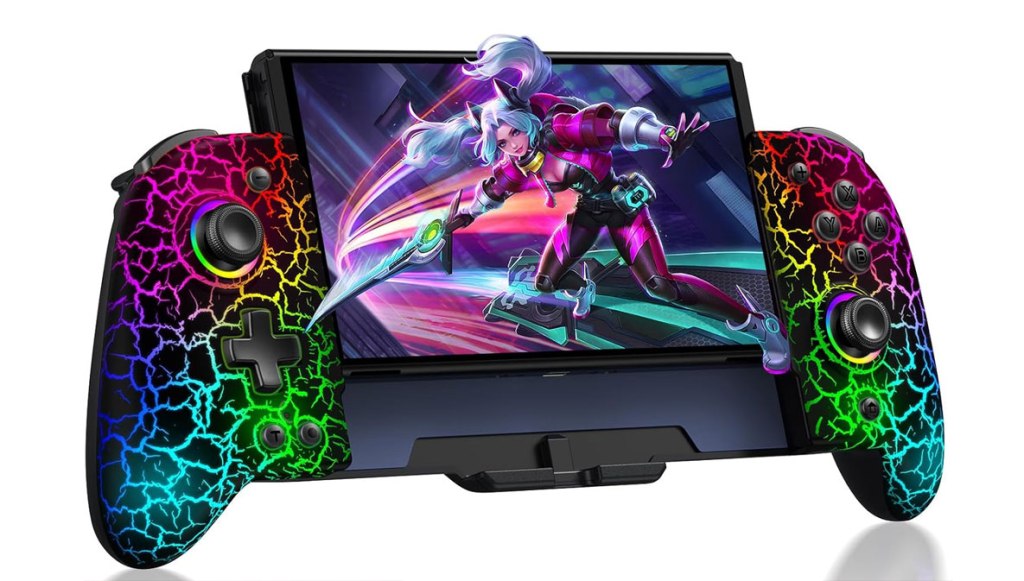
Gammeefy JC200 Switch Controller
Hardware Type: Controller / Grip
.
Review:
(Note: This product was received at no cost for review via the Amazon Vine program. Also, I should note that I have seen this same product with different color casing released under the brand names Saitake, Lifufutee, NealGamefy, MystNova, Jorep, and AXYBCool, with the same model number even. For the sake of consistency, I’m referring to the controller by the name I was first introduced to this manufacturer – Gammeefy.)
In my search for the perfect Nintendo Switch controller, I’ve kinda’ ignored grips, devices designed for your Nintendo Switch to slide into. Not only have they always struck me as gimmicky, but I already feel that the Nintendo Switch is too bulky for a handheld game system, and pretty much every grip on the market makes the Nintendo Switch even bulkier. Still, I’ve heard others sing the praise of grip devices like the Satisfye ZenGrip Pro Gen 3, which I admit I have not yet tried, so I suppose I should keep an open mind about them.
The Gammeefy JC200, released in 2024, is the first device of this kind that I’ve had the opportunity to try for myself, and if it is any indication, I have been doing these devices a great disservice by ignoring them. This device has completely changed my thinking on this entire category of devices, though it ultimately did disappoint me in one key area.
While the JC200 is designed for a Nintendo Switch to slide directly into the slot in the middle off the controller, it does not communicate directly with the Nintendo Switch, not in the way Joy-Cons do, or even the way wired controllers do. It doesn’t share a power supply, and the Nintendo Switch doesn’t detect that it’s within the grip. In fact, if it wasn’t for the gap to fit a Nintendo Switch into the device, the JC200 would simply be a standard wireless controller, connecting to the Nintendo Switch via Bluetooth like any other wireless controller.
The Nintendo Switch (minus its Joy-Cons, of course), fits snugly into the JC200, though not so tightly that the Nintendo Switch is difficult to get back out of the device. Still, to ensure you don’t accidentally eject the Nintendo Switch, there are sliders on the back of the JC200 on either side to hold the Switch securely in place.
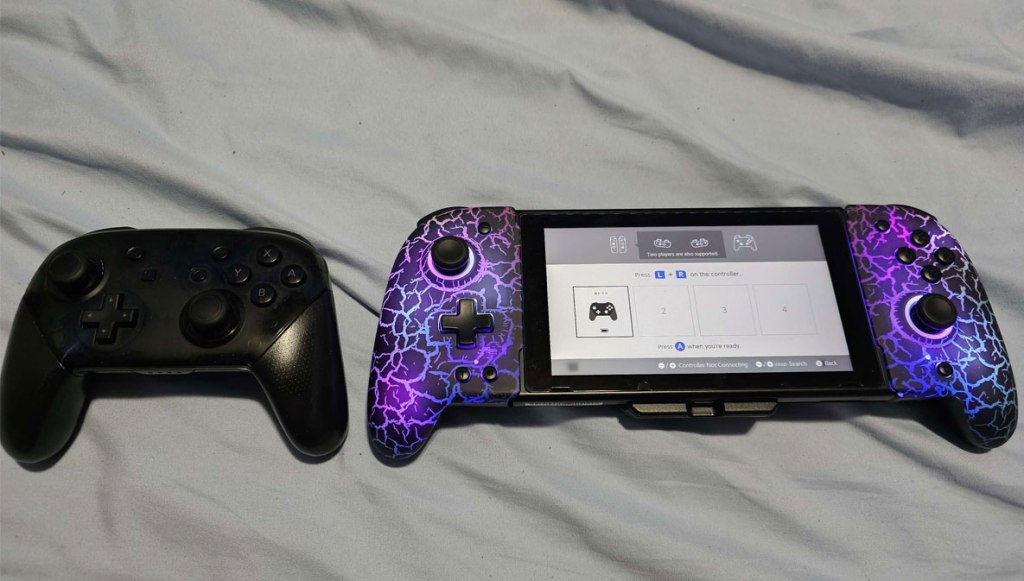
The JC200 is clearly not bothered by any notion of trying to be small. Placed next to Nintendo’s own Pro Controller, and even not accounting for the space taken up by the Nintendo Switch itself, the JC200 is bulkier and taller. However, getting your hands on it, it becomes immediately apparent why this choice was made.
That is because the JC200 is incredibly comfortable in the hands, with the sides at just the right angle for your fingers to wrap comfortably around the L/R or ZL/ZR buttons. The back of the controller features some wonderful texturing that makes it easy to grip the controller. You’ll also feel two back buttons, ML and MR, which are also wonderfully-textured.
Without the Nintendo Switch inside it, the JC200 is surprisingly light for its size, and with the Nintendo Switch inside it doesn’t really feel like you’re adding much weight at all to what you normally get with the Switch and two Joy-Cons. In fact, the better, more comfortable grip actually makes the weight feel easier to handle.
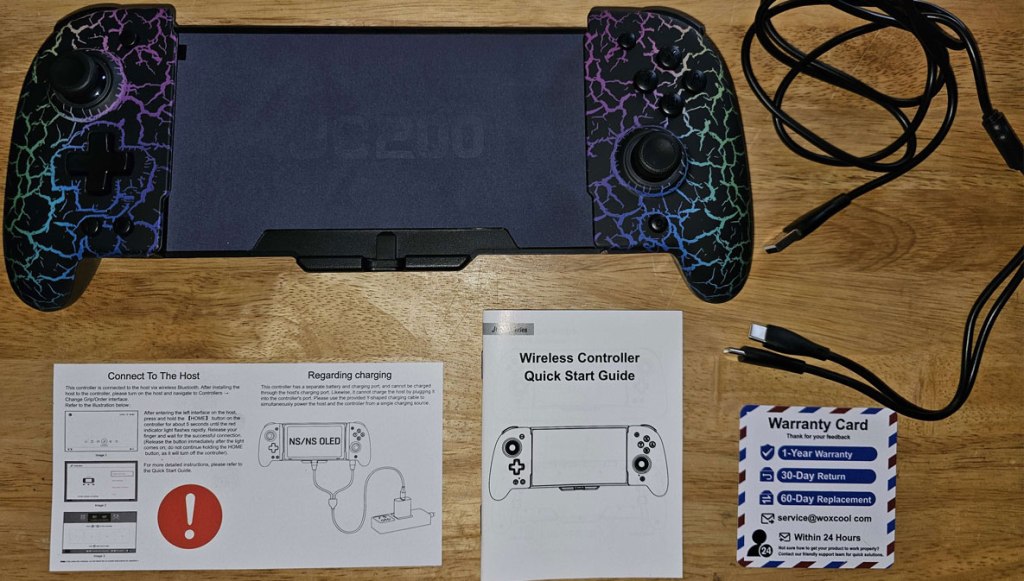
The grip comes with a split USB-C charging cable, so that you can charge one end into the Nintendo Switch and the other into the controller to charge both without separating the two (as I mentioned before, the JC200 cannot share a charge with the Nintendo Switch itself, they are completely separate even when the Nintendo Switch is housed within the JC200). This is somewhat cumbersome, as is the fact that the JC200 cannot fit into Nintendo’s Switch dock, so either you’ll have to use a third-party dock, or separate the two to dock your Switch. Not ideal, but not unexpected either.
For the standard buttons and features, I’ll start by saying that this controller features rumble with selectable strength (though not HD rumble), it has excellent gyroscopic motion control, and it can wake the Nintendo Switch from sleep mode with a single button press, doing so as effortlessly as Nintendo’s own controllers. The JC200 does lack the ability to scan Amiibo figurines, but this ability is rare in third-party Nintendo Switch controllers.
The JC200 features two Hall Effect analog sticks (no “drift”) arranged in Nintendo’s asymmetrical layout. The -/+ buttons are near the top of the controller, while the screenshot and home buttons are at the bottom, a choice I appreciate as it makes it harder to confuse these buttons with each other. To the left of the screenshot button is a Turbo button, but more on this and other extra features later.
At the top of the controller, the L/R and ZL/ZR buttons feel nice, but they’re smooth and untextured, where I think I might have preferred some texturing. And returning back to the face of the controller… I have to mention what is likely this controller’s biggest flaw.
The D-Pad on this device is pretty bad. Again, smooth and untextured, and I find it catching and sticking on its sides far too frequently. The face buttons on the right only fare a bit better, still sticking a bit. It’s not enough to outright kill this controller’s functionality, but it is noticeable. It’s a real shame, because of everything else this controller gets right.
Let’s talk about that, because it absolutely deserves recognition.
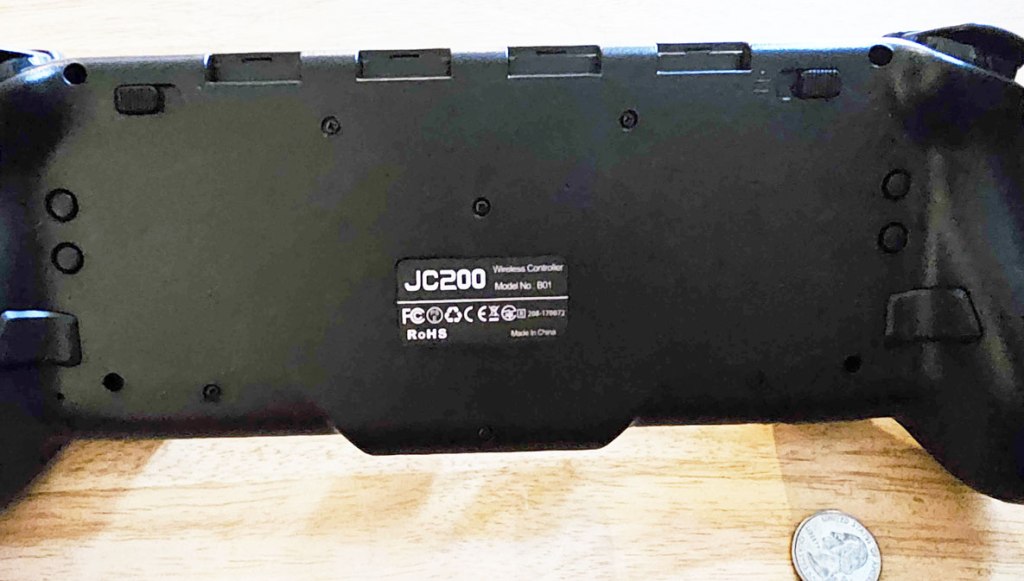
I mentioned the Turbo button, which can combine with any other button for an on-press turbo (at three selectable speeds), or an “always on” turbo. On the back of the controller, there are even more great surprises. There are ports on top to store 4 Nintendo Switch cartridges (a bit too snug – they’re tough to get out), then farther down you have on either side an SL and SR button, an M button and a light button, and then an ML and MR button.
The SL and SR buttons are used to designate a sequence of commands repeatedly playing without an input, so you can have the JC200 jiggle the controller to keep the Nintendo Switch from falling asleep while you take a nap, or input a command at regular intervals. The M, ML, and MR buttons, meanwhile, let you set up ML and MR as programmable buttons. So you could input a series of commands to be done every time you press these buttons. Finally, the light button allows you to cycle through numerous lighting modes for the controller’s internal light, which has a surprisingly large array of options.
Doing all of this requires the use of various button combinations, but players not wanting to fiddle with all of that or read through all the tiny text in the included instruction manual (in English, Japanese, and German, apparently) can download the Android app KeyLinker, which will let you alter these options directly in its menus, a welcome addition! What’s more, when connected to a PC via USB-C, it functions as a PC controller as well (though I don’t see a way to set this up as an Android controller, even though any device with Bluetooth can see the JC200 in range.
There is so much about the Gammeefy JC200 to love, and so much about it that made me completely reexamine my opinions on Nintendo Switch grip controllers. It has a ton of options and features, feels great in the hands, and looks amazing. Unfortunately, its poor D-Pad and face buttons really hurt what is otherwise an outstanding controller, and as a result, I can’t quite give it the full-hearted recommendation I would like to.
tl;dr – The Gammeefy JC200 Switch Controller is a grip-style controller that looks great, has an abundance of options and features, and fits your hands like a glove. It’s just a shame that a pretty bad D-Pad and face buttons mar what is otherwise a truly remarkable controller.
Grade: B
You can support eShopperReviews on Patreon! Please click HERE to become a Sponsor!
This month’s sponsors are MB, Andy Miller, Johannes, u/RamboFox, Exlene, Eli Goodman, Ilya Zverev, and Stov. Thank you for helping to keep the reviews coming!
 eShopperReviews
Leave a comment