
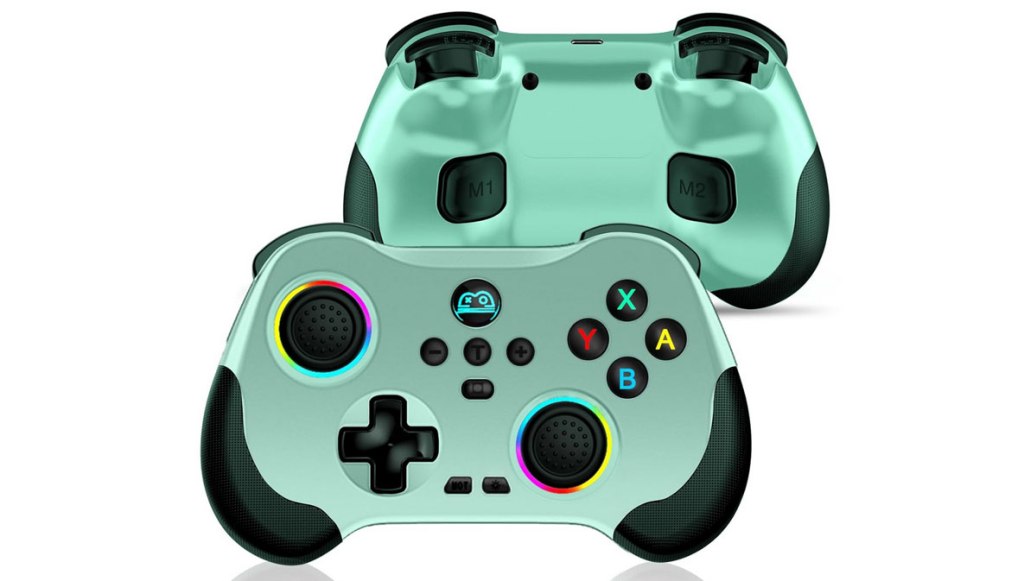
arVin Wireless Gamepad Controller
Hardware Type: Controller
.
Review:
(Note: This product was received at no cost for review via the Amazon Vine program.)
When it comes to “Pro”-style gamepads, there are a few common approaches for manufacturers to take. You can make something cheap, you can make it polished and well-constructed, you can fill it with nice features, you can target a specific niche audience or demographic, you can make it visually different to set it apart, or you can do some combination of the above.
The arVin Wireless Gamepad Controller, released in 2024, arguably has a combination of many of the above features, but I would argue that key among them is its wide compatibility. You often come across game controllers that support Nintendo Switch, PC, and mobile platforms, or PlayStation 4, PC, and mobile platforms, but the arVin Wireless Gamepad Controller is fairly unique in that it supports all of the above and then some.
The full list is as follows: PC, Android devices, iOS, Nintendo Switch, PlayStation 4, PlayStation 3, Steam Deck, and Tesla. For the purposes of this review, I looked at the arVin Wireless Gamepad Controller primarily as a Nintendo Switch controller, but I did also test it out with a PC, an Android smartphone, and a PlayStation 4. I’ll talk about how that went in a bit.
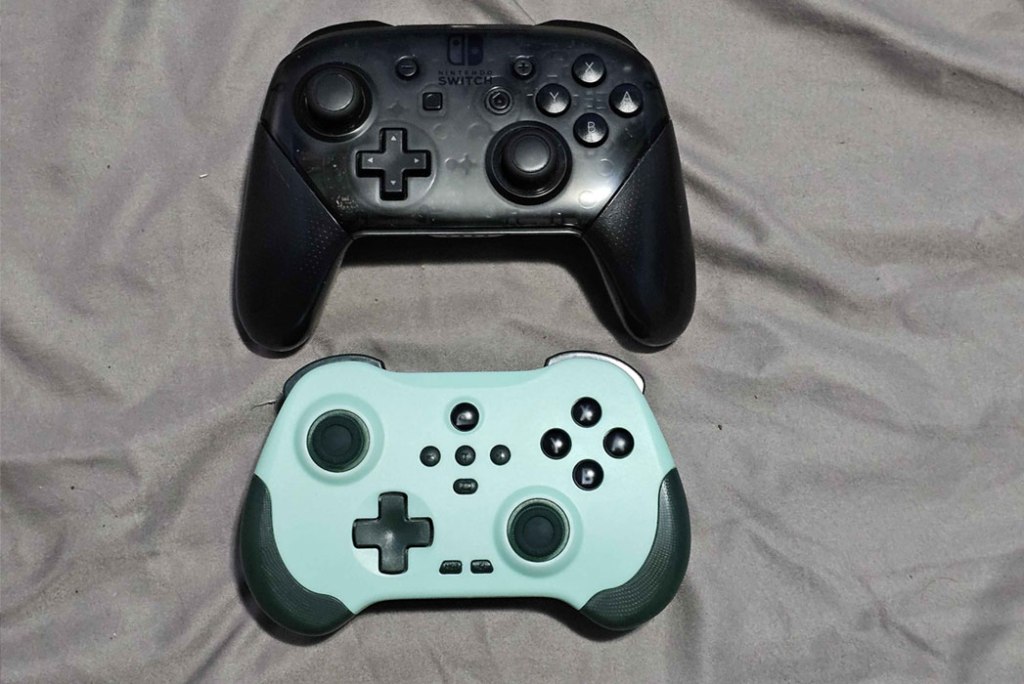
The arVin Wireless Gamepad Controller is somewhat smaller than The Nintendo Switch Pro Controller, lacking the grips on the lower part of the controller. This makes the controller more ideal for players with smaller hands, while those like me with larger hands will feel a bit cramped. The lower corners of the controller are nevertheless lightly textured, though I don’t know how much of a difference this makes.
The placement of the main face buttons and analog sticks is fairly similar to Nintendo’s controller, including the asymmetrical analog stick placement, with hall effect analog sticks that should keep the controller from suffering “drift” in the long-term. The controller’s build feels fairly sturdy, the buttons feel like the right mix of “clicky” and “squishy” about on par with Nintendo’s controller, the D-Pad and sticks feel good, and the controller overall feels mostly comfortable to hold, despite my large hands getting a bit cramped in the back.
The exception to this would be the shoulder buttons, which feel unnecessarily cramped due to a slightly steep angle for the ZL and ZR buttons that nudge middle fingers resting on them into your pointer fingers on the L and R bumper buttons. It’s not ideal, but it’s far from a deal-breaker. Incidentally, for platforms other than the Nintendo Switch, the ZL and ZR buttons are fully analog-compatible, something important for controllers not limited to Nintendo’s platform.
Getting back to the face of the controller, the Plus and Minus buttons have been moved to just left and right of center, with the Home button enlarged and moved to the top center, and the Screenshot button moved to the bottom-center. I approve of these changes, and all of these buttons are placed in sensible but somewhat out-of-the-way locations that feel fairly natural.
The odd choice here is to add the new Turbo button to the dead-center of the controller. This placement works, but it basically means you won’t be likely to make turbo settings on the fly. This controller’s use of the Turbo button is a bit odd, too. While you do use it in conjunction with other buttons to turn them into turbo versions of that button, doing so requires you going through the awkward process of holding down the pair of buttons for five seconds to set them, hold them down for another five to set them on automatic, and then hold them on for yet another five seconds to clear them. In other words, if you want to return a button to its normal function after making use of the turbo feature, you’ll have to take as much as ten seconds to do so.
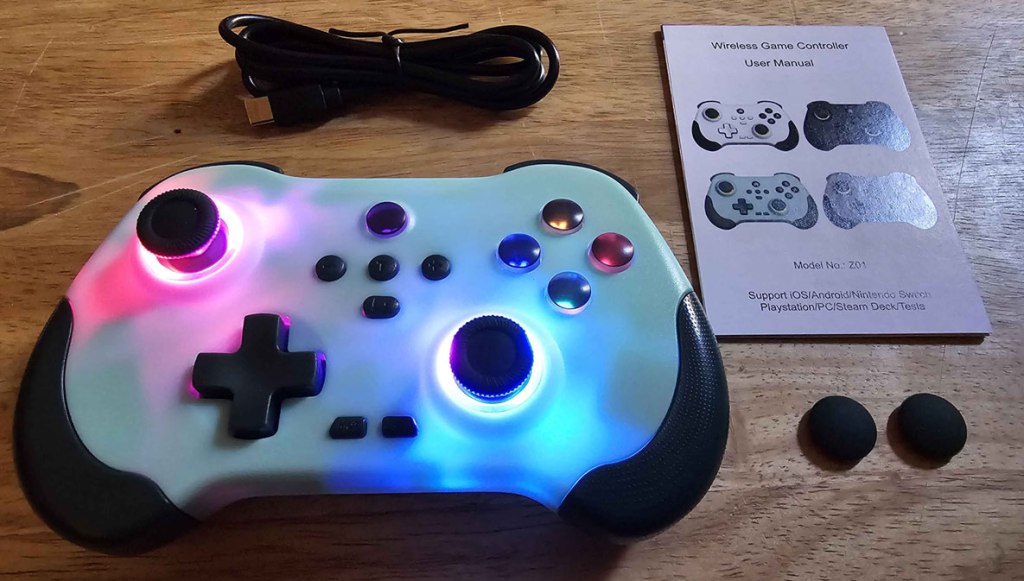
The other two buttons on the face of the controller are rumble adjustment on the center left toward the bottom, and lighting adjustment on the center right toward the bottom. This controller does not support HD Rumble, but it does have adjustable rumble that works well enough. As for the lighting, this button selects one of multiple lighting modes for the lights behind the thumbsticks – namely, you can have them cycle through various color combinations, have them glow blue, red, green, or purple, or shut them off. I’ll note that whichever way you change the lighting, the primary face buttons and Home button remain backlit, which is nice.
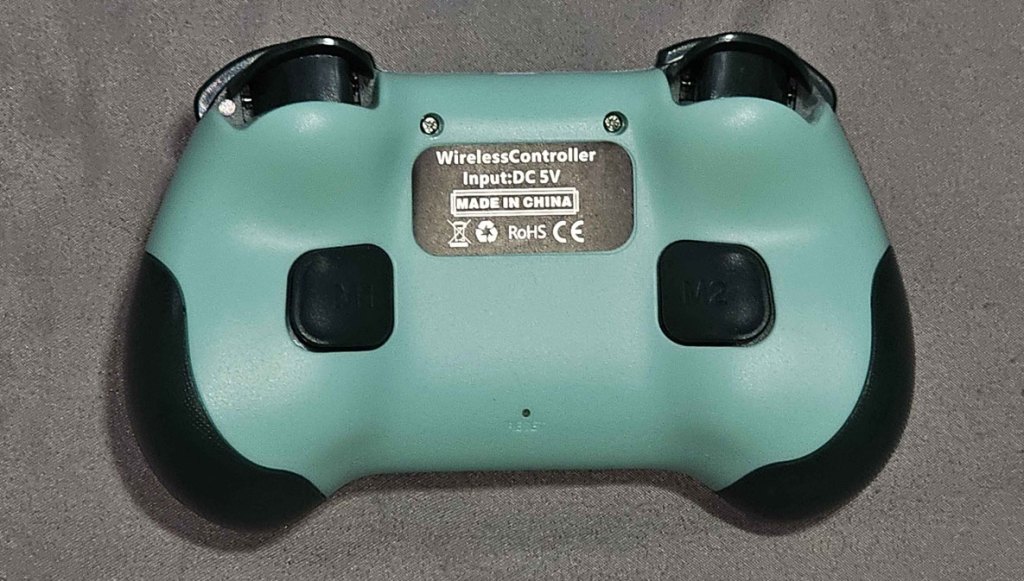
On the back of the controller, we see one pair of “programmable” M-buttons, though “programmable” is overstating it somewhat. These buttons can be set to act as duplicates of face buttons, or even as a combination of two buttons at once. However, it doesn’t remember sequences, so using a button for an automatic perfect “hadouken” in a Fighting game isn’t going to happen. At best this can be used for 2-button presses you use often enough that you’d prefer to save yourself the inconvenience of always having to press two buttons.
On the Nintendo Switch, the arVin Wireless Gamepad Controller won’t scan Amiibo figurines, but it is capable of waking the Nintendo Switch from sleep mode with a single button press, which is nice.
Okay, so now we get to discussing this controller’s use on non-Nintendo platforms, and here the arVin Wireless Gamepad Controller has some real potential, but it also feels like it tries to overreach.
First, the good news – when I tested this with my Android Smartphone it seemed to work flawlessly in wireless mode connected by Bluetooth. It worked well with my PlayStation 4 also, though I could not get it to wake the PS4 from sleep, a feature the controller’s documentation claims it can do.
However, my worst luck with this thing was oddly when I tested it with my PC, which technically worked, but the Bluetooth connection suffered so much lag that the controller was essentially unusable. Connecting the controller to my PC via the included USB-C cable eliminated this issue, but it’s still disappointing that this thing goes far enough to technically work wirelessly with PC, but do such a poor job that you feel forced to play it with a wired connection.
In the end, I have mixed feelings about the arVin Wireless Gamepad Controller. When viewed simply as a Pro-style Nintendo Switch controller, it’s not a bad choice – its price of $36 is decent, it works well, it has most of the functionality of Nintendo’s own Pro Controller, the few added features it throws in are nice (if a tad lacking), and its smaller build makes this a decent alternative controller for players with smaller hands.
However, I feel like this controller’s biggest selling point is its wide compatibility, and here it disappoints somewhat. While it does work with every advertised platform I tested the controller with, most of these platforms had a major issue or missing feature.
On balance, I still think the arVin Wireless Gamepad Controller is a decent controller for the price, but it really depends what you’re using it for, and what you’re comparing it to. If you want to use this as a wireless PC controller or to outright replace your PlayStation 4 controller, this is a poor choice. If you have larger hands and want comfort, this is a poor choice. If you’re looking for a controller with lots of bells, whistles, and extra features, this is a poor choice. And if you’re wanting a controller that has all the same features of Nintendo’s Pro Controller, this is a poor choice. But as a decent middle-of-the-road Nintendo Switch controller? This is pretty good when it comes to that.
tl;dr – The arVin Wireless Gamepad Controller is a Pro-Style Controller for Nintendo Switch that advertises an array of features and compatibility with a wide range of platforms. In this latter category it ends up being a mixed bag, but if simply taken as a mid-range Nintendo Switch controller for players with smaller hands, this is a fairly solid choice.
Grade: B
You can support eShopperReviews on Patreon! Please click HERE to become a Sponsor!
This month’s sponsors are MB, Andy Miller, Johannes, u/RamboFox, Exlene, Eli Goodman, Ilya Zverev, and Stov. Thank you for helping to keep the reviews coming!
 eShopperReviews
Leave a comment