

Ligame Switch Wireless Controller
Hardware Type: Controller
.
Review:
(Note: This product was received at no cost for review via the Amazon Vine program.)
(Note: This product has also been sold under the brand GMBack.)
When it comes to something like controllers, it’s hard to answer the question “what’s the best Pro-style controller for Nintendo Switch?”, because there is no definitive answer. There are some standouts, of course, but all of these have their own pros and cons.
The standard is naturally Nintendo’s own Nintendo Switch Pro Controller, which feels great, has some features you won’t see on many other controllers – at this point, Amiibo scanning and HD rumble (previously, I would include the ability to wake the Nintendo Switch from sleep mode to this list, but increasingly more controllers can do this now). However, this controller is only compatible with Nintendo Switch, has no bells or whistles, and is one of the more expensive controllers on the market.
The 8BitDo Ultimate Bluetooth Controller is the controller with the best suite of features I’ve encountered, but it doesn’t have Amiibo scanning or HD rumble, and it’s still absurdly expensive. If you don’t want to spend as much, there are some decent budget options, like the Donajia Switch Wireless Controller and Exlene Wireless Pro Controller, but these controllers lack a lot of the features of the more expensive controllers.
As far as I’ve seen, the perfect Nintendo Switch controller doesn’t exist, but that’s not to say that a controller couldn’t excel in its own way beyond its peers. I just never expected such a controller to come from some no-name company I’ve never heard of.
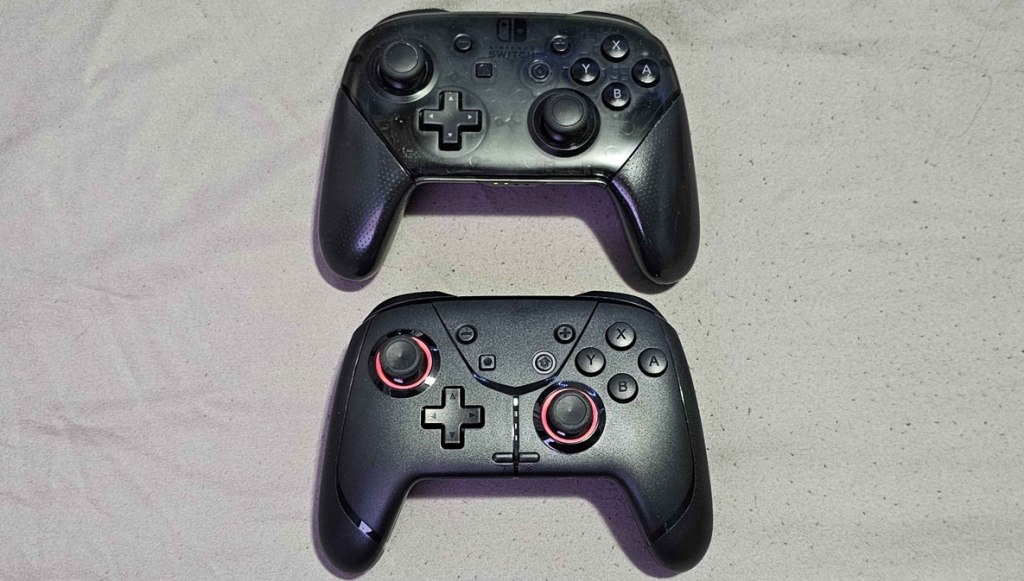
The Ligame Switch Wireless Controller, released in 2024, starts with a pretty solid foundation, doing a pretty good job copying the size, shape, asymmetrical analog stick placement, button layout, and feel of Nintendo’s controller. It’s lighter and its materials feel a bit cheaper than Nintendo’s controller, what little texturing is on the grips is barely noticeable, and the ZL and ZR triggers stick up a bit more, but otherwise this feels much in line with what Nintendo offers.
The concave analog sticks feel pretty good, and the buttons have just the right amount of “squishy” feel as Nintendo’s controller. The D-Pad feels pretty good here too. Overall, I think you won’t confuse these two controllers for each other, even blindfolded, but as a baseline this seems like a solid replacement for what Nintendo offers.
In terms of standard features, this controller does have some excellent gyroscopic motion control, it can wake the Nintendo Switch from sleep mode, and while it does not have HD Rumble, it does have adjustable rumble, which some may see as a good tradeoff. If you’re sensitive to rumble, you may want to take it down a bit on this controller, as its default rumble is pretty strong. Apart from this, the only feature that’s truly missing here that Nintendo’s own controller has is Amiibo scanning.

However, now we have to talk about the extra buttons and features on this controller. On the face of the controller toward the bottom on the center-left you have a Turbo button (which operates in the way you would expect), and on the center-right you have a button to change the LED lighting. Flipping the controller onto its back, you’ll see a pair of macro buttons on either side on the grips that can store sequences of up to 25 inputs (so you can have each remember a “hadouken” or similar move if you like), then in the center near the bottom there’s a “setting” button used in conjunction with other buttons to change the controller settings, and above it a three-setting slider.
The slider is a bit interesting. On one setting, you can use the macro buttons as described above, on another you can shut the macro buttons off so you don’t need to worry about accidentally hitting them, but the third setting does something unique I haven’t seen in other controllers, “Sensor Mode”. This mode changes the macro buttons so that holding one of them down allows you to use gyroscopic motion control instead of the right analog stick. In theory, this feature could allow you to use gyroscopic motion control even on games that don’t support it. In practice, I found this feature to be very finicky, and I don’t recommend counting on it.
In addition to the Nintendo Switch, this controller also supports PC, Android, and iOS. I was able to test this with both PC and Android, and both of these worked quite well using Bluetooth, albeit with some noticeable lag (an issue I’ve encountered on other controllers). Also, I should note that this controller doesn’t have analog triggers, making it less than ideal for games that make use of those, particularly Racing games.
Much of what I’ve talked about here seems pretty good for a mid-range Nintendo Switch controller, but here’s the thing… the Ligame Switch Wireless Controller isn’t a mid-range controller. This is a budget controller, selling at the surprisingly low price of $23, given the quality and features on offer here. With the amount of value and quality packed into this controller, I would argue this makes the Ligame Switch Wireless Controller the absolute best “bang for your buck” on Nintendo Switch. Honestly, I was absolutely stunned at everything this controller offers, given the price.
What would I change to make this the perfect Nintendo Switch controller? Well, I’d add analog triggers for play on other platforms, hall effect analog sticks, I’d rework the LED lighting feature and macro buttons so they don’t have to be used in conjunction with a Settings button, which is both awkward and confusing. I’d fix the lag issues using Bluetooth on PC. Oh, I’d make it so that when I connect it to PC, it doesn’t swap the face buttons (a common frustration in multiplatform controllers like this). And ideally, I’d have it supported with an app, preferably with multiple selectable profiles. Oh, and also, fix the “Sensor Mode” feature – it’s a great idea, just executed poorly.
Yeah, this controller is far from perfect. However, I’m not expecting a perfect controller at the price this controller is selling for. Not even close.
Is it the absolute best Pro-style controller on Nintendo Switch? Certainly not, for that I’d still likely point you to the Nintendo Switch Pro Controller or the 8BitDo Ultimate Bluetooth Controller, as each offers features that cannot be found here, and lacks the minor flaws this controller has. However, I don’t think any Nintendo Switch controller hits the mark it is aiming for anywhere near as well as the Ligame Switch Wireless Controller does. If you are looking for a budget Nintendo Switch Pro-style controller, or even a mid-range controller, this is an absolute must-have. Yeah, I’m as surprised as you.
tl;dr – The Ligame Switch Wireless Controller would be a pretty good midrange Pro-style controller, but it’s priced as a budget controller, and as a budget controller it absolutely soars above the competition with a solid build that feels great and an excellent feature set. It’s not the best controller on Nintendo Switch, but at $23 it is absolutely the best “bang for your buck” of any controller I have yet tried.
Grade: A
.
This hardware has been nominated for one or more of eShopperReviews 2024 Game Awards:
Runner-Up: Best Hardware
.
You can support eShopperReviews on Patreon! Please click HERE to become a Sponsor!
This month’s sponsors are MB, Andy Miller, Johannes, u/RamboFox, Exlene, Eli Goodman, Ilya Zverev, and Stov. Thank you for helping to keep the reviews coming!
 eShopperReviews
Leave a comment