
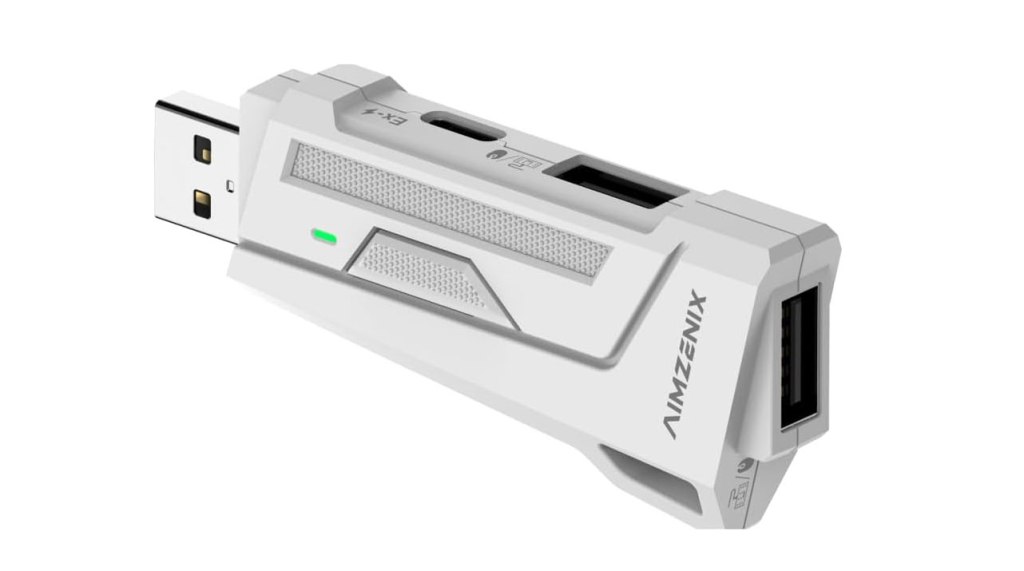
Aimzenix AX200 Gaming Adapter
Hardware Type: Adapter
.
Review:
(Note: This product was received at no cost for review via the Amazon Vine program.)
Not long ago, I reviewed the Aimzenix Blader Keyboard and Mouse Adapter, a device aiming to bring the Mouse/Keyboard controls of PC games to the Nintendo Switch by having the mouse and keyboard emulate a Nintendo Switch controller. This came after my disappointment at a similar device, the Leadjoy VX2 Aimbox Keyboard and Mouse Adapter, which simply did not work. To the Aimzenix Blader’s credit, the Blader does work, but it doesn’t work very well – it had difficulty interpreting the movements of the left analog stick into the digital format of keyboard keys, and it offered few options for altering the layout or settings.
It was my hope, then, that the more-expensive Aimzenix AX200 Gaming Adapter would do a better job compared to Aimzenix’s less-expensive hardware, and indeed one of the highly-advertised features is just how customizable your controls are when using it. With this being the case, I approached the AX200 with guarded optimism…
… only to find out that we’re right back where we started. Yeah, this device does not work at all on Nintendo Switch.
Just to be clear, this device does seem to be intended primarily for use on PC, I would guess for simulating PC gamepad movements using a mouse and keyboard, something I cannot imagine being much more than an extremely niche application as most PC games already support a mouse and keyboard. Meanwhile, the Nintendo Switch seems to be an after-thought, but if they weren’t going to ensure that it at least works, they shouldn’t have listed it on the device’s sales page.
To use the device, you plug it into the USB port on your docked Nintendo Switch (or use an adapter to plug it into the USB-C port of your Nintendo Switch), and then plug a USB-C charging adapter (not included) into the device, as well as a mouse and keyboard. Download the GeekVice app onto your Android or iOS device and sync it with the AX200, and you’re good to go! Or at least, that’s the idea.
To its credit, the AX200 was quickly detected by GeekVice once it was all set up, even downloading new firmware to the device. And the device had my keyboard working on the Nintendo Switch with no problem… though this is hardly a great feat, as the Nintendo Switch can detect a keyboard without any adapter. The mouse, on the other hand, was not detected at all, despite me using a standard USB mouse, and the way it was fully lit showed it was receiving power.
I checked the instruction manual for a solution. Nothing. I checked the app’s tutorial video for a solution. Nothing (and it’s also not even a tutorial for this device). I looked in the FAQ for a solution. Nothing. I tried looking through the app’s settings for a solution. Nothing.
In short, I cannot say how well this device works for whatever tiny target audience it has on PC, but I can say that for Nintendo Switch owners, this device is completely useless. Stick with the Aimzenix Blader Keyboard and Mouse Adapter if you really must use a mouse and keyboard on Nintendo Switch. Or, quite honestly, just get used to playing with a gamepad. This path seems like it’s a dead end.
tl;dr – The Aimzenix AX200 Gaming Adapter is a device advertised to be able to get your Nintendo Switch working with a Mouse and Keyboard in place of a controller, but it really only succeeds at the keyboard part… which is to say it’s pretty much worthless. Don’t bother with this.
Grade: F
.
This hardware has been nominated for one or more of eShopperReviews 2024 Game Awards:
Runner-Up: Worst Hardware
.
You can support eShopperReviews on Patreon! Please click HERE to become a Sponsor!
This month’s sponsors are Ben, Ilya Zverev, Andy Miller, Homer Simpin, Johannes, Francis Obst, Gabriel Coronado-Medina, Jared Wark, Kristoffer Wulff, and Seth Christenfeld. Thank you for helping to keep the reviews coming!
 eShopperReviews
Leave a comment