
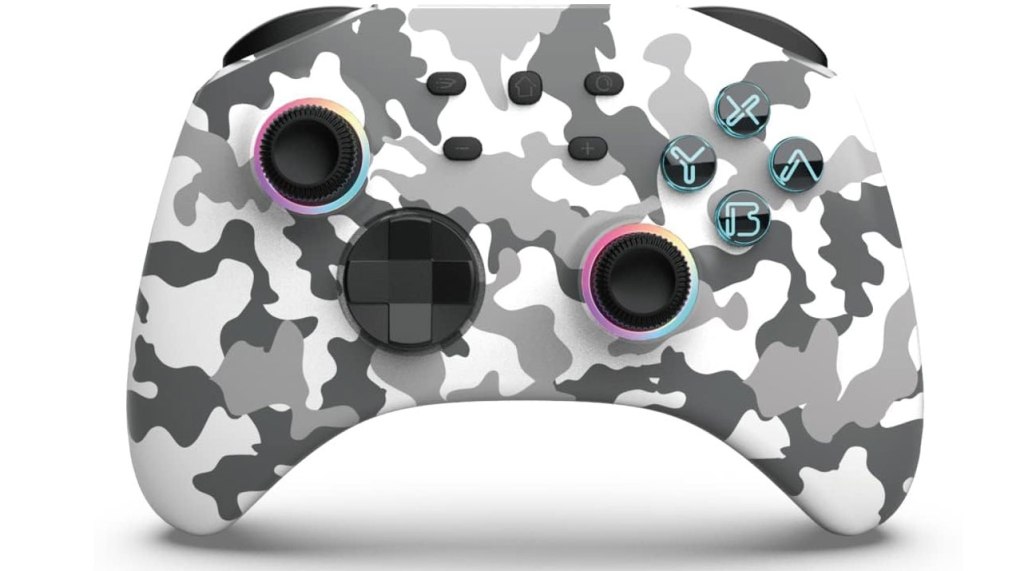
Simgal Wireless Switch Gamepad Controller
Hardware Type: Controller
.
Review:
(Note: This product was received at no cost for review via the Amazon Vine program. Also, I should note that I have seen this same product with different color casing released under the brand name Phnixgam.)
By this point, I have reviewed over a dozen Nintendo Switch controllers. Some have been great, some have been okay, and some have been mediocre or outright bad. But the Simgal Wireless Switch Gamepad Controller is the first time I have ever reviewed a controller that broke while I was using it through normal play (I do not throw my controllers, except that one time I accidentally threw a Joy-Con playing a motion-control game, but I digress).
Having said that, it’s probably clear what my overall thoughts on this controller are, but I thought I could take this as an opportunity to show you my process for reviewing these controllers, since this thing is busted and I can’t very well finish reviewing it.
I took photos of the box and its contents, different photos of the controller (some next to Nintendo’s Pro controller for a size reference) and photos of the instruction manual both to include on the Amazon review and for my own reference later on. Bringing it back, I plugged it into my docked Nintendo Switch via USB-C cable (one cable is included in the box) and let it charge for a few hours.

After I felt enough time had passed, I took the controller off the cable and tried using the home button to wake the Nintendo Switch, which it did quickly without a problem. A good early sign.
I got a good feel for the way the controller sits in my hands. It feels nice, maybe a tad big, without any texture. The buttons feel fin, the D-Pad is okay. I note that the asymmetrical analog sticks are concave on top, which is usually my preference. One extra face button and it’s hard to see which button does what, so I’ll have to play around with that. And I note there are two macro buttons on the back. Okay, so far so good.
I play around with it in just a random game I felt like playing (for the record, it was Balatro), and it mostly worked fine, though I did notice a few issues. The secondary face buttons are really mixed up – the plus and minus buttons have been swapped with the two on bottom, the home button moved to the middle of the controller on top, the screenshot button moved where the plus button used to be, and a new Turbo button where the minus button was. This is already a controller that’s going to wreak havoc on anyone with muscle memory for those button placements.
Another problem, I notice, is that the default rumble setting for this controller is way too strong. I decide to have a look at the instruction manual to see about adjusting that. Thirtd-party controllers usually have a way to adjust rumble. However, as I do so, I notice something I hadn’t seen before – a headphone port on the bottom of the controller, in the center ridge between the grips.
This gets me to set aside what I was doing to give this a closer look – none of the other controllers I reviewed had a headphone jack! What I end up finding is a bit disappointing though – you can indeed use this to listen to sound through headphones connected to your controller… but only while it is connected by USB-C cable to the Nintendo Switch or a docked Nintendo Switch. A nice addition, but not quite what I was hoping for.
At this point, I turn my attention back to adjusting the rumble. Once I fix that, I’ll test out the D-Pad, turbo function, and macro buttons in a Fighting game, I’ll test the gyroscopic motion control and analog sticks in the Super Mario 3D All-Stars port of Super Mario Galaxy, which makes extensive use of both and has an on-screen cursor I can play with. And then I’ll take the controller over to the PC and my Android smartphone to test out the connectivity on other platforms.
Only… I don’t get far enough to do any of that. I see that adjusting the rumble requires a combination of the left analog stick and the Turbo button, which I successfully use to reduce the rumble. Unfortunately, after doing so, I see that the left analog stick now constantly thinks it is tilted hard to the left, and nothing I do seems to rectify this.
I tried resetting the turbo function on the controller, I tried shutting the controller off and then on, I tried recalibrating the analog stick in Nintendo Switch’s settings menu. None of this worked.
So now I have a useless controller I can’t use, and I can’t even finish out the rest of the review because it broke. And again, it broke through normal use, not anything rough. I was using it for less than an hour.
So… yeah, don’t buy this controller. If I couldn’t even get an hour’s worth of use out of it, you sure as heck shouldn’t pay for it.
tl;dr – The Simgal Wireless Switch Gamepad Controller is a Pro-style Nintendo Switch controller that has some promising features, but none of that matters, because it stopped working properly within an hour of me using it. Do not buy this controller.
Grade: F
.
This hardware has been nominated for one or more of eShopperReviews 2024 Game Awards:
Winner:
Worst Hardware (Tie) – This is the first time I have had a tie in these awards, and it is because both of these controllers have the exact same flaw – they stopped working within an hour or two of use. While other pieces of hardware on my list may not have worked properly, there’s at least the possibility that I was using incompatible hardware or software, or that I hadn’t configured things properly – I’m only human, after all. But these two controllers? Just straight-up died not long after I got my hands on them. That’s not user error, that’s not incompatible software or anything, it’s a straight-up hunk of junk that’s going to cost people money and leave them with useless plastic.
.
You can support eShopperReviews on Patreon! Please click HERE to become a Sponsor!
This month’s sponsors are MB, Andy Miller, Johannes, u/RamboFox, Exlene, Eli Goodman, Ilya Zverev, and Stov. Thank you for helping to keep the reviews coming!
 eShopperReviews
Leave a comment