
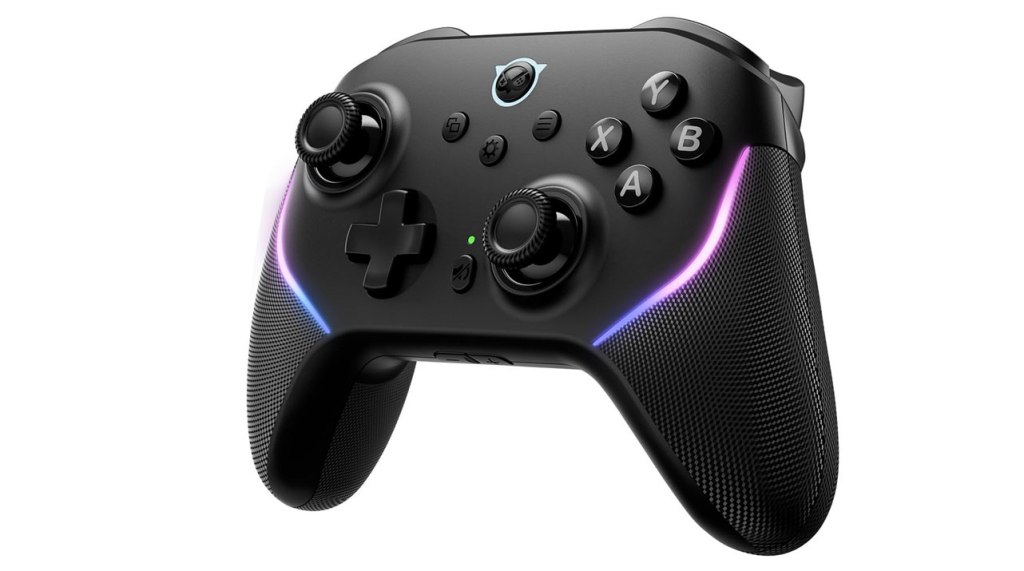
NYXI Master P1 2.4G Wireless PC Controller
Hardware Type: Controller
.
Review:
(Note: This product was received at no cost for review via the Amazon Vine program.)
I have been reviewing a lot of budget Nintendo Switch controllers lately, and it’s about time I sunk my teeth into something a bit meatier. The NYXI Master P1 2.4G Wireless PC Controller, released in 2024 and selling at a mid-range price of $50, finds itself still well under the cost of Nintendo’s own Nintendo Switch Pro Controller, which I find is a good watermark for a mid-range controller on Nintendo Switch – is this controller on par with, or possibly better than Nintendo’s controller? I was eager to find out myself.
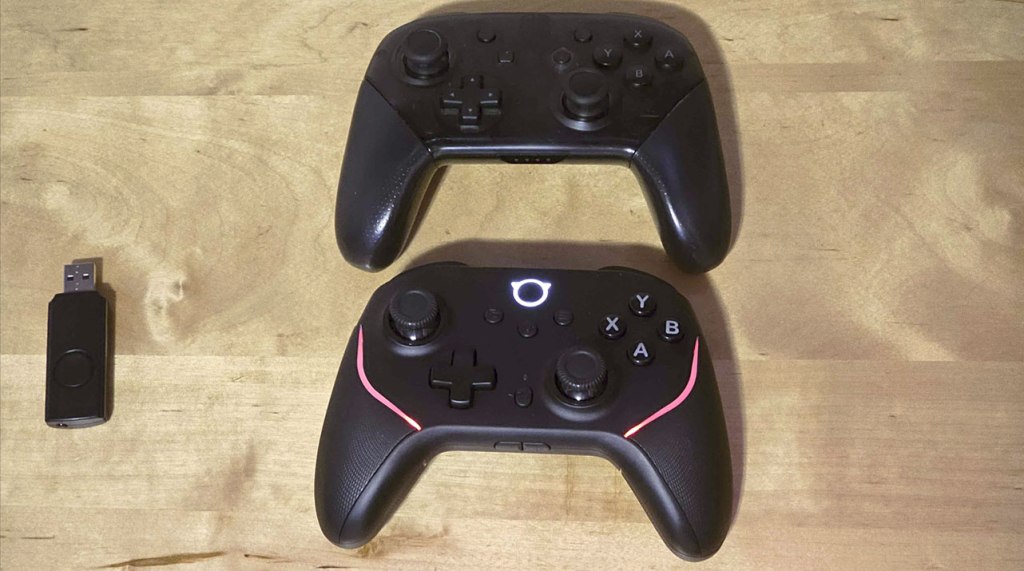
At first glance, the Master P1 shares some similarities with Nintendo’s Pro controller, but also some differences. The size, weight, and shape of the two controllers are about the same, as is the face button layout and asymmetrical analog stick layout. However, unlike Nintendo’s controller, the Master P1 touts more noticeable textured grips, as well as hall effect analog sticks (so you won’t be getting any “drift”), and also marks the face buttons to match a standard PC controller button layout, swapping the A/B and X/Y buttons. This latter change won’t affect gameplay on Nintendo Switch unless you’re the sort of person who tends to look down at the buttons while playing, however – this controller’s A button still acts as an A button on Nintendo Switch, even if it’s labeled with a “B”.
The face buttons are a good midpoint between squishy and clicky, but unlike these, the D-Pad is clicky, which I’m coming to find I don’t mind. The analog sticks feel quite good too, though they do have convex tops like Nintendo’s controllers do, which I personally don’t prefer, though I credit these analog sticks with having better textured ribbing than most Nintendo Switch controllers.
Before moving on, I’ll talk about the secondary face buttons, but I’ll have to circle back around to discuss some additional functionality later. The plus and minus buttons, here marked with window and menu icons, have been moved left and right of center, while the home button has been moved to the top-center location. Meanwhile, the screenshot button has been moved between the D-Pad and right analog stick, marked with a “mute” symbol.
So by now, you can see one complaint forming right from the start – the way this controller has all its buttons labeled is pretty confusing, and this combined with the way some buttons have been shuffled around means you’ll need to re-learn where a lot of these buttons are. It’s annoying, but it’s clear why they did it, and it’s even in this controller’s name – this is a controller that puts a priority on playing on PC. I’ll discuss how this works out farther down.
However, to finish our tour of the standard buttons, we take a look at the shoulder buttons, and here we find one of the more remarkable things the Master P1 does. The L/R “bumper” buttons feel good, a tad more clicky than squishy, but that feels about right for this sort of button. However, the ZL and ZR trigger buttons do something I don’t think I’ve encountered on any other controller I’ve yet reviewed – they find the absolute perfect solution to the analog/digital trigger issue.
For those who are unaware, the Nintendo Switch does not recognize analog inputs on its triggers. However, for controllers that are compatible with multiple platforms, this is a vital feature, because games on other platforms do utilize this feature, particularly Racing games. That would seem to make analog triggers the better option, but this results in far more “travel” between neutral state and fully-depressed triggers, so do you make the slightest input count as a button press on Nintendo Switch, or do you only count it when fully pressed in? Both ways feel wrong – the former doesn’t provide the right tactile feedback, and the latter can create a slight delay when trying to press the button.
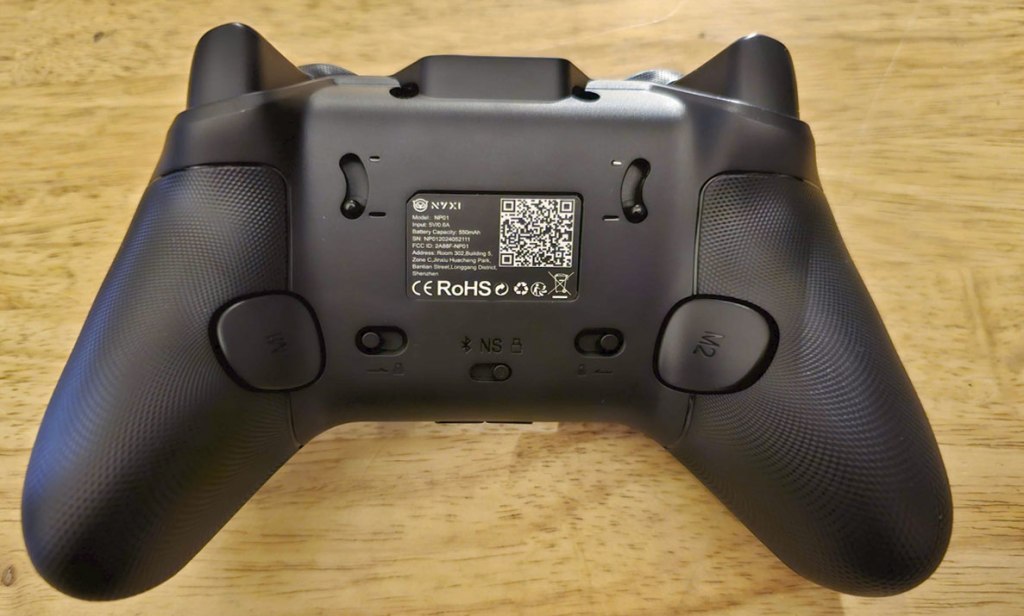
The Master P1 doesn’t try to find the right compromise, because it instead gives players physical switches on either side of the back of the controller that can change the ZL and ZR triggers from analog to digital. Doing so changes the gradual press of these buttons to a simple click in. And just like that, you have a controller with pretty much ideal ZL and ZR triggers, regardless of what platform you use them on.
Rounding out standard Nintendo Switch controller features, the Master P1 can wake the Nintendo Switch from sleep mode, has excellent gyroscopic motion control, and has an adjustable rumble instead of HD rumble (something I think many would see as a fair trade-off). That leaves the only standard feature not to make it into this controller as the Amiibo scanning functionality.
As for new features, these are pretty much all controlled using the “settings” button that is now dead-center on the front of the controller. Combine it with one of the standard buttons and it acts as a turbo function, working exactly as you would expect this function to work. Combine it with different directions on the analog sticks or D-Pad to adjust the rumble strength, the lighting, and other functions. Or you can combine it with the two macro buttons on the back of the controller at the base of the handles to have these buttons memorize a series of commands to play out on a single button press (such as a Street Fighter “hadouken”). Players not wanting to accidentally press a macro button can also shut them off with switches to either side of the center on the back.
In the dead center of the back, the controller has a connection switch, that swaps between three modes, determining whether the controller is set to connect to a Nintendo Switch, to a PC or Android device via bluetooth, or to the included USB dongle. The Nintendo Switch and Android functionality works just fine, however PC connectivity via bluetooth shares a common problem with many multiplatform controllers that connect to PC this way – it’s so laggy it’s hardly worth doing it. Of course, you could connect the controller via USB-C cable and simply play on PC wired, but the included USB dongle solves all these problems – pop it into your PC and switch the controller’s setting to match, and you can instantly connect with no problem, and no latency issues.
I also have to mention that the way wireless profiles are saved means that there’s no re-syncing required for any of this. After setting everything up, with a simple flick of a switch I can easily connect to my Nintendo Switch, to my Android device via bluetooth, and then to my PC using the USB dongle connection, making this the best controller I’ve ever used when it comes to swapping between these different platforms easily and conveniently.
It’s worth mentioning that some of the face buttons on the controller have new functionality when connected to a PC or Android device instead of the Nintendo Switch. That screenshot button with a mute symbol becomes, surprisingly enough, a mute button. Furthermore, there are volume up/volume down buttons at the bottom edge of the controller that do nothing on Nintendo Switch, but are a simple, easy volume adjustment on other platforms.
Overall, I find myself highly impressed with the NYXI Master P1 Controller. It’s not perfect – it’s missing Amiibo functionality, the standard bluetooth connectivity on PC is still laggy, and the way buttons are labeled can be highly confusing on Nintendo Switch. However, these are all extremely minor complaints, and this controller gets just about everything else right, and then some. Apart from the issues I mentioned, this is a feature-complete controller, it feels great, the buttons feel excellent, it has hall effect analog sticks, macro buttons, and other standard goodies you find on many third-party controllers, but it also fixes the analog/digital trigger problem on multiplatform Nintendo Switch controllers, as well as addressing the wireless lag on PC by including a dongle that solves this problem. Plus, this is pretty much the perfect controller to use if you’re planning on swapping it back and forth between different platforms.
All of this is to say that despite a few minor issues, the NYXI Master P1 is absolutely the best mid-range Nintendo Switch Pro-style controller I have yet gotten my hands on, and if you’re looking for a quality controller for the Nintendo Switch that costs less than Nintendo’s own controller but offers far more functionality, you will absolutely want to pick this up, especially if you want to use it on your PC and/or Android device as well.
tl;dr – The NYXI Master P1 2.4G Wireless PC Controller is a Pro-style controller that is not only nearly feature-complete and high-quality, but that actually does a few things that are truly great, such as giving players switches to swap between digital and analog triggers, a dongle for top-notch effortless wireless connectivity to PC, and an additional switch that makes swapping between Nintendo Switch, PC, and Android, as well as multiple other nice features. There is a little frustration here with the confusing manner the buttons are labeled, but overall this is a phenomenal controller that is absolutely worth getting, especially if you plan on using it on multiple platforms.
Grade: A
.
This hardware has been nominated for one or more of eShopperReviews 2024 Game Awards:
Runner-Up: Best Hardware
.
You can support eShopperReviews on Patreon! Please click HERE to become a Sponsor!
This month’s sponsors are MB, Andy Miller, Johannes, u/RamboFox, Exlene, Eli Goodman, Ilya Zverev, and Stov. Thank you for helping to keep the reviews coming!
 eShopperReviews
Leave a comment