
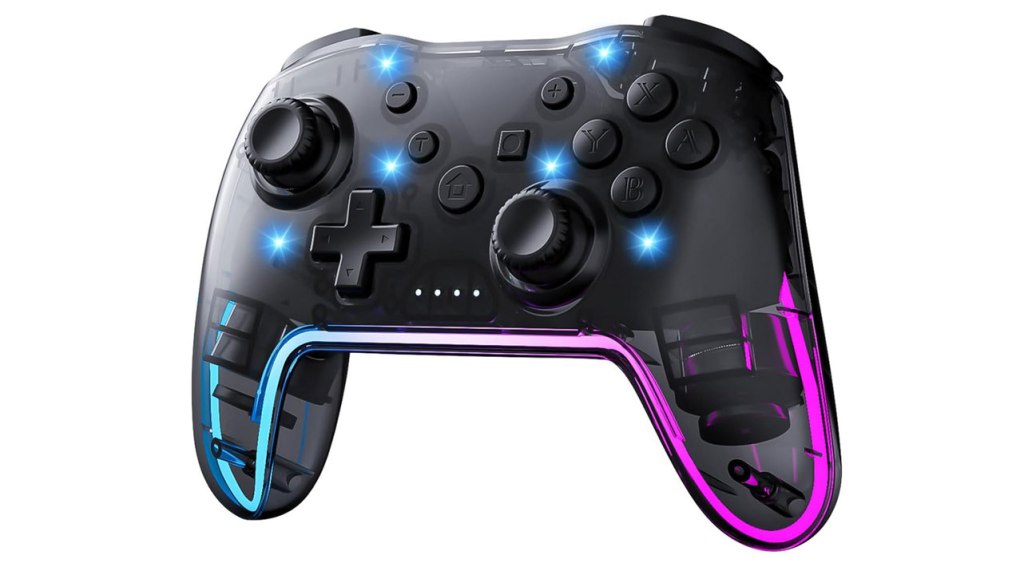
Twylyte Wireless Switch Controller
Hardware Type: Controller
.
Review:
(Note: This product was received at no cost for review via the Amazon Vine program.)
“You should never judge a book by its cover”. So the old saying goes. I don’t think it’s always true, but when it comes to game controllers I’ve seen this old adage hold true surprisingly frequently. Just recently, I found the extremely cutesy IINE Candy Pop Mini controller to be a surprisingly well-made piece of hardware. And the teenie-tiny ShanWan Bluetooth Gamepad Keychain Sized Mini Controller seems all gimmick, but surprisingly turns out to be pretty ideal for a certain type of game. As such, I go into controller reviews with an open mind.
So when I see the Twylyte Wireless Switch Controller, which looks like it’s designed to sell purely on its gaudy LED lighting, I make it a point to try to go into a review of this device without any preconceptions to truly find out the answer to the question: Is this controller all flash, or is there some substance?
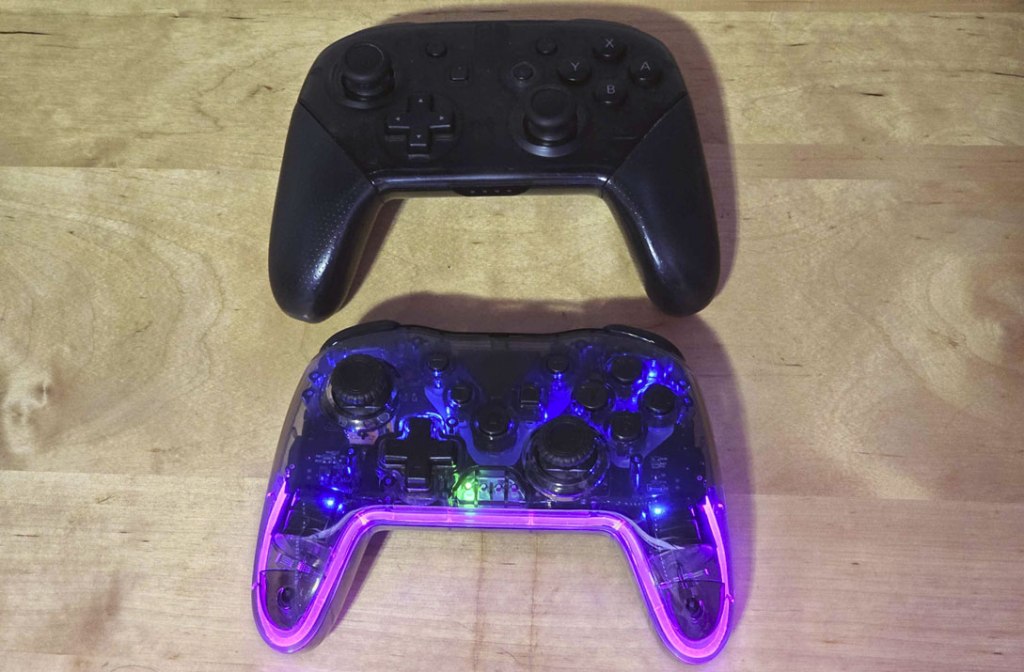
Like most third-party Nintendo Switch Pro-style controllers, Twylyte’s controller doesn’t stray too far from the mold set by Nintendo’s own Nintendo Switch Pro Controller. It’s roughly the same size and shape, with the same asymmetrical analog stick layout, and mostly the same button placement. However, there are a few noticeable differences, beyond the appearance.
First, Twylyte’s controller is noticeably lighter than Nintendo’s controller. While this is good in that it’s easier to hold, it also contributes to an overall feeling of the controller being cheaply-constructed. This impression is not at all helped by the smooth, untextured transparent plastic the controller’s housing is made of, which not only feels super-cheap, but also makes your hands feel extra-clammy while using it, sticking to the controller if you get even a little sweaty.
The cheapness of this controller isn’t just the way the casing feels, either. While the D-Pad, shoulder buttons feel fine, as do the analog sticks, the ZL and ZR triggers are digital and not analog, which means that this is less than ideal for Racing games on non-Nintendo platforms (on the Nintendo Switch itself it shouldn’t matter, as the Nintendo Switch doesn’t recognize analog trigger inputs). Furthermore, the analog sticks are not hall effect sticks, meaning there’s a potential for these sticks to eventually drift. Then there’s the face buttons, which are extremely clicky, to the point where you’ll be making constant clacky noises as you play.
To round out the buttons before moving on, the home button has been moved to the center of the controller (the best spot for it if it’s being moved at all), the screenshot button moved to where the home button was, and a new Turbo button is where the screenshot button was (which operates in the way you would expect a Turbo button to work).
So far, things aren’t looking so great for Twylyte’s controller. However, this controller does have a few surprises up its sleeve. It can wake the Nintendo Switch from sleep mode, has pretty good gyroscopic motion control, and has adjustable rumble instead of HD rumble, which some would see as an acceptable tradeoff. That means the only basic functionality of Nintendo’s own controller that this one doesn’t have is the ability to scan Amiibo figurines.
Then we get to this controller’s compatibility with other platforms, and here’s where things get strange. Despite their being two methods to connect to Android devices, I wasn’t able to get either method to work – one wouldn’t detect the Twylyte controller at all, and the other paired with the controller but then the controller was unable to do anything, even after downloading the recommended QMacro software from the Play Store. This is particularly strange, because in my experience it is extraordinarily rare for a controller that advertises Android support to have trouble doing so.
Yet even stranger, this controller seems to connect via bluetooth to PC just fine, without any noticeable lag. This is also extraordinarily rare – almost every Nintendo Switch controller I’ve used that supports PC connectivity has horrible lag when playing via bluetooth and needs to have a wired connection to be used reliably. And it’s almost a shame that this is the one thing this controller seems to do well, because the lack of analog triggers undercuts this success.
The other problem this controller is facing is price – at $28, it’s more expensive than both the ECHTPower Wireless Switch Controller (ES01) and the Ligame Switch Wireless Controller, which are both better-made, more comfortable, and have more features.
With this being the case, it’s difficult to recommend the Twylyte Wireless Switch Controller. To its credit, it does have a few surprises hidden under its flashy lights, but mostly it’s just too poorly-made and touts too few features to compete with other controllers in this price range.
tl;dr – The Twylyte Wireless Switch Controller is a Pro-style controller with some flashy lights under its transparent casing, and while I wouldn’t go so far as to say it’s all flash and no substance, it’s also pretty lacking both in quality and in features. Unless you value style over functionality, you have much better options in this price range.
Grade: C
You can support eShopperReviews on Patreon! Please click HERE to become a Sponsor!
This month’s sponsors are MB, Andy Miller, Johannes, u/RamboFox, Exlene, Eli Goodman, Ilya Zverev, and Stov. Thank you for helping to keep the reviews coming!
 eShopperReviews
Leave a comment