

Beitong KP40 Elite Wireless Controller
Hardware Type: Controller
.
Review:
(Note: This product was received at no cost for review via the Amazon Vine program.)
It’s fairly easy for me to review a controller that’s terrible. Bad controller, bad grade, done and done. It’s also easy to review a great controller. Great controller, great grade. Simple, makes sense. But every now and then I find myself reviewing a controller that does some really excellent or even spectacular things, but then bungles other things, and it’s difficult to know exactly how to approach this sort of review.
This is where I find myself with the Beitong KP40 Elite Wireless Controller, elsewhere referred to as the Beitong Kunpeng 40 Intelligent Controller. And suffering a bit of an identity crisis in its name seems to be pretty on the nose for this device.
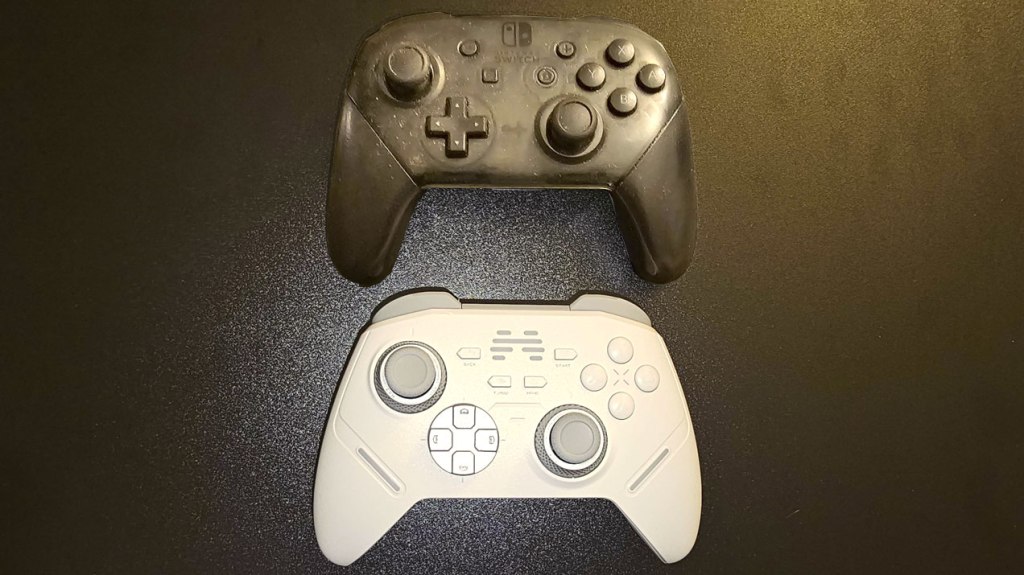
Beitong’s controller is roughly the size and shape of Nintendo’s own Nintendo Switch Pro Controller, including the asymmetrical analog stick layout. I’ll talk more about these analog sticks in a moment, because they deserve their own breakdown. Overall, the controller is fairly comfortable to hold, though it’s a bit light.
The analog sticks on Beitong’s controller use TMR (Tunneling Magnetoresistance) technology, which is more accurate and more power-efficient compared to what is increasingly becoming the industry standard, hall effect analog sticks, putting Beitong’s controller well ahead of the curve. At this point this is only the second controller I’ve reviewed with TMR sticks (the first being the GameSir Tarantula Pro Wireless Controller, which I named as a runner-up in the Best Hardware category in last year’s eShopperReviews Game Awards). The difference is only likely to be noticed by the most detail-oriented players like competitive pro gamers, but by most accounts it’s the best way to do analog sticks, and avoids the problem with “drift” you get on traditional analog sticks.
However, in addition to this, the KP40 goes an extra step further by having tension adjustment sheaths over the analog sticks. These metallic grey plastic covers can be dialed back and forth to adjust the resistance on the sticks, to make them feel more “tight” or “loose”. The result is what might be quite possibly the best analog sticks I’ve encountered on a gamepad.
Beitong’s controller has a connected disc-shaped D-Pad which I found to be a bit imprecise, particularly on diagonal inputs. Both this and the face buttons feel very “clicky”, which isn’t always ideal but here it works well enough. I note that it has the labeling of the buttons reversed, using a typical PC/Xbox layout for the ABXY button names – something that doesn’t really affect performance, but may confuse less experienced players looking at the buttons on the controller and seeing them differ from instructions in the game.
The shoulder buttons also work fine, and the ZL and ZR buttons make use of yet another rare feature, and one seen on the Tarantula Pro as well as another 2024 Hardware of the Year runner-up, the NYXI Master P1 2.4G Wireless PC Controller – its backside features physical switches that can change each of the ZL and ZR buttons from analog to digital input, in theory making this controller capable of always giving players the ideal input whether they’re playing on Nintendo Switch (which cannot recognize analog triggers), or other platforms (which make use of analog triggers for some games, particularly Racing games). However, on the KP40, this doesn’t work quite so well as those other controllers, as the “digital” setting still feels like it has way too much give, something that kinda’ defeats the whole point of a feature like this.
The plus and minus buttons are in their usual locations, as is the home button. Meanwhile, the screenshot button has been outright replaced with a turbo button, something that shocked me when I realized this – I’ve encountered some gimmicky controllers and budget controllers that removed buttons and features from the standard Nintendo Switch controller, but this is the first time I’ve found a premium-priced controller that did so (specifically one selling for $70). And I’m honestly stunned that the screenshot button wasn’t moved somewhere else – it’s not like the KP40 is lacking real estate – there’s even a little indent between the D-Pad and right analog stick that serves no purpose!
Speaking of the turbo button, this mostly operates the way standard turbo buttons do, but it lacks an auto-turbo feature, which is once again pretty stunning for a premium-priced controller, as this is a feature that even bargain bin third-party controllers have.
Finally, before moving on, I should round out the other standard Pro controller features this controller does and more often doesn’t have. On the upside, this controller does feature gyroscopic motion control that works quite well, no complaints here. This controller also has adjustable rumble in place of Nintendo’s HD rumble, which I find to be an acceptable trade-off. And while there is no Amiibo-scanning functionality, this feature is rare in third-party controllers so I don’t fault the KP40 for lacking it. However, I am quite surprised that this controller cannot wake the Nintendo Switch from sleep mode. Two years ago, this feature was rare in third-party controllers, but in 2025 it’s pretty much standard, and for a controller touting itself as “Elite” and “Intelligent”, the lack of such a feature seems very much… well, not so.
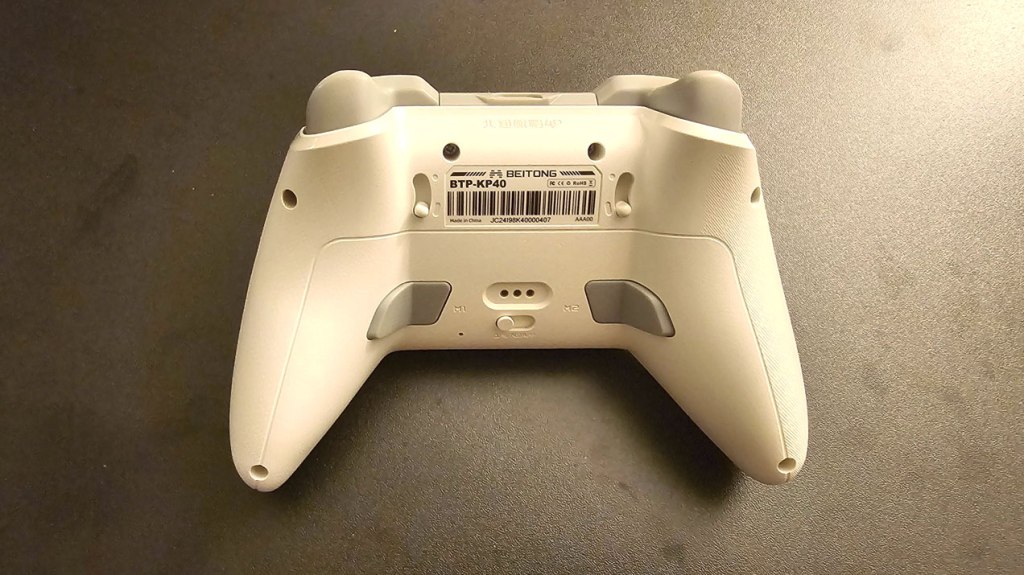
Turning the controller over, we see the aforementioned analog trigger switches, and farther down there are a pair of macro buttons to either side near the grips, but an observant eye may notice a few things wrong here. For starters, unlike the controller images on the sales page, these buttons are grey and untextured (in the sales page’s images they appear red with small grooves). However, I don’t think either of these small changes is all that important. What is important is what’s missing – there’s no macro programming button on the controller. And that’s because you cannot adjust the macro buttons on the controller itself at all, as well as other features like the lighting, vibration, and turbo speed. Again, I was quite shocked at this omission, yet another standard feature on controllers with macro buttons.
Apparently, in order to adjust these features, players must download the PC, Mac, or Android app from Beitong’s website. And just to make things just a bit more suspect, there’s no version of the app in the Google Play store, making this the first Android controller app I’ve ever encountered that circumvents the standard app store.

To be fair, app support is a feature I celebrate in the rare controllers that offer it, and this controller’s app does offer a healthy number of features to adjust the appearance, button assignments, and other elements of the controller to your liking. However, this is the first time I’ve encountered a controller that forces players to use an app to adjust features that most other controllers allow you to change with the controller itself. Oh, and also a small note – while you can change button assignments, there’s no way to change the turbo and home buttons, so it looks like even this won’t allow you to get the screenshot button back.
While this might seem like a minor inconvenience for setting up the macro buttons, it’s actually worse than it seems, because you have to take the controller away from the Nintendo Switch, set it up on PC, program in the macro (such as a Street Fighter-style “hadouken” command sequence), and then return it to the Nintendo Switch to use it… and then you may well find out that you got the sequence of commands wrong and need to perform this exercise all over again. In other controllers that actually use a macro settings button, if you got the sequence wrong the first time, you can try again within seconds, but on the KP40 that process takes minutes.
We still have one major feature to get to on this controller, and that is yet another feature we’ve seen on another controller I named earlier. Like a fair few third-party Nintendo Switch controllers, the KP40 is compatible with not only Nintendo Switch but also Android, PC, and Mac. Like some third-party Nintendo Switch controllers, the KP40 includes a USB dongle that you can use for a better wireless connection on PC. And much like the NYXI Master P1 2.4G Wireless PC Controller, the KP40 further facilitates this with a switch on the back that you can use to easily swap between the above modes. And thankfully, all of the above forms of connectivity (save for Mac compatibility, which I could not test) worked just fine, with no complaints.
Finally, I should note that this controller is compatible with a charging dock that is sold separately. I don’t personally think this dock is necessary, but to those who value that sort of thing, this is an option for you.
So, in the end, where does this leave the Beitong KP40 Elite Wireless Controller? In some ways, this is an outstanding controller, with some features not seen on most other controllers. In the case of the analog sticks, the KP40 is as good as you can possibly get, and there are other features here that mirror some of the features on controllers that are among the best Nintendo Switch controllers I’ve ever used. But every time a feature on the KP40 impressed me, it did something else that left me utterly perplexed at the horrible design choices present.
Removing the screenshot button, not waking the Nintendo Switch from sleep mode, only including half of the standard turbo functionality, and forcing players to set up macro buttons using an app (and a potentially shady one, at that). Plus, the digital/analog trigger switch that’s less than ideal, and a D-Pad that’s a bit lacking. It’s just an odd mix of really great and pretty bad, and at this price, I just cannot imagine recommending this over something like the GameSir Tarantula Pro Wireless Controller. While I don’t think the KP40 is a terrible controller, I think you have a much better option if you’re looking for something that has many of the features this controller offers.
tl;dr – The Beitong KP40 Elite Wireless Controller is a Pro-style wireless controller that has some excellent and even outright unique features and then bungles some really basic stuff. Its TMR analog sticks are possibly the best you can get and there’s excellent cross-compatibility with Android and PC, but this controller inexplicably loses the screenshot button, can’t wake the Nintendo Switch from sleep mode, only half-implements turbo, and forces you to use an app to set up the macro buttons, leaving this a very mixed bag in a price range with much better alternatives.
Grade: B-
You can support eShopperReviews on Patreon! Please click HERE to become a Sponsor!
This month’s sponsors are Jamie and His Cats, Ben, Ilya Zverev, Andy Miller, Homer Simpin, Johannes, Francis Obst, Gabriel Coronado-Medina, Jared Wark, Kristoffer Wulff, and Seth Christenfeld. Thank you for helping to keep the reviews coming!
 eShopperReviews
Leave a comment