
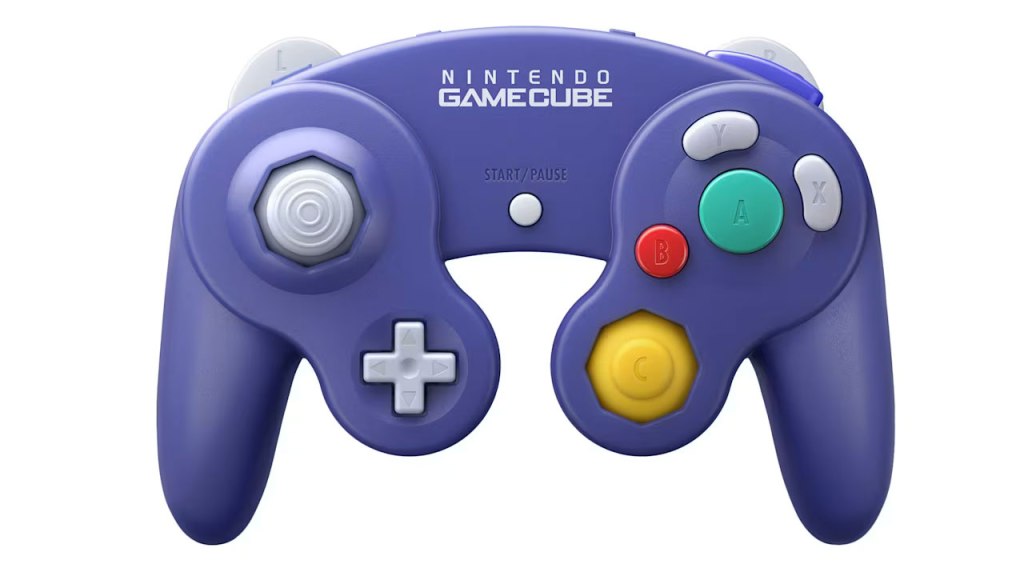
Nintendo GameCube Controller
Hardware Type: Controller
.
Review:
With the 2025 launch of the Nintendo Switch 2, Nintendo has included a new benefit for subscribers to Nintendo Switch Online + Expansion Pack in the form of the Nintendo GameCube – Nintendo Classics app. And as they do with every release of a new Nintendo Switch Online app for a console, Nintendo has released a new controller styled after that classic game console, only available for purchase for those who have an active Nintendo Switch Online subscription.
I have made it no secret that I have a strong dislike for the GameCube controller. To be sure, it’s not all negative – I find it extremely comfortable in the hands (truth be told, one of the most comfortable controllers ever made), and the trigger buttons (called L and R on this controller) are not only comfortable, but do a great job conveying their analog function, even “clicking” in when pressed in fully. However, these good qualities do not outweigh the massive amount of bad for me.
The bizarre bean-shaped X and Y buttons look and feel strange, the odd yellow little nub of the right analog “C-Stick” doesn’t feel appropriate for games with a traditional dual-analog setup, the D-Pad is tiny in a way that feels woefully inadequate, the lack of a “select” button to match the “start” button always made it awkward to play older games that used such a button, and I hate the way this controller has a right shoulder button but inexplicably lacks an left shoulder button (R is named Z on this controller).
So, in a game controller designed to replicate all of that, how well does this new GameCube controller adapt to the needs of modern gamers?
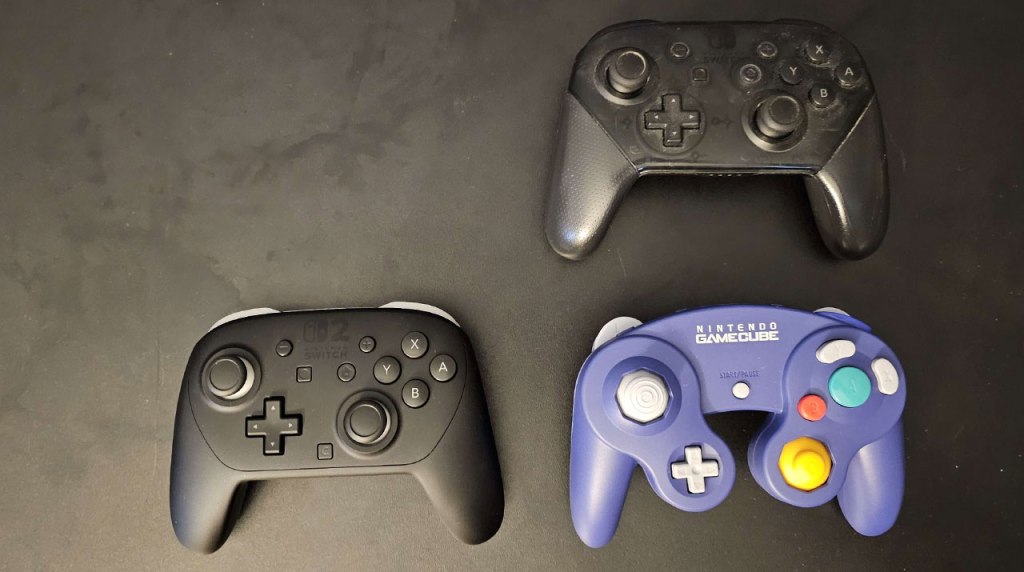
I’m not going to go too in-depth on this controller’s standard features and dimensions. As always with these controllers, Nintendo has done a superb job replicating the look and feel of the classic controller, now in wireless form on Nintendo Switch 2, and just to be clear this is specifically a Nintendo Switch 2 controller – there’s zero compatibility with the original Nintendo Switch or with other platforms like PC or mobile devices.
To be more precise about how this controller feels like the original, everything I said about the buttons remains true here – the triggers still have that great feeling as they’re pressed in and then “click” into place, and in the GameCube app they retain their analog input, allowing for more subtle shifts of your craft left and right in F-Zero GX, for example. This makes the GameCube controller the only controller on the Nintendo Switch 2 with analog triggers (though you can technically also connect a Wii U GameCube Controller adapter and use original GameCube controllers for this, though only the GameCube app and a very select few games will detect analog trigger input).
Other parts of the gamepad feel much the same as well – the D-Pad still feels far too tiny, the bean-shaped buttons still feel odd in the same way, the analog sticks still feel… – look, it all feels the same, the good and the bad.
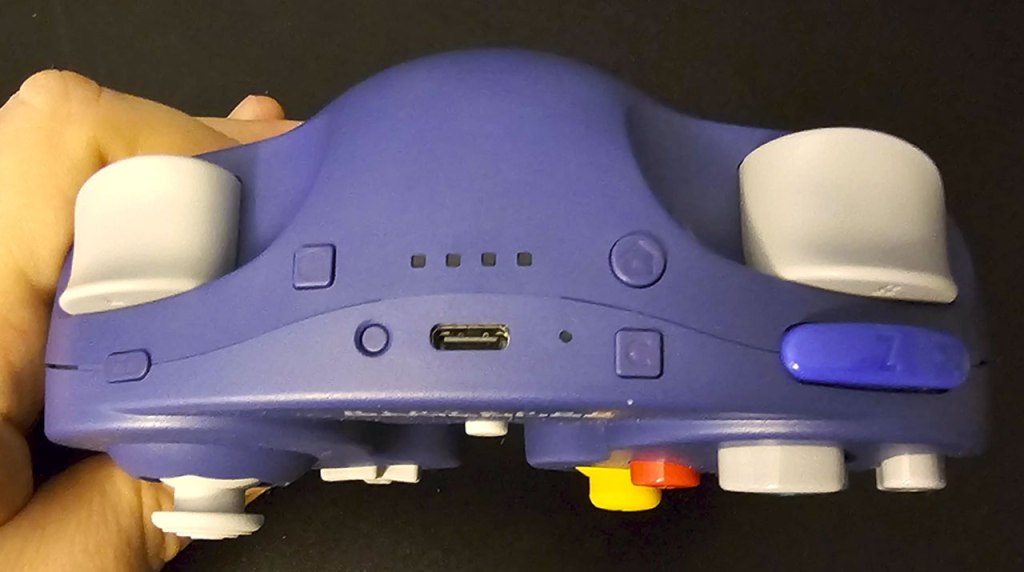
The biggest changes you’ll find here are to the top of the controller. In addition to the cord being replaced by a now-standard USB-C port to connect and charge the controller, a sync button and indicator lights to display what controller number you are, many of the functions of the Nintendo Switch 2 Pro Controller have been relocated here. Toward the right, there’s the home button and the new chat button, and on the left there’s the screenshot button.
Nintendo has once again refused to include a standard left shoulder button, though it has thrown modern players a bone in the form of a teenie-tiny “ZL” button where a normal L button would go. This choice seems baffling to me – there’s plenty of room there for a normal button, and it wouldn’t make the controller any less comfortable to hold or more awkward to use. The only reason I can imagine they did this was to keep this controller looking more like the original GameCube controller.
However, now we have to address one major issue with this controller. On the GameCube, the trigger buttons were named the L and R buttons, as opposed to ZL and ZR like most other Nintendo Switch games label these buttons as. And when playing games outside of the GameCube app, these buttons are treated as L and R buttons, making them needlessly confusing since they’re swapped with the shoulder buttons, with the Z button now acting as ZR, and the tiny new button on the left shoulder being a ZL button. This choice seems baffling, and surely it couldn’t have been too difficult to map these buttons to their expected positions outside of the GameCube app.
The exception to this is the select few games that were previously designed to recognize GameCube controller input via the Wii U USB GameCube controller adapter. These games, like Trials Rising and the Super Mario Sunshine portion of Super Mario 3D All-Stars, just see this controller as a standard GameCube controller with the shoulder and trigger buttons where they normally should be, complete with analog input.
You may also notice that when listing off all of the buttons I mentioned on the top of the controller, I left out an important one – the minus button. That’s because this controller doesn’t have one. Out of all the bizarre choices this controller makes, that might be the most inexplicable – they included the chat button, but not the minus button, a button many games need the use of?
Another bizarre choice here is that while this controller does have a rumble feature that works within the GameCube app, it only works within the GameCube app. Yeah, the rumble feature won’t work anywhere else. Seriously, what the heck, Nintendo!? And rounding out the other standard Nintendo Switch controller features, this controller does have gyroscopic motion control, but cannot scan Amiibo figures.
Look, I think I’ve been more than fair to the Nintendo GameCube controller for Nintendo Switch 2, despite my dislike for the original, but at some point we have to recognize that this thing has some severe problems, including some that are outright inexplicable. The swapped trigger and shoulder buttons. The needlessly tiny left shoulder button, the lack of a minus button, a rumble that only works within the GameCube app, and a lack of compatibility with the original Nintendo Switch… that’s way too many issues for a controller priced at an absurd $65 with limitations placed on ordering it that you can only get it if you have a Nintendo account and you can only order one.
Unless you absolutely need a GameCube-style controller on Nintendo Switch 2, and unless you absolutely need that controller to have analog triggers, do not buy this controller – it is severely-flawed and massively-overpriced for what it is.
tl;dr – The Nintendo GameCube Controller for Nintendo Switch 2 delivers a way to play games on the new GameCube app as they were originally intended, even including analog triggers. Unfortunately, outside of this use, this controller has some pretty severe problems, including missing buttons, bizarre design choices, and a rumble that won’t work outside of the GameCube app. Unless you absolutely need a GameCube controller specifically for that app, skip this.
Grade: D+
You can support eShopperReviews on Patreon! Please click HERE to become a Sponsor!
This month’s sponsors are Jamie and His Cats, Ben, Ilya Zverev, Andy Miller, Homer Simpin, Johannes, Francis Obst, Gabriel Coronado-Medina, Jared Wark, Kristoffer Wulff, and Seth Christenfeld. Thank you for helping to keep the reviews coming!
 eShopperReviews
Leave a comment