

Nintendo Switch 2 Pro Controller
Hardware Type: Controller
.
Review:
The Nintendo Switch Pro Controller has long been the standard that other Pro-style controllers on the Nintendo Switch have been judged against. Its comfortable form factor, its reliable controls, and its inclusion of functions like HD rumble, Amiibo scanning, and gyroscopic motion control that other controllers sometimes didn’t include all made it the obvious choice for Nintendo Switch players who wanted something more comfortable to play with than the Nintendo Joy-Con controllers.
However, as time went on, Nintendo’s Pro Controller’s superiority started to come more and more into question. More controllers started to enter the market with controls just as good. Many featured turbo buttons and macro buttons. Some had smartphone apps that let you adjust their settings. Some worked across multiple platforms like PC and mobile devices. HD rumble usually isn’t found in third-party controllers, but adjustable rumble often is, and which of the two is more desirable is a matter of personal preference. Amiibo functionality in third-party controllers remains rare, but it’s also not an especially-important function to most players. And the high price of Nintendo’s controllers make many of these third-party controllers even more desirable.
So, as we enter a new generation of hardware, and Nintendo has released a new Pro-style controller to go alongside the Nintendo Switch 2, it’s only natural to feel a bit more skeptical this time around.
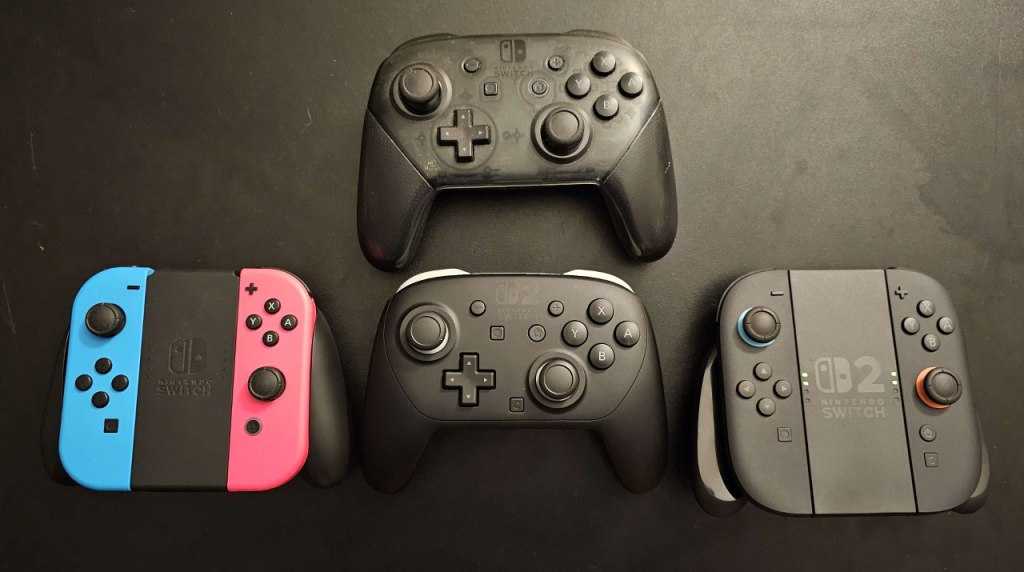
The Nintendo Switch 2 Pro Controller is extremely similar to Nintendo’s previous Pro Controller – it features a very similar form factor, with the same asymmetrical analog stick placement with convex sticks with a rim, a D-Pad and face buttons with about the same balance between “squishy” and “clicky”, clicky L and R shoulder buttons, and clicky ZL and ZR trigger buttons because the Nintendo Switch 2 isn’t designed to detect analog trigger inputs, save for games designed specifically for it like those in the Nintendo Switch Online + Expansion Pack’s Nintendo GameCube – Nintendo Classics app.
Also like its predecessor, this controller can wake the console from sleep mode, has gyroscopic motion control, and can scan Amiibo figurines. And while the wake and motion control features are becoming increasingly common in third-party controllers, Amiibo-scanning is still fairly rare outside of Nintendo’s own controllers.
On the downside, the Nintendo Switch 2 Pro Controller is devoid of many bells and whistles you can find in some third-party Nintendo Switch controllers – it has no turbo button, no macro buttons, no ability to pair with other platforms like PC or smartphones. In fact, even though every Nintendo Switch controller including the original Nintendo Switch Pro Controller can connect to both Nintendo Switch and Nintendo Switch 2, the Nintendo Switch 2 controller cannot connect to the original Nintendo Switch – this is a Nintendo Switch 2-only controller.
As if that wasn’t bad enough, the Nintendo Switch 2 Pro Controller doesn’t even use Hall effect or TMR sticks to avoid stick drift. Yeah, that’s right – this controller could eventually suffer stick drift. Granted, the same is true of the original Nintendo Switch Pro Controller, and most players complained of this issue with the Joy-Con controllers… but it still does happen. Heck, I got stick drift on a Nintendo Switch Pro Controller.
At this point, it may seem like there’s little reason to get a Nintendo Switch 2 Pro Controller given all that it lacks and how similar it is to its predecessor. However, it does have a few things in its favor that set it apart.
The first is comfort – while the Nintendo Switch 2 Pro Controller features a nearly-identical form factor to its predecessor, it has a smooth matte finish that’s extremely comfortable to the touch, and seems far less likely to cause clammy hands that stick to the controller. Also, it has raised plus and minus buttons that make these buttons easier to find and distinguish from the home and screenshot buttons. In the end, I would say this is one of the most comfortable controllers I’ve used.
The second thing it has going for it, and at launch this is a feature only present in the Nintendo Switch 2 Pro Controller and the Nintendo Joy-Con 2 Controllers, is HD Rumble 2. And before you write this off, I suggest you give it a try with one of the games that supports it, like Mario Kart World, Fast Fusion, and Hogwarts Legacy. You may find yourself changing your mind.
The third feature the Nintendo Switch 2 Pro Controller has and another that it shares in common with the Joy-Con 2 Controllers is the new “C” button that opens the Chat menu on Nintendo Switch 2. Though… well, I can’t imagine that third-party controllers will have a difficult time replicating this particular feature. You know, since it’s just a button.

The fourth feature the Nintendo Switch 2 Pro Controller has is a microphone port at the bottom edge of the controller, a feature often found on other platforms and that frustrated many players when it wasn’t included on the original Nintendo Switch.
The fifth and final feature, that not even the Joy-Con 2 controllers have (though you can add this feature to the Joy-Con 2 Controllers using a Nintendo Joy-Con 2 Charging Grip), is the new GL and GR buttons, located on the back of the controller at the base of the grips, where you often find macro buttons.
Earlier I said the Nintendo Switch 2 Pro Controller doesn’t have macro buttons, and this is true – these buttons do not allow players to store multi-button commands, and you can easily remap them by holding down the home button in-game and selecting from one of the menus that brings up. However, they do allow players to custom-map a single button to these buttons, including the D-Pad directions, home button, screenshot button, share button, and L3/R3 (pushing in the analog sticks), but not analog stick directions.
While on the surface this may seem inherently inferior to macro buttons, since storing a single button is more limited than storing a sequence, the trick is that the Nintendo Switch 2 saves these button inputs to individual games, meaning that players can have different button assignments for these buttons when playing The Legend of Zelda: Breath of the Wild than they have when playing Fantasy Life i.
I found this feature particularly useful when playing Super Metroid in the Nintendo Switch Online Super Nintendo Entertainment System App, which makes it a pain to run, use the charge beam, and jump at the same time, something that only ever felt remotely comfortable to do using a Super Nintendo controller. But with the Nintendo Switch Pro 2 controller, I can set the run button to GL and it all becomes easy… and that’s not a setting I need to remember or maintain for any other Nintendo Switch game, though it does mean that other games on the Super Nintendo app would also use that button assignment.
But… again, this seems to be a system-level command, and I can’t help but wonder how long it will take before we see third-party controllers that can do this on the Nintendo Switch 2 as well…
The thing is, while the Nintendo Switch 2 Pro Controller has some very nice features, it’s hard to ignore the one biggest thing it has going against it – its price. At $85, this controller is more expensive than nearly every Nintendo Switch controller I’ve ever laid hands on, including ones that have countless great features that are missing in this one. And while I could forgive the pricey Nintendo Switch Pro Controller at a time when there were few competitors that could match it, at this point I feel like it’s just a matter of time before someone else makes something that does what this controller can do, but cheaper, or does more than what this controller can do, but at the same price.
So if you care about features like HD Rumble 2 and the mappable GL and GR buttons, the Nintendo Switch 2 Pro Controller is indeed the only controller on the market that can do those things. But give it a few months, and that might not be true anymore… and for the absurd $85 price tag, I think that most players are better off waiting until that happens.
tl;dr – The Nintendo Switch 2 Pro Controller is a pro-style controller that is similar in many ways to the original Nintendo Switch Pro Controller, with a similar list of features and flaws, though this controller has a few nice extras too, like HD rumble 2, a headphone jack, and customizable GL and GR buttons. However, it’s also susceptible to stick drift, lacks many features common in modern third-party controllers, and costs a whopping $85. While this is a solid controller, I think you’re better off waiting until a controller that’s a better value comes along.
Grade: B-
You can support eShopperReviews on Patreon! Please click HERE to become a Sponsor!
This month’s sponsors are Jamie and His Cats, Ben, Ilya Zverev, Andy Miller, Homer Simpin, Johannes, Francis Obst, Gabriel Coronado-Medina, Jared Wark, Kristoffer Wulff, and Seth Christenfeld. Thank you for helping to keep the reviews coming!
 eShopperReviews
Leave a comment