

GuliKit KK3 Wireless Controller
Hardware Type: Controller
.
Review:
(Note: This product was received at no cost for review via the Amazon Vine program.)
My first impression of GuliKit was far from a glowing one. The Aknes GuliKit Goku USB Wireless Controller Adapter, designed to supposedly connect any modern controller with any modern gaming platform, simply did not work – try as I might, I could not get it to connect any controller to any gaming platform, a performance that earned that device an F grade from me and designation as runner-up for Worst Hardware in that year’s eShopperReviews Game Awards. So you can probably imagine that I would go into testing this controller with some degree of doubt.
Furthermore, I have to recognize that looking at other reviews of this controller posted on the Amazon sales page, it seems that many customers are finding this controller outright isn’t working for them. I would feel remiss not to mention this, but I must also say that I had no such issues with this device – the GuliKit KK3 Wireless Controller works just fine for me, and I can only review this controller based on my own experience with it.
So that brings me to the question: Is this a good controller? Is its deserving of its price point of $40, which places it squarely in the mid-range for wireless Pro-style Nintendo Switch controllers? And does it compare well with other controllers in that price range?
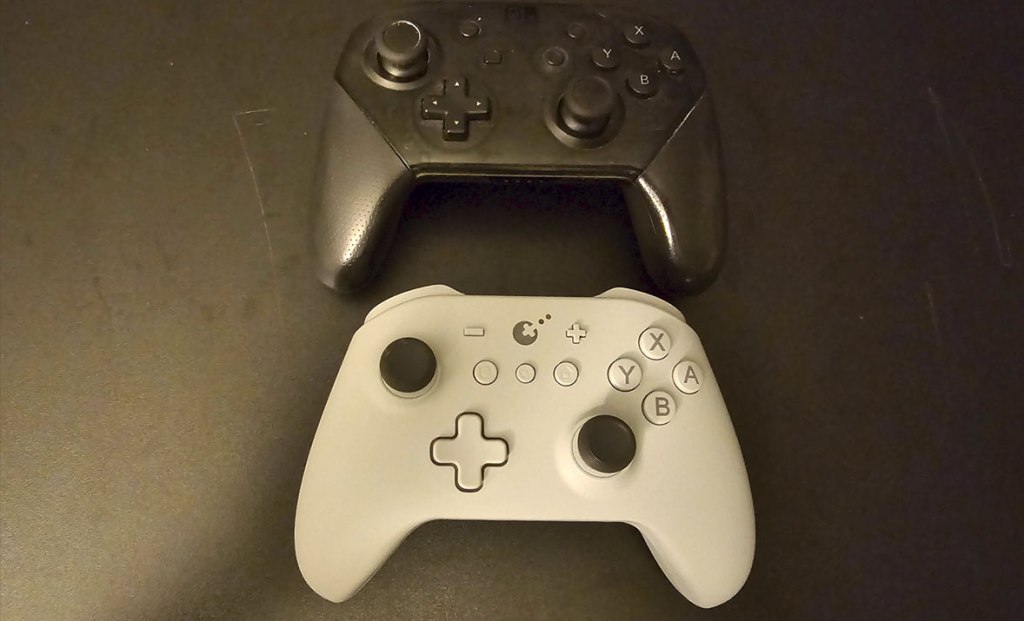
The GuliKit KK3 is roughly the size and shape of Nintendo’s own Nintendo Switch Pro Controller, including the asymmetrical analog stick layout. I’ll talk more about these analog sticks in a moment, because they deserve their own breakdown. The grips on either side have a nice textured feel on the back, and the overall weight felt about on par with Nintendo’s controller, perhaps maybe a slight bit lighter. However, the overall shape and feel actually reminded me a lot of the Xbox One Pro controller, which is good company to be in, in my opinion – like that controller, I found the GuliKit KK3 to be extremely comfortable.
The analog sticks on the GuliKit KK3 use TMR (Tunneling Magnetoresistance) technology, which is more accurate and more power-efficient compared to what is increasingly becoming the industry standard, hall effect analog sticks. While I only reviewed one controller with this feature in 2024, I’m already starting to see a fair number of controllers make use of the feature in 2025, and I’m definitely pleased to see this is the case, as that 2024 controller was the GameSir Tarantula Pro Wireless Controller, which I named as a runner-up in the Best Hardware category in last year’s eShopperReviews Game Awards. The difference in quality compared to Hall Effect sticks is only likely to be noticed by the most detail-oriented players like competitive pro gamers, but by most accounts it’s the best way to do analog sticks, and avoids the problem with “drift” you get on traditional analog sticks.
The D-Pad and face buttons on the KK3 feel like a good balance of “squishy” and “clicky”, and feel reasonably responsive and accurate, with the L and R shoulder buttons being clicky and feeling just right. The ZL and ZR trigger buttons are full analog buttons, which is great for use with other platforms, but less than ideal for use on Nintendo Switch, which cannot recognize analog input and this style of trigger means that play with these will be a tad less responsive.
The plus, minus, screenshot, and home buttons are all in their standard places, and in addition to these is a settings button dead-center, which also doubles as a turbo button. The turbo functionality works in the typical style of this sort of button, but players can also use this button to adjust the rumble (it’s not HD rumble, but I find that adjustable rumble is an acceptable substitute), as well as to optionally remove the “dead zone” from the analog sticks, an excellent feature that you don’t often see in Nintendo Switch controllers.
As for other standard features, this controller has good gyroscopic motion control, and can wake the Nintendo Switch from sleep mode, but it doesn’t include Amiibo-scanning capability, though this is rare in third-party Nintendo Switch controllers. If this particular feature is really important to you, you may want to look over at the GuliKit KK2 T Wireless Controller, which actually does include this feature, for $10 more.
As for non-standard features, a lot of the bells and whistles you see on other controllers aren’t present here – there’s no programmable macro buttons, no app support, and no USB dongle (though oddly, one of the selectable platforms is listed as “D”, which has me thinking that maybe this was at one time intended to have one?). However, that last omission actually leads me to one other excellent feature in the KK3.
Like many third-party Nintendo Switch controllers, the KK3 is also compatible with Windows, Android, and iOS devices, and I was able to test all of these except iOS. And to my surprise, the connection to both Windows and Android devices was excellent, regardless of what connection method I used. Many multiplatform Nintendo Switch controllers really need a USB dongle to get a good wireless connection to PC, but this one does it easily just using Bluetooth, which in other controllers I find to result in a laggy connection, but not here. What’s more, by double-tapping the platform button, you can quickly switch to your preferred platform of choice one after the other, with the individual setting remembered by the controller. Just tapping the button a few times instantly disconnected me from my PC and connected to Nintendo Switch.
Honestly, the only complaints I have about the GuliKit KK3 Wireless Controller are the things it’s missing – things like Amiibo scanning, macro buttons, and app support, as well as analog triggers that, while not bad, are going to be better for play on platforms other than Nintendo Switch. But overall, this is a superb controller that feels great, has nice responsive buttons, includes the excellent TMR analog sticks, and wireless platform-swapping with no need for a dongle. I don’t think it’s the most exciting controller in the world, but at a mid-range price point, this is a solid choice.
tl;dr – The GuliKit KK3 Wireless Controller is a Pro-style wireless controller that lacks some of the bells and whistles you’d expect to find in this price range, like macro buttons and app support. However, while it may lack exciting features, it makes up for this by being an all-around excellent controller with a good feel, responsive buttons, TMR analog sticks, and excellent multi-platform wireless connectivity via bluetooth, no dongle needed. If you’re looking for a good mid-range controller, this is well worth picking up.
Grade: B+
You can support eShopperReviews on Patreon! Please click HERE to become a Sponsor!
This month’s sponsors are Jamie and His Cats, Ben, Ilya Zverev, Andy Miller, Johannes, Francis Obst, Gabriel Coronado-Medina, Jared Wark, Kristoffer Wulff, and Seth Christenfeld. Thank you for helping to keep the reviews coming!
 eShopperReviews
Leave a comment