
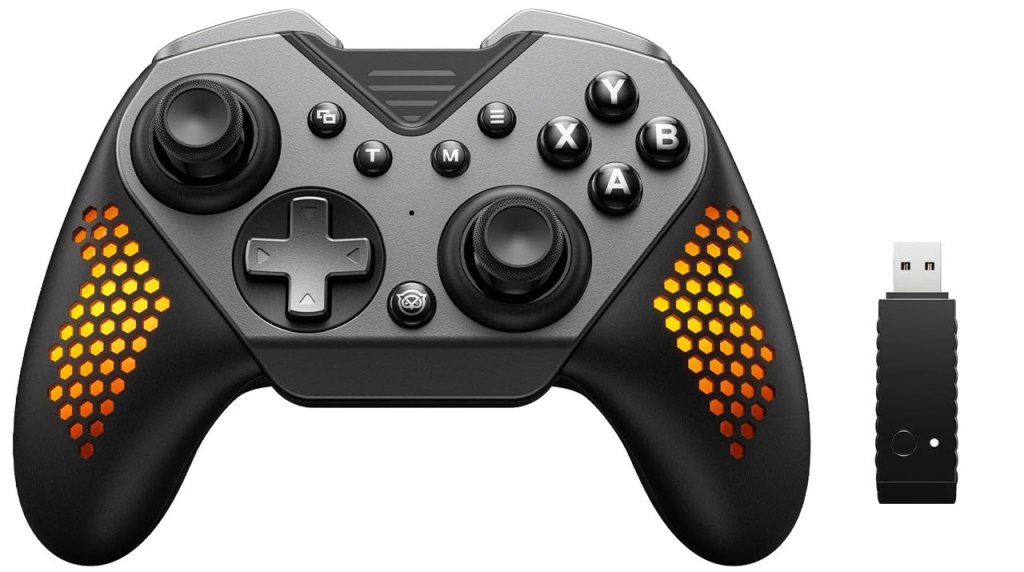
NYXI Flexi Wireless Game Controller
Hardware Type: Controller
.
Review:
(Note: This product was received at no cost for review via the Amazon Vine program.)
This will be the second controller I review from NYXI, and it has a lot to live up to, because the previous controller, the NYXI Master P1 2.4G Wireless PC Controller, is one of the finest controllers I’ve reviewed on Nintendo Switch, and a runner-up for Best Hardware in last year’s eShopperReviews Game Awards. Like the NYXI Master, the NYXI Flexi comes to the table with some truly unique features, so there’s definitely potential here for a repeat of NYXI’s prior success.

I’m going to break from my usual way of doing these reviews and start by talking about this controller’s signature feature, because this will impact a lot of the other parts of this review. The NYXI Flexi has a magnetic faceplate that can be detached from the front of the controller with a little effort – it’s not something that will come free when you don’t mean to. Upon doing so, you can gain access to the inside, where you can use a screwdriver to pry loose different elements of the controller’s insides to rearrange or swap them out as you see fit.
Specifically, you can swap the orientation of the left analog stick and D-Pad from a typical asymmetrical layout like most Nintendo Switch controllers to a symmetrical layout closer in style to a PlayStation controller. you can also swap out the standard face buttons, so if you prefer Nintendo’s default ABXY button assignments you can use those instead of the default PC/Xbox style.
This makes for an overall clever feature, and one I don’t think I’ve seen in other controllers, though the GameSir Tarantula Pro Wireless Controller does do something somewhat similar in letting players swap the face button layout using the press of a button to trigger internal mechanisms to reorient the labeling of those buttons.
Whatever else the NYXI Flexi gets right or wrong, this feature is certainly a unique and interesting selling point. And now that we’ve gotten that out of the way, let’s look at the rest of the controller.
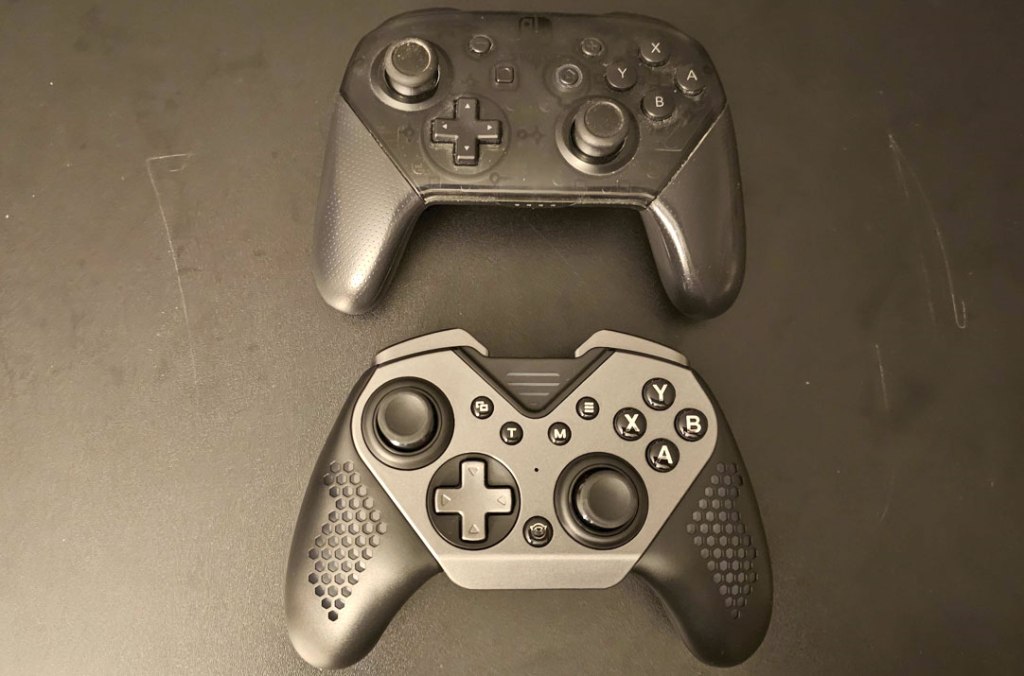
As with many of the Pro-style controllers released for Nintendo Switch, the NYXI Flexi is pretty comparable in size and shape to Nintendo’s own Nintendo Switch Pro Controller, with a mostly-comparable button layout (the face buttons have PC/Xbox labeling by default, but as I’ve said, you can change this if you like), as well as asymmetrical analog stick placement (which you can also change to a symmetrical layout). The Flexi is about the same weight as Nintendo’s controller, with very lightly textured grips.
Unlike Nintendo’s Pro Controller, the analog sticks on the NYXI Flexi use a concave top, which I tend to prefer. These sticks are also hall effect sticks, which means they shouldn’t suffer from “drift”.
The D-Pad and primary face buttons are more “clicky” than Nintendo’s controller, make quite a bit of noise during use, and actually stick a bit, which is far from ideal. Oddly, the face buttons are also squishy in addition to clicky, which is an odd combination I haven’t encountered before – as you press them if, they have some give to them, but click when pressed in a certain amount. Personally I found this to be not to my liking, as it felt a bit imprecise. I should also mention that the design of the D-Pad made it extremely difficult to get a precise cardinal direction press – ducking in a 2D Mario game was a crapshoot as the slightest tilt in either direction would be counted as down-left or down-right, making me walk in that direction instead of ducking.
The L and R shoulder buttons are a more traditional sort of “clicky”, which is just fine. As for the ZL and ZR trigger buttons, these are analog buttons, which means they may be a bit less precise on Nintendo Switch, which cannot detect analog trigger input, but it makes them more ideal for use on other platforms this controller supports, most notably for Racing games, which tend to make use of these inputs. However, these trigger buttons jut out from the controller, making them uncomfortable to hold.
The secondary face buttons have the plus and minus buttons in their usual spots, but the rest have been swapped around in some odd ways. In place of the screenshot button is a turbo button, which works in the usual way this sort of button tends to work. However, this button is sharing double-duty with the macro settings button, used in conjunction with the four macro buttons on the back of the controller, which you can set up to perform a sequence of commands, like a Street Fighter “hadouken”.
The screenshot button has moved over to where the home button usually is, but it is now an “M” button, sharing double-duty with a feature that allows you to turn on or off the macro buttons so you don’t have to worry about accidentally pressing them. Unfortunately, this results in the side-effect of whenever you’re trying to use this button to turn on or off the macros, you’ll be inadvertently starting up video recording or taking a screenshot as well, which is really annoying.
Finally, the home button has been moved down to the bottom, between the D-Pad (by default) and right analog stick. It is so close to the D-Pad that I found myself repeatedly hitting it on accident when playing games with the D-Pad, and players may find themselves swapping to the symmetrical stick layout just to avoid this. This is a frustrating button relocation, especially when the top-center of the controller would have worked fine for this and avoided the issue entirely.
When it comes to the other features of Nintendo Switch controllers, this controller includes the ability to wirelessly wake the Nintendo Switch from sleep mode, good gyroscopic motion controls, and has adjustable rumble in place of HD rumble. It has no Amiibo functionality, though this is rare in third-party Nintendo Switch controllers so I don’t hold that against it.

Flipping over the controller to look at its underside, we see the aforementioned macro buttons (two on each side). The bottom macro buttons work great, but the smaller size and placement of the top buttons make these a bit less natural-feeling to use, especially if your pointer and middle fingers are on the L/R and ZL/ZR buttons while you’re trying to use these. Then closer to the middle on either side there’s a small reset button and a lighting adjust button.
In addition to Nintendo Switch, the NYXI Flexi is compatible with PC, Android, and iOS, and I was able to test the former two of these. For PC connectivity this comes with a wireless USB dongle, with the controller connecting to the other devices via Bluetooth. All of this worked flawlessly for me, no problem.
Finally, before closing this out, I should mention that while this controller comes with an instruction manual, almost all of the instructions for this controller are not included within it. Instead, users are expected to follow a QR code to NYXI’s website, which lists the full instructions. While I appreciate having these instructions available in digital format, not including a physical copy in the box when you’re already including an instruction manual just seems bizarre and frustrating.
I’ve used that word “frustrating” a lot here, haven’t I? Taking all of the above into consideration, the NYXI Flexi is certainly an interesting and unique controller with some truly noteworthy features, but also a terribly flawed controller. The ability to open up the controller and swap around its innards is delightfully original, but then the controller has a terrible D-Pad, awkward face buttons, uncomfortable trigger buttons, a home button that feels like it forces you to use a specific controller layout, a macro on/off feature sharing a button with the screenshot feature that just causes problems… while there’s a fair amount to love here, there’s also a lot to hate, and in the end for all its clever uniqueness, I can’t really recommend this controller, especially at the premium price they’re asking for it.
tl;dr – The NYXI Flexi Wireless Game Controller is a Pro-style wireless controller with a unique feature that you can remove its magnetic face plate to change its insides to your liking. As cool as this feature is, it can’t outweigh the huge barrage of problems the controller has, ranging from poor button placement to uncomfortable buttons to a few buttons trying to juggle multiple tasks and doing so poorly. With everything this controller does wrong, I simply cannot recommend it.
Grade: C-
You can support eShopperReviews on Patreon! Please click HERE to become a Sponsor!
This month’s sponsors are Jamie and His Cats, Ben, Ilya Zverev, Andy Miller, Johannes, Francis Obst, Gabriel Coronado-Medina, Jared Wark, Kristoffer Wulff, and Seth Christenfeld. Thank you for helping to keep the reviews coming!
 eShopperReviews
Leave a comment