

NYXI Warrior Bluetooth Controller
Hardware Type: Controller
.
Review:
(Note: This product was received at no cost for review via the Amazon Vine program.)
I’ve never personally been fond of the GameCube controller. I know Nintendo fans swear by it, and pro Super Smash Bros. players see it as an absolute necessity, but I always felt like this controller was odd, and not well-suited for games that weren’t designed with this controller in mind. However, as I am seemingly in the minority in this regard, it’s no surprise that there are a fair few controllers for the Nintendo Switch designed to imitate the look, feel, and experience of the GameCube controller, such as the Exlene Wireless GameCube Switch Controller.
However, this time we have a GameCube-style controller from NYXI, the maker of the NYXI Master P1 2.4G Wireless PC Controller, which I consider to be one of the finest controllers I’ve reviewed on Nintendo Switch, and a runner-up for Best Hardware in last year’s eShopperReviews Game Awards. So perhaps this is the controller that can change my mind about things.
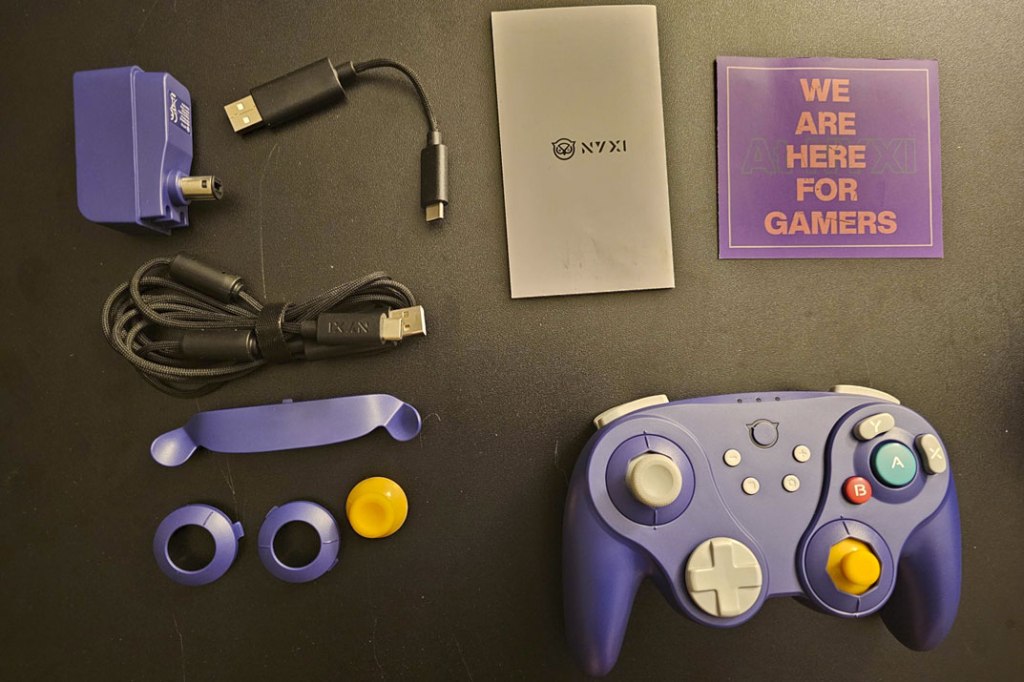
Right out of the box, NYXI is off to a good start, with multiple fun surprises. First, for players like me who thought the GameCube’s smaller right analog stick was terrible, there’s the ability to swap it out with a standard analog stick. You can swap out the left stick too, if you want both sticks to be a matching yellow, or if you’re an absolute masochist and want to use the tiny right stick on the left analog stick instead. Hey, if that’s you, who am I to judge? In addition, for purists there’s a way to replace the macro button paddle on the back of the controller with just a flat piece of plastic so you don’t need to worry about hitting those buttons.

However, the truly exciting thing included here is a Wavebird-style receiver that can sync up with the controller for play not only using the Nintendo Switch GameCube controller adapter, but in an actual GameCube console, as well as original Wii consoles (the ones that were backwards-compatible with GameCube, a feature they took out in later versions). This receiver can also be plugged into a PC to be used as a USB dongle, except… well, I’ll get to that a bit later.

The NYXI Warrior is pretty comparable in size to Nintendo’s own Nintendo Switch Pro Controller, though of course from there the comparisons start to become more strained, so it’s probably better to compare this to a GameCube controller.

Compared to a standard GameCube controller, we see a great deal more similarities. The general size and shape is the same, though the NYXI Warrior connects the gap between the D-Pad and right analog stick. As mentioned before, the right analog stick is similarly small (though as I also noted, you can swap this for something more traditional), the face buttons are laid out with the signature central A button, much smaller B button, and X and Y bean-shaped buttons in orbit around A.
However, there are differences as well. Unlike the GameCube controller, which is missing a left shoulder button, the NYXI Warrior has a full set of both L/R and ZL/ZR buttons, the D-Pad is much larger here (and the NYXI Warrior has a disc-style D-Pad as well), the trigger buttons no longer have a comfortable groove for your fingers to rest in, and while the left analog stick on the GameCube is convex with a textured top, the NYXI Warrior is concave.
Getting into greater detail here, NYXI’s controller has hall effect sticks, which means they shouldn’t suffer from “drift”. And the D-Pad, face buttons, and L and R buttons are all very much on the “clicky” side of the “clicky”/”Squishy” spectrum. I should note that the disc shape of the D-Pad causes some problems – as I often find with this style of D-Pad, it is difficult to get it to stay in a cardinal direction, meaning that trying to duck in a 2D Mario game proves difficult when the slightest movement to either side causes Mario to walk instead.
The ZL and ZR trigger buttons make use of a feature similar to the one we saw in the NYXI Master controller, using a toggle switch on either side to change between digital and analog, with the former being more responsive on the digital-only Nintendo Switch, but the latter being better on every other platform including the GameCube, with analog triggers being great for Racing games, but also being used in surprising ways in games like Super Mario Sunshine, where pressing the right trigger in sprays water from Mario’s “F.L.U.D.D.” but pressing it all the way in roots Mario to one spot to let you aim in place.
I’ll talk more about connectivity on different platforms a bit later, but before moving on I should say that these toggle switches don’t work anywhere near as well here as they did on the NYXI Master – even when changed to digital mode, there’s still quite a lot of give in these triggers that cuts down on the responsiveness that you’d want from digital triggers. What’s more, unlike actual GameCube controllers, they don’t have the satisfying “click in” when pressed all the way in.
Moving on, of course the GameCube’s one secondary face button won’t cut it here, and instead we have plus, minus, and screenshot buttons in their usual spots, a settings button in place of the normal spot for the home button, and the home button moved up to top-center, a layout that works fairly well. The settings button is used in conjunction with the macro buttons on the back to set up command sequences so you can use those macro buttons to instantly perform, say, a Street Fighter “hadouken”.

Turning the controller over to look at the back, we see some of the features I’ve already mentioned – the trigger switches on either side for swapping between analog and digital triggers, and a paddle-style pair of macro buttons that can be swapped out with a simple flat panel using a switch dead-center on the controller. I should note that even though these macro buttons are a bit high compared to other controllers that use the feature, the placement works here because the grips on the GameCube controller naturally invite fingers to rest in that little nook anyway.
Finally, on the center of the macro button paddle, there’s a turbo button in the last place you’d look for one. I suppose this placement works, but it’s a tad awkward.
When it comes to the other features of Nintendo Switch controllers, this controller includes the ability to wirelessly wake the Nintendo Switch from sleep mode, good gyroscopic motion controls, and claims to have HD rumble too, which is pretty rare in third-party Nintendo Switch controllers. Also rare in third-party Nintendo Switch controllers is Amiibo functionality, something this controller doesn’t have, though I don’t hold that against it.
Finally, we get to the topic of platform compatibility, and here’s where I need to talk about some of the major issues I have with the NYXI Warrior. Perhaps it’s burying the lead, but the instant I tried using this controller with a game on Nintendo Switch, I noticed the first major problem, and it instantly made my opinion of this controller sink tremendously – when using this controller via a standard wireless connection, it has some of the absolute worst input lag I have ever encountered. Testing the game out in Super Mario Bros. 3 on the NES app, I was shocked to find myself dying at the very first goomba because of the massive delay the controller took in detecting my jump. This input lag persists on PC as well when you use bluetooth, though oddly not on Android, which seems to work just fine.
Of course, there’s another half to this platform compatibility thing, and that is the wireless receiver I mentioned earlier, which doesn’t seem to have these input lag issues. It was easy enough to connect the controller to the receiver, and have nice responsive control on Nintendo Switch using the GameCube USB controller adapter, and it works just fine on the GameCube and Wii as well – if you’re looking for a modern replacement for the gameCube’s Wavebird controller, there’s an argument to be made that this is a good substitute. Not on PC, though – you’re supposed to be able to connect this receiver to use like a USB dongle, but I was not able to get this feature to work at all.
Also, just to be clear, the analog triggers on this controller work just fine when using the receiver, regardless of what platform you’re using them on. This means that subtle F.L.U.D.D. control I mentioned earlier works great here, even in the Super Mario 3D All-Stars version of the game… just only when you’re using this controller with the wireless receiver. Be aware that there aren’t many Nintendo Switch games that can detect analog triggers this way (as of now, I think it’s just Super Mario 3D All-Stars, Super Smash Bros. Ultimate, GRID Autosport, Trials Rising, and WRC Generations). Plus, when using the controller in this way, some other features of the controller stop working, like the home button.
Because of the input lag problems, how well the NYXI Warrior controller will work for you really comes down to how you plan to use it. If you’re looking for a GameCube-shaped Nintendo Switch controller with some extra features, you’re likely to be disappointed. If you want to use this controller on PC, you’re going to be disappointed.
On the other hand, if you’re looking to use the wireless receiver to treat this like a GameCube controller on GameCube, Wii, or Nintendo Switch via a GameCube controller USB adapter, this might be worth your while. However, even then, the D-pad is still terrible, the turbo button is in a bizarre spot, the trigger buttons aren’t nearly as good as the ones in the NYXI Master nor do they feel as good as the original GameCube triggers.
In other words, I can absolutely see some good uses for the NYXI Warrior Bluetooth Controller, but they come with so many caveats and fine print that I can’t see myself giving this controller a strong recommendation.
tl;dr – The NYXI Warrior Bluetooth Controller is a GameCube-style controller with some excellent features, including a Wavebird-style receiver that allows it to be used like a GameCube controller, even connecting to the GameCube and original Wii consoles. As great as that is, connecting the controller in the traditional way results in horrible input lag, the D-Pad is terrible, and along with other smaller issues this makes it difficult to recommend this controller, even though there are some specific situations where it might be worth trying out.
Grade: C
You can support eShopperReviews on Patreon! Please click HERE to become a Sponsor!
This month’s sponsors are Jamie and His Cats, Ben, Ilya Zverev, Andy Miller, Johannes, Francis Obst, Gabriel Coronado-Medina, Jared Wark, Kristoffer Wulff, and Seth Christenfeld. Thank you for helping to keep the reviews coming!
 eShopperReviews
Leave a comment