
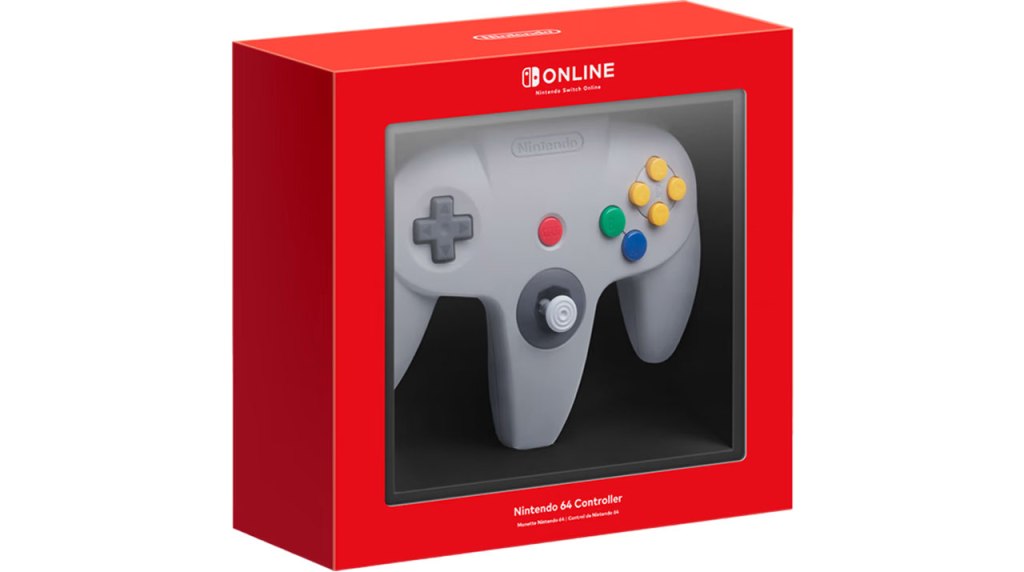
Nintendo 64 Controller
Hardware Type: Controller
.
Review:
As Nintendo has done for other console releases on their Nintendo Switch Online subscription service, they have made available for purchase a Nintendo 64 controller to pair with the Nintendo Switch Online Expansion Pack – Nintendo 64 – Nintendo Classics App and Nintendo Switch Online Expansion Pack – Nintendo 64 – Nintendo Classics: Mature 17+ App, available only to active subscribers to Nintendo Switch Online, with this controller priced at $55, and designed to mimic the look, feel, and use of the original Nintendo 64 controller.
Now let’s get something out of the way here – The Nintendo 64 controller is one of the most divisive controllers Nintendo ever produced. Some players love it and attach strong nostalgia value to it, while other players will list it high on their “worst controllers ever made” lists. This goes all the way back to the controller’s original release, where you had players snickering about the controller’s odd three-pronged shape (“You know, for players who have three hands”).
Joking aside, there’s no denying how revolutionary and influential the Nintendo 64 controller was. It wasn’t the first controller to feature an analog control stick, but it was the first to normalize them (beating out the Sega Saturn’s 3D Pad by one month in Japan, and used far more extensively on Nintendo’s console). Its rear slot enabled players to use individualized memory cards tied to their controller, an idea we would later see reused on Sega Dreamcast. And with the release of the Nintendo 64 Rumble Pack, Nintendo normalized the rumble feature on controllers. Many of these ideas were so influential that they became staples in controllers almost immediately – when Sony revised the PlayStation controller with the release of the DualShock a year later, it included both analog sticks (two in this case), and a built-in rumble feature, and nearly every subsequent major PlayStation and Xbox controller has continued to do so.
That said… yeah, the Nintendo 64 controller was weird, and bears the hallmarks of a transitional controller designed by people who didn’t have a clear picture of exactly what the medium would demand from controllers going forward. The three-pronged design is a major part of this. The idea was that it gave players more choices – you could use the right two prongs for analog controls in the new polygonal 3D games the Nintendo 64 would offer, or the left and right prongs for a more traditional 2D control scheme like the Super Nintendo had. Or potentially, you could use the left two prongs for a more complete control of movement in three-dimensional space… only this third control scheme was almost never used (To my recollection, I think the Japan-only game Sin and Punishment is the only game to do so). And later controllers would solve the problem of letting players choose between digital and analog inputs by just putting both the analog stick and a D-Pad within reach of the left thumb, no additional prong/handle needed.
Another problem here is one we would only come to fully understand in retrospect – the lack of a second analog stick. Nintendo instead used four yellow-colored C-buttons for camera control, though some games used these buttons for other things. Still, the lack of a second stick makes the Nintendo 64 controller and its games particularly painful to return to when playing genres like First-Person Shooters, which have come to be associated with dual-analog controls (well, unless you’re a PC player who swears by mouse/keyboard controls).
Additionally, the Nintendo 64 controller was far from ideal for playing older games. It lacked a “select” button as all prior Nintendo platforms had, and while it had more than enough face buttons to make up for the lack of the Super Nintendo’s X and Y buttons, their size and layout was far from ideal for standing in for those buttons. beyond this, the way you hold the controller with its three “prongs” was quite different from how you hold a typical Nintendo controller, and the relatively sharper edges on the top of those prongs are far from comfortable compared to modern Pro-style game controllers.
So… all of those, all those problems, and all the nostalgia that many have for this controller… they’re all present in the Nintendo 64 Controller for Nintendo Switch. So let’s look at how this compares, and what has and hasn’t changed.
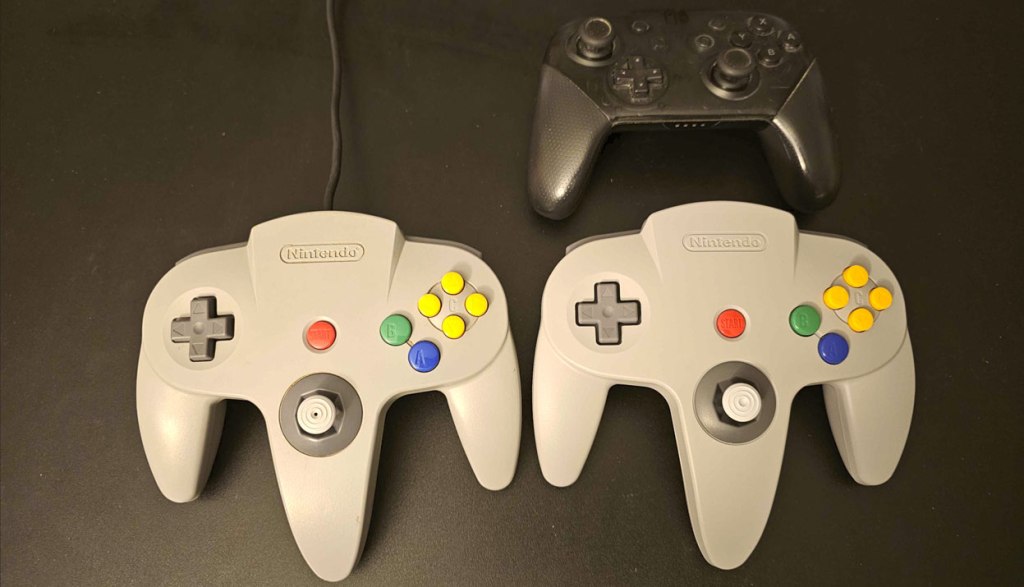
As you can see in the image, the Nintendo 64 Controller for Nintendo Switch (on the right), pretty much exactly mirrors the size, shape, and layout of the original Nintendo 64 controller (on the left). I should note that before we look at the other parts of the controller, there is one major change you’ll notice right away – it’s noticeably heavier than the original Nintendo 64 controller.
However, other parts of the controller feel pretty much identical – the D-Pad and buttons both feel good and have a nice mix of “clicky” and “squishy” that feels right for a classic Nintendo controller. The analog stick also feels much like the original Nintendo 64’s analog stick, again for better or worse. No idea if this will end up having the “white dust” problem the original analog stick will have – that’s the sort of thing you only notice over time.
To my hands, the Nintendo 64 controller just does not feel as comfortable as a modern pro-style controller. The grips are uncomfortable in my hands, the analog stick seems too prone to slip out from under my thumb, the button layout is not conducive to using more than two buttons together at a time or in quick succession… honestly, the only potential reasons I can see for going back to this design is either out of nostalgia, or perhaps because you feel like Nintendo 64 games will feel more natural using the original controller.
Let me address the latter of these reasons by saying… not really. Playing Super Mario 64 using the Nintendo 64 controller did make that game feel more like playing it in its original release, but it didn’t make playing the game feel better. For games with symmetrical shoulder button controls like Star Fox 64 (“Do a barrel roll!”), holding the right two prongs brings the game closer to feeling the way it should than the game’s default controls on a Pro-style gamepad do… but this is a moot point now that the Nintendo 64 app lets players freely remap controls, so you can change Star Fox’s controls to a more natural-feeling L and R. And First-Person Shooters like Goldeneye 007… yeah, those still feel really odd and unnatural to play on the Nintendo 64 Controller. Seriously, how did we ever think this was okay?
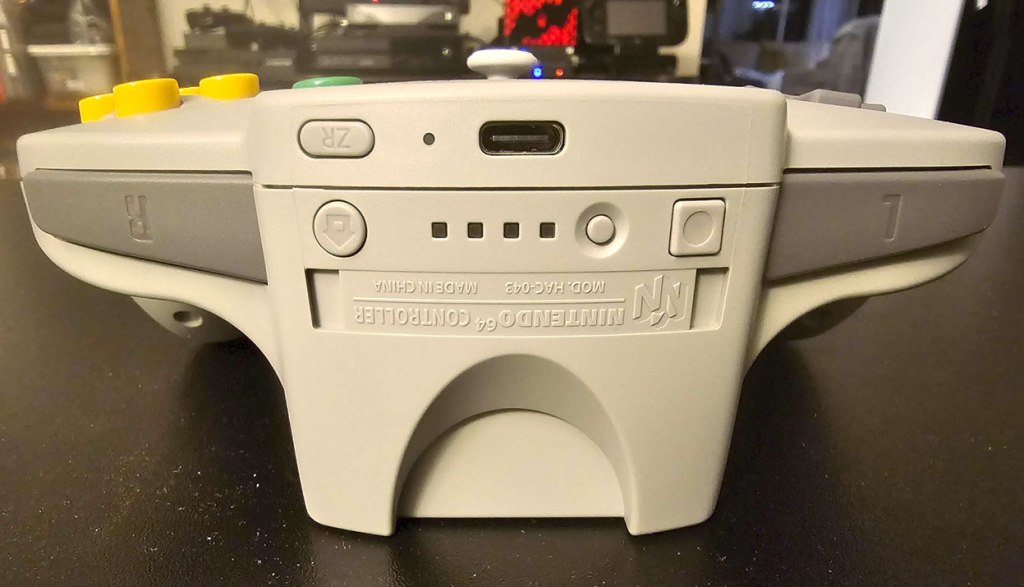
Looking at the top of the controller, we see some concessions that have been made to change the design to work on the Nintendo Switch. A tiny ZR button has been added (much like the GameCube Controller for Nintendo Switch 2) so players can access the Nintendo 64 apps’ menus. We also have home and screenshot buttons, a pairing button and light indicators and a USB-C charging port. Now let’s look at the bottom:
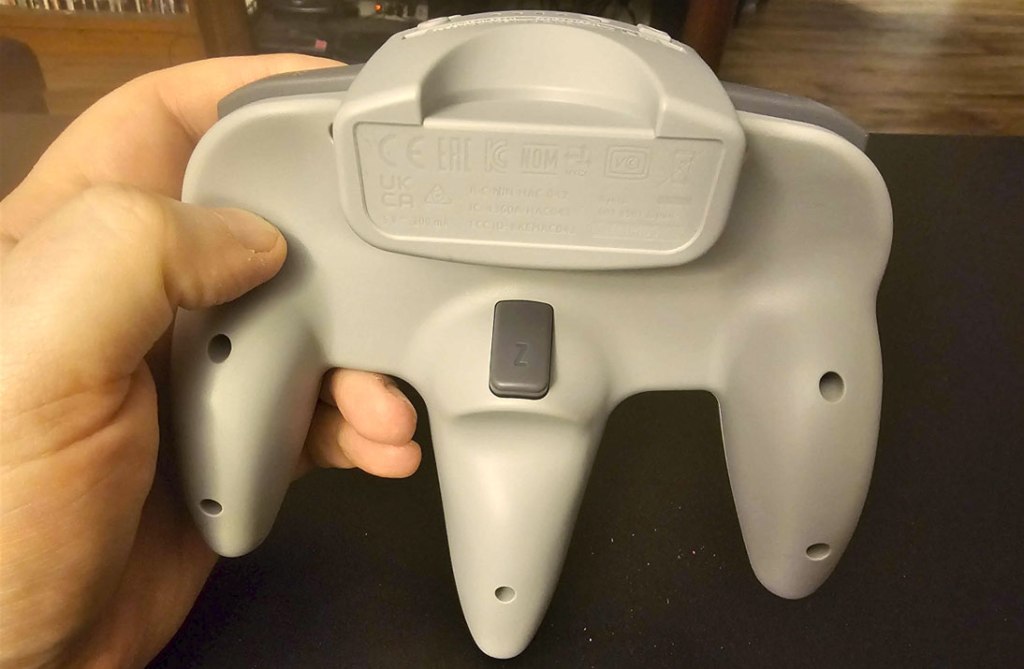
Here we see the Z button (which maps to the Nintendo Switch’s ZL button), much the same as it was in the original Nintendo 64 controller. We also see the controller’s expansion port has been filled in. Those with nostalgia for plugging in memory cards and rumble packs may be disappointed at this, but functionally we’re not losing much with this change, since this controller has built-in rumble and the Nintendo 64 apps handle game saves on their own.
However, now that we’ve covered the controller from every angle, we have to discuss what’s missing. There’s no select or minus button. There are no X or Y buttons (the yellow directional buttons simply map to D-Pad directions on the Nintendo Switch outside of the Nintendo 64 apps). Obviously there’s no second analog stick. And any games that rely heavily on the use of ZL and ZR will be difficult to play as one of these buttons is on the bottom of the controller, and the other is tiny and inconveniently located along the top edge. In other words, this is not a controller that was designed with any thought towards use outside of the Nintendo 64 apps.
Just to drive that message home, we also have no Amiibo support here, and no gyroscopic motion control. And that’s beyond that there are no added features you see from third-party controllers like macros, app support, or turbo functionality. Nothing like that here.
But I suppose on the other hand, you do get a Nintendo 64 controller icon when syncing this controller with your Nintendo Switch, and the Nintendo 64 apps make different Nintendo 64-themed noises when you navigate them using this controller. So that’s… something, I guess?
For what it’s worth, the Nintendo 64 Controller for Nintendo Switch is a well-crafted recreation of the original, and players nostalgic for the way Nintendo 64 games originally felt to play will likely find this to be a wonderful trip through memory lane. But outside of nostalgia and novelty, there’s not a lot going for the Nintendo 64 Controller, especially now that the Nintendo 64 apps allow button reassignment. I don’t think any Nintendo 64 games play better using this controller instead of a standard Pro-style controller, and this controller is missing far too many important features and buttons to still be selling for $55, especially when this is a terrible controller to use for games other than the Nintendo 64 apps.
As such, unless you’re really seriously nostalgic about the Nintendo 64 controller and don’t mind that it’s not likely to see use outside of the Nintendo 64 apps (and perhaps games like Super Mario 3D All-Stars), I would suggest avoiding this one and just using a standard gamepad for Nintendo 64 games. As important as the Nintendo 64 controller is to history, it’s not going to add much to your ability to play games on your current Nintendo console.
tl;dr – The Nintendo 64 Controller is a faithful recreation of the original Nintendo 64 controller, for better or worse. It looks and feels much the same as the original, with only a few added features for modern use. However, compared to modern controllers, it lacks a laundry list of absolutely staple features, and this design has not aged well at all. Unless you’re getting this purely for nostalgia or novelty reasons, you’re much better off getting a standard gamepad.
Grade: C-
You can support eShopperReviews on Patreon! Please click HERE to become a Sponsor!
This month’s sponsors are Jamie and His Cats, Ben, Ilya Zverev, Andy Miller, Johannes, Jaka, Jared Wark, Gabriel Coronad-Medina, Francis Obst, Kristoffer Wulff, and Seth Christenfeld. Thank you for helping to keep the reviews coming!
 eShopperReviews
Leave a comment