
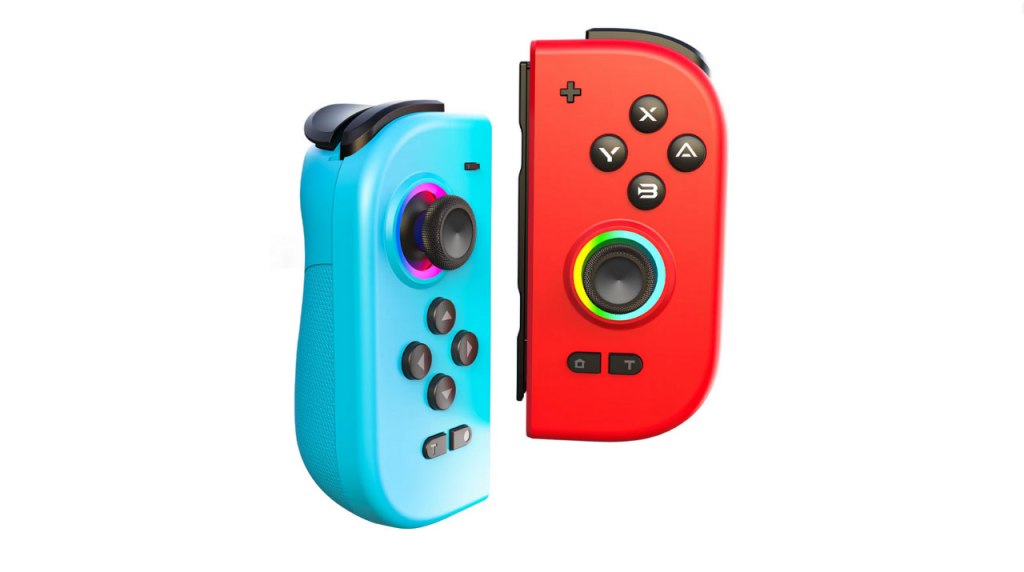
AceGamer DuoShadow Wireless Joy-Pad
Hardware Type: Controller
.
Review:
(Note: This product was received at no cost for review via the Amazon Vine program.)
One of the signature features of the Nintendo Switch are its Joy-Con controllers that can attach to the sides of the Nintendo Switch to use the system as a handheld, and then be detached from the system to play it like a normal gamepad by combining them using a Joy-Con Grip, or individually by holding them sideways. However, I think players generally agree that while this is a good idea in theory, in practice it leaves a lot to be desired – the Joy-Cons’ small size makes them uncomfortable in the hands, they’re expensive, and of course they infamously have that drift problem.
A few third-party manufacturers have tried their hands at making a better replacement for the Joy-Cons, ones that offer all or most of the features without all of the drawbacks. Among them is AceGamer, whose AceGamer Wireless Controller Pro was severely flawed, but everyone deserves a second chance, right? Well, with their DuoShadow, they’re taking aim at another type of controller.
However, it can’t be a good sign that between the time that I received this pair of controllers from Amazon and the time I sat down to review it, the DuoShadow is not just no longer available, but its page has been ripped from the website. The only place I can find that still has it available is AliExpress. Not encouraging at all…
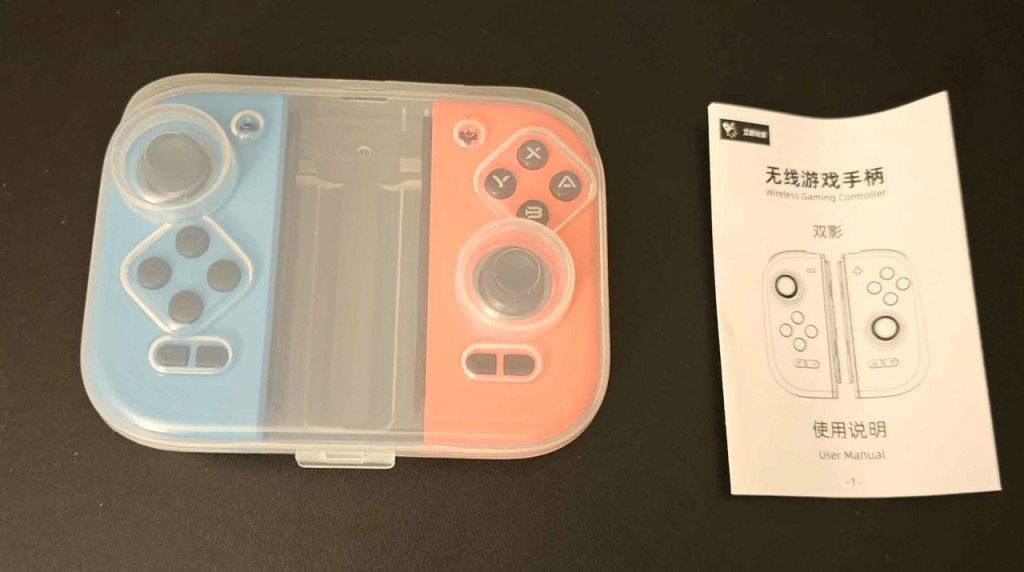
The DuoShadow comes as a pair – a left Joy-Con-style controller and a right Joy-Con-style Controller, with the only other things included in the package being an instruction manual and a plastic clamshell case. For those paying attention, this means that if you want to use this pair of Joy-Con replacements with a Nintendo Switch Lite or a Nintendo Switch 2, you need some sort of charging device, as there’s no way to power these controllers other than that or by sliding them onto the rails of a Nintendo Switch or Nintendo Switch OLED Model. Amusingly, when detected by a Nintendo Switch, the DuoShadow is recognized as blue and red Joy-Cons, just like Nintendo’s own Joy-Cons.
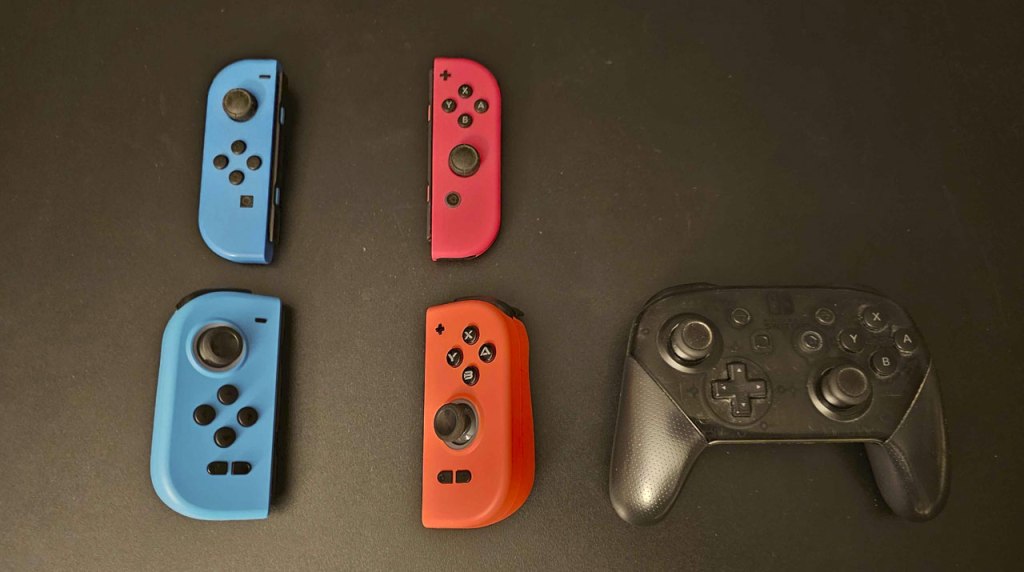
The DuoShadow’s individual Joy-Con controllers are much bigger than Nintendo’s Joy-Cons. They replicates the general shape and layout of Nintendo’s own Joy-Con controllers, with asymmetrical analog sticks with a concave top. The product page for the DuoShodow claims that these are hall effect analog sticks, which should prevent them from getting “drift”, and they seem to work fine.
Meanwhile, the standard face buttons and D-Pad in the usual places, and are pretty clicky on the “clicky”/”squishy” spectrum, and definitely noisier than I’d like. Unfortunately, I found these buttons often weren’t too responsive, and the down button on the D-Pad seemed particularly poor, often not detecting when I was pressing another button.
The backside of the grips are slightly textured, and the controllers are overall very comfortable to hold, both in the hands on their own and when attached to the Nintendo Switch. This isn’t the most comfortable grip feeling I’ve had with the Nintendo Switch, but it’s certainly better than Nintendo’s own Joy-Cons.
On the top of the controller, we have a pair of clicky L and R bumper buttons, as well as a pair of clicky digital ZL and ZR triggers. While this is less than ideal for controllers used on other platforms, it works fine for Nintendo Switch, which doesn’t recognize analog trigger inputs.
Getting back to the controller’s face, the plus and minus button are more or less in their usual spots, but the screenshot and home buttons have been moved to the bottom just underneath the D-Pad down button and the right analog stick.
There are also two turbo buttons on the face, one to either side of the screenshot and home buttons. This is potentially a rather clever way of doing this, since these two halves are designed to be able to be used as separate controllers, so each of them now has their own turbo button, which is nice. These turbo buttons operate in the usual way these sorts of buttons do.
However, there’s a problem here – these buttons are far too close to other parts of the controller, especially the ones near the D-Pad down on the left Joy-Con. This made for me accidentally hitting them multiple times, which messed up my gameplay. And it’s never a good sign when a feature on a controller makes me feel like it would be better if it was never there at all.
When it comes to the other standard features of Nintendo Switch controllers, these controllers include the ability to wirelessly wake the Nintendo Switch from sleep mode. The gyroscopic motion control works fine, too. And the HD Rumble feature has been replaced with an adjustable rumble here, which I see as a decent trade-off. Finally, there’s no Amiibo-scanning support here, though this is rare in third-party controllers so I don’t hold that against the Hyperion Pro. I suppose I should also mention the lack of the infrared port, though only a small handful of games ever used this anyway.
Flipping the controllers over to look at their underside, we have two macro buttons, one on each side, near the grips. Then moving back up, we have small buttons on either side for setting the macros.
Macros on this controller work in a very strange way. To set them, you need to hold down the macro setting button while you input a button or series of commands, with this programming said commands to the corresponding macro button. This is already awkward and frustrating, require you to coordinate holding and pressing buttons on both sides of the controller. However, it gets worse – when it comes to setting macros, each half of the Hyperion Pro only recognizes its own half. This means that if you want to set up a Street Fighter-style “hadouken” macro sequence, it’s impossible, because that sequence involves buttons on both halves of the controller. Because of this, it’s probably going to be better to just treat these macro buttons as just being alternate assignable buttons rather than macro buttons.
These controllers are compatible with the free KeyLinker app on Android, and the instructions seemed to indicate there may be a way to set macros for the controllers using that app, but here once again it seems to disappoint, as the two controllers are listed separately on the app, and macro setting seems limited.
Also, while the DuoShadow is technically compatible with the PC, this requires a USB receiver that is not included with each DuoShadow, and mine was one of the unfortunate ones that didn’t include it, so I’m out of luck there.
Also, since these can be used as individual Joy-Con controllers held sideways, I can say that in this respect they’re… okay. Their odd asymmetrical shape really wasn’t designed with this use in mind, but their larger size still makes them more comfortable to hold like this than standard Joy-Con controllers, though I wouldn’t exactly say they’re very comfortable.
I should also note that due to the larger shape and lacking infrared port, there are some games that these controllers will be incompatible with, or at the very least not fully compatible with, such as Ring Fit Adventure.
Finally, I have to talk about the price. AliExpress lists the DuoShadow at $105, which is absolutely ridiculous for what’s on offer here, and the currently-listed sale price of $41 isn’t all that much better when these controllers are broken in so many ways and lacking many common features.
So while I do think the AceGamer DuoShadow Wireless Joy-Pad controllers are more comfortable to hold than Nintendo’s Joy-Cons, in just about every other way they fail miserably to provide a worthwhile gameplay experience on Nintendo Switch. The buttons don’t work well, the macro settings are a disaster, the turbo and screenshot buttons are too close to the D-Pad buttons, and there are just too many missing features here compared to other controllers on the market. The result is a pair of Joy-Con replacements I honestly can’t recommend over the original Joy-Cons. You have better options for this.
tl;dr – The AceGamer DuoShadow is a pair of Joy-Con-style controllers. Overall these controllers feel nice in the hands, but they work poorly, have some design issues, lack common features, and are overpriced for what’s on offer. You have better alteratives than this.
Grade: D
You can support eShopperReviews on Patreon! Please click HERE to become a Sponsor!
This month’s sponsors are Jamie and His Cats, Ben, Ilya Zverev, Andy Miller, Johannes, Jaka, Jared Wark, Gabriel Coronad-Medina, Francis Obst, Kristoffer Wulff, and Seth Christenfeld. Thank you for helping to keep the reviews coming!
 eShopperReviews
Leave a comment