
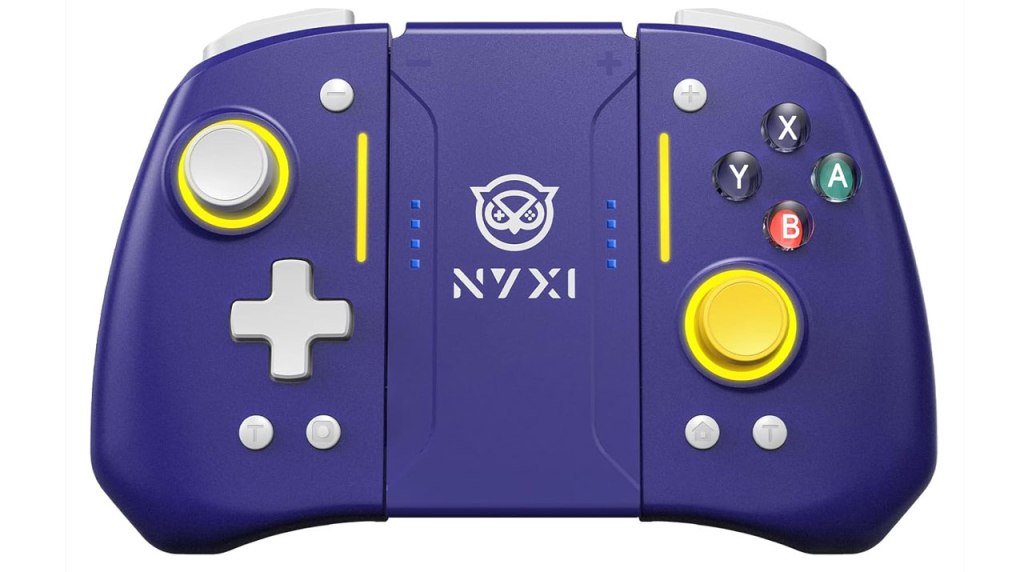
NYXI Hyperion Pro Wireless Controller
Hardware Type: Controller
.
Review:
One of the signature features of the Nintendo Switch are its Joy-Con controllers that can attach to the sides of the Nintendo Switch to use the system as a handheld, and then be detached from the system to play it like a normal gamepad by combining them using a Joy-Con Grip, or individually by holding them sideways. However, I think players generally agree that while this is a good idea in theory, in practice it leaves a lot to be desired – the Joy-Cons’ small size makes them uncomfortable in the hands, they’re expensive, and of course they infamously have that drift problem.
A few third-party manufacturers have tried their hands at making a better replacement for the Joy-Cons, ones that offer all or most of the features without all of the drawbacks. Among them is NYXI, whose NYXI Master P1 2.4G Wireless PC Controller remains one of my all-time favorite controllers for Nintendo Switch, and whose Hyperion Pro controller aims to bring the same quality play to a Joy-Con replacement.
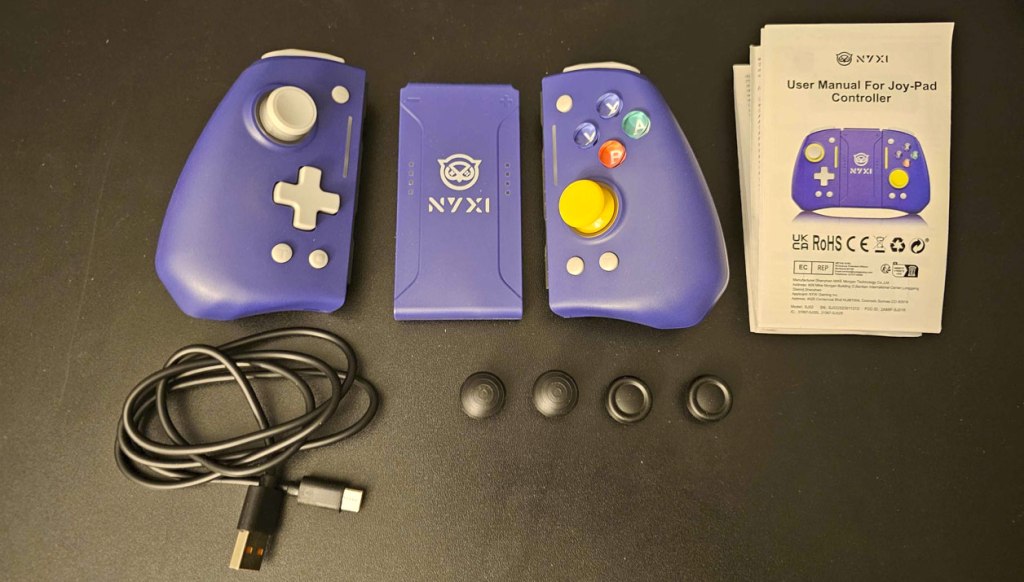
The Hyperion Pro, which comes in multiple color styles, comes with primarily three separate pieces – a left Joy-Con-style controller, a right Joy-Con-style Controller, and a grip piece connecting the two. The grip is interesting because the design of the controller kinda’ requires it to use the standard Nintendo Switch rail connection system, which means that the Hyperion Pro’s grip can be used with pretty much any standard Joy-Con. In that use, I suppose it works just fine, but with standard Joy-Cons it results in a bland-looking square shape that isn’t especially ergonomic. It works, and it’s a nice little extra, but this isn’t the main reason to get the Hyperion Pro.
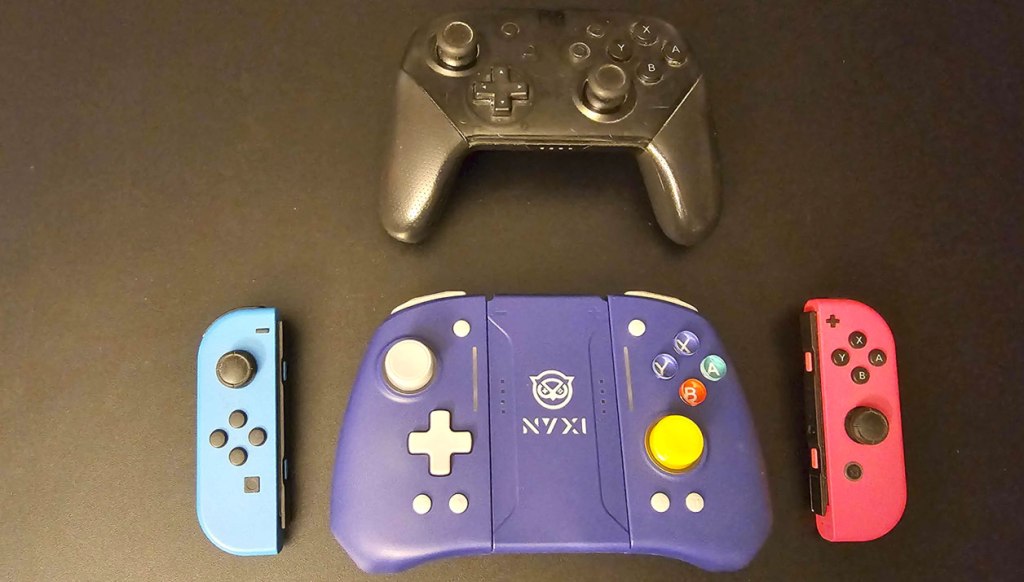
The Hyperion Pro’s individual Joy-Con controllers are much bigger than Nintendo’s Joy-Cons, and the trio of pieces combine together to make a combined unit that’s noticeably larger than a Nintendo Switch Pro Controller. That said, even when you combine all three pieces they’re surprisingly light, so you’re basically trading compact size for lighter weight.
If we look at this as a Pro-style controller, then like many of the Pro-style controllers released for Nintendo Switch, the Hyperion Pro replicates the general shape and layout of Nintendo’s own Nintendo Switch Pro Controller, with asymmetrical analog sticks with a concave top, The Hyperion Pro does come with two additional alternate analog stick types, but I couldn’t for the life of me figure out how to install them, and the instructions don’t seem to say anything about them.
In any case, the analog sticks work well (though they’re a tad on the loose side), and they’re hall effect sticks which means they should avoid issues with “drift”. Meanwhile, the standard face buttons and D-Pad in the usual places, and are pretty clicky on the “clicky”/”squishy” spectrum, but they seem responsive and work well, though they’re definitely noisier than I’d like.
The backside of the grips are slightly textured, and the controller is overall very comfortable to hold. The lack of weight does make the controller feel a bit cheap and flimsy, but despite this I found it nice to hold. It’s also a tad odd that the center grip piece is much slimmer than the rest of the Hyperion Pro, which makes it look odd from the back when connected, but it doesn’t really affect the performance or feel of the controller.
On the top of the controller, we have a pair of clicky L and R bumper buttons, as well as a pair of digital ZL and ZR triggers. While this would be less than ideal for controllers designed to work with other platforms, it works fine for Nintendo Switch, which doesn’t recognize analog trigger inputs.
Getting back to the controller’s face, the plus and minus button are more or less in their usual spots, but the screenshot and home buttons have been moved to the bottom-center, which takes some getting used to.
There are also two turbo buttons on the face, one to either side of the screenshot and home buttons. This is a rather clever way of doing this, since these two halves are designed to be able to be used as separate controllers, so each of them now has their own turbo button, which is nice. These turbo buttons operate in the usual way these sorts of buttons do, with the added convenience of “always on” turbo being toggle-able.
When it comes to the other standard features of Nintendo Switch controllers, these controllers include the ability to wirelessly wake the Nintendo Switch from sleep mode. The gyroscopic motion control works fine, too. And the HD Rumble feature has been replaced with an adjustable rumble here, which I see as a decent trade-off. Finally, there’s no Amiibo-scanning support here, though this is rare in third-party controllers so I don’t hold that against the Hyperion Pro. I suppose I should also mention the lack of the infrared port, though only a small handful of games ever used this anyway.
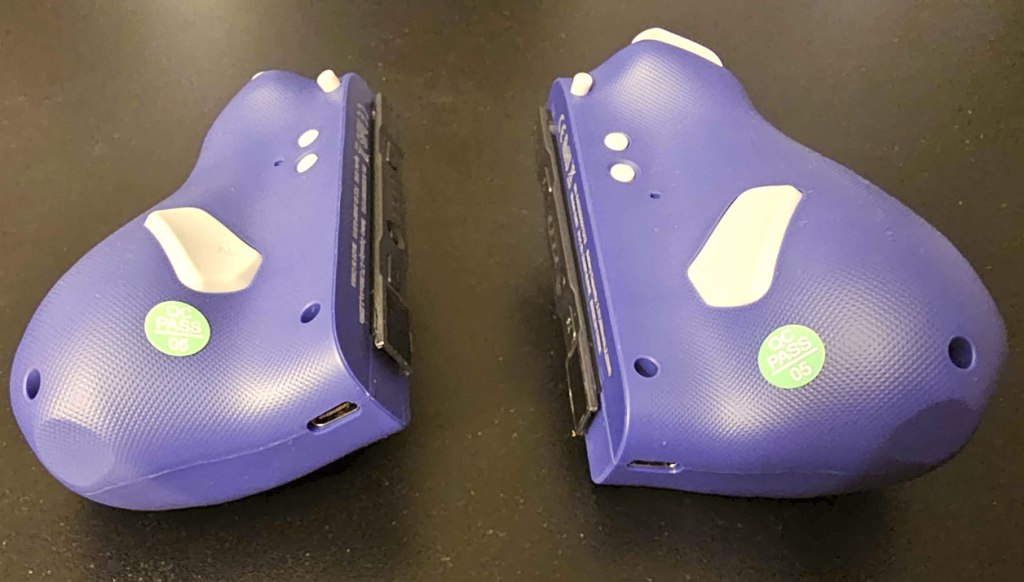
Flipping the controllers over to look at their underside, we have two macro buttons, one on each side, near the grips. Underneath them on the bottom edge, we see each controller has a USB-C port to charge them and/or sync them with a Nintendo Switch without using the rails if you choose (or if you have a Nintendo Switch Lite or Nintendo Switch 2, which don’t have rails). Then moving back up, we have small buttons on either side for adjusting the rumble and setting the macros.
Here’s where I need to start talking about some of the frustrating design choices the Hyperion Pro makes. Macros on this controller work in a very strange way. To set them, you need to hold down the macro setting button while you input a button or series of commands, with this programming said commands to the corresponding macro button. This is already awkward and frustrating, require you to coordinate holding and pressing buttons on both sides of the controller. However, it gets worse – when it comes to setting macros, each half of the Hyperion Pro only recognizes its own half. This means that if you want to set up a Street Fighter-style “hadouken” macro sequence, it’s impossible, because that sequence involves buttons on both halves of the controller. Because of this, it’s probably going to be better to just treat these macro buttons as just being alternate assignable buttons rather than macro buttons.
I should also mention that unlike many other third-party Nintendo Switch controllers, the Hyperion Pro isn’t designed to work as a controller for other platforms – this is specifically just for Nintendo Switch, though you can connect these controllers to a PC for firmware updates.
Also, since these can be used as individual Joy-Con controllers held sideways, I can say that in this respect they’re… okay. Their odd asymmetrical shape really wasn’t designed with this use in mind, but their larger size still makes them more comfortable to hold like this than standard Joy-Con controllers, though I wouldn’t exactly say they’re very comfortable.
I should also note that due to the larger shape and lacking infrared port, there are some games that these controllers will be incompatible with, or at the very least not fully compatible with, such as Ring Fit Adventure.
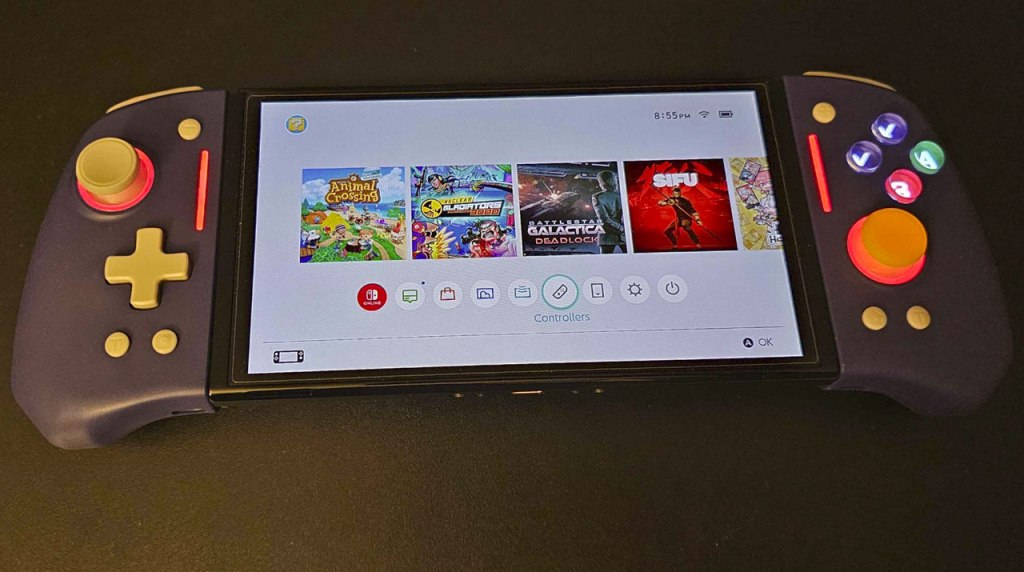
When sliding the two halves of the Hyperion Pro onto and off the Nintendo Switch, they feel a bit snug, but mostly work well enough. And because of their design, they’re dockable while in use… mostly. Because of how thick the grips on either side are, I found them to be running into the cables coming out of either side of the dock (power, HDMI, and USB/network cables on the right, USB cables on the left).
However, aside from this issue, the Hyperion Pro works great in place of standard Joy-Cons in handheld mode – they feel far more comfortable than Nintendo’s Joy-Cons, and their light weight means they’re not adding too much to the overall heft of the Nintendo Switch. Their increased size does bloat up the overall profile of the Nintendo Switch quite a bit, but it’s still an improvement over what Nintendo offered us, in my eyes.
However, the final question here is whether the Hyperion Pro is worth the price. As I write this, the controller is unavailable on Amazon, but you can still get it on NYXI’s website. It’s listed as normally being $94, but discounted to $55… but I’m not sure if that’s just as I write this or that’s some sort of sales tactic to make it look like a better bargain. In any case, I would say $94 is far too pricey given the issues I’ve named above, but $55 sounds somewhat more reasonable.
In the end, the NYXI Hyperion Pro gets a lot of things right and a lot of things wrong. Its core design is solid – it feels great, it plays well, and is absolutely more comfortable than Nintendo’s Joy-Con controllers without losing much functionality (the only major thing being Amiibo scanning). On the other hand, it’s a bit too snug when docked, the macro buttons don’t work well, and it lacks functionality you find in a lot of other third-party controllers that sell for a much lower price point. On balance, I think the NYXI Hyperion Pro is a solid improvement on Nintendo’s Joy-Cons, but be aware that it’s far from perfect.
tl;dr – The NYXI Hyperion Pro is a pair of Joy-Con-style controllers and a grip to join them making something akin to a Pro-style controller. Overall this works well, and is far more comfortable than Nintendo’s Joy-Cons. However, it’s a bit clunky and overly-snug when docked, added functions like macros work poorly, and other common features of controllers that sell at a lower price aren’t present here. On balance, this is still an improvement over standard Joy-Cons, but it’s not without its drawbacks.
Grade: B+
You can support eShopperReviews on Patreon! Please click HERE to become a Sponsor!
This month’s sponsors are Jamie and His Cats, Ben, Ilya Zverev, Andy Miller, Johannes, Jaka, Jared Wark, Gabriel Coronad-Medina, Francis Obst, Kristoffer Wulff, and Seth Christenfeld. Thank you for helping to keep the reviews coming!
 eShopperReviews
Leave a comment