
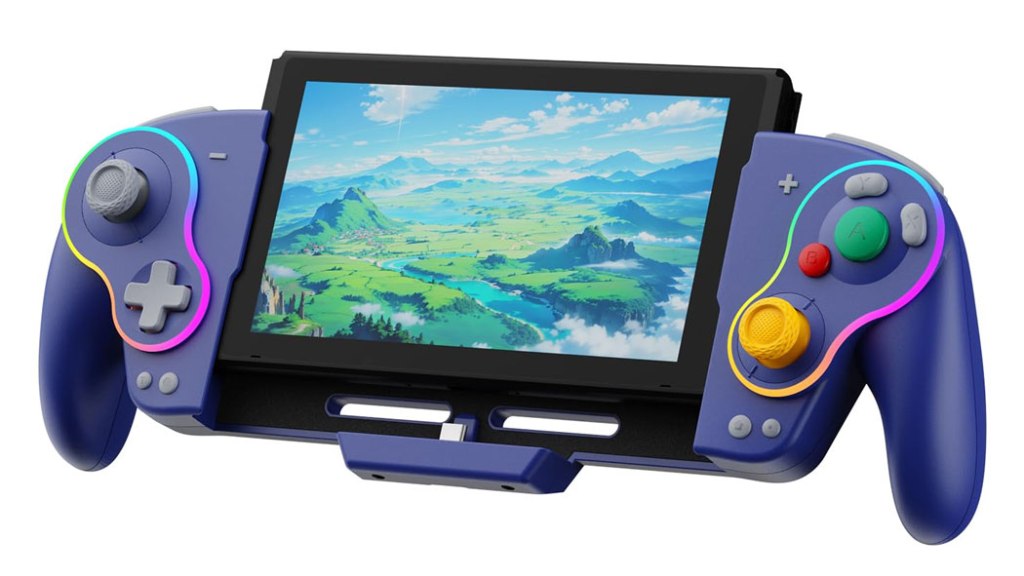
DongBlitz Switch Joycon Controller
Hardware Type: Grip
.
Review:
(Note: While sold under the name DongBlitz, this controller is branded with the name LinYuvo.)
There’s a fascination with the GameCube controller I admit I never quite understood. While I agree it’s comfortable to hold and visually-appealing, I’ve always felt that the odd button size and placement makes it ill-suited to most games. However, the controller seems to have garnered a sizeable fanbase, and of course many professional Super Smash Bros. players often swear by it, so I suppose to each their own.
While I’ve reviewed a few different kinds of GameCube controllers, the DongBlitz Switch Joycon Controller will mark the first time I’ve gotten my hands on a grip-style device designed to imitate the GameCube controller. My personal feelings aside, let’s have a look and see how it stacks up.
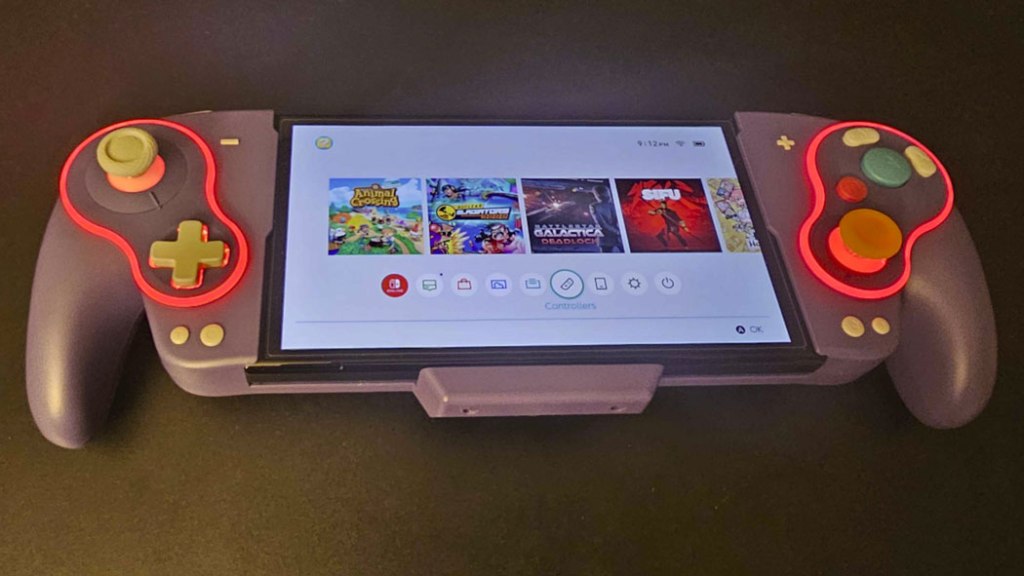
DongBlitz’s grip is something of an amalgamation between the GameCube controller and a more typical modern Pro-style controller. It mirrors the odd button layout of the GameCube controller, and includes the GameCube-style hand grips on either side (that are lightly-textured and indeed quite comfortable to hold here), but many of the other features are more modern in their sensibilities.
The controller features asymmetrical analog sticks that are hall effect sticks, meaning they should avoid issues with “drift”. I should note that this grip comes with multiple analog sticks you can swap these out with to find your ideal stick shape, and what’s more there are also different analog stick covers, so you can use a more modern free-moving cover, or an angular 8-direction cover that’s better for ensuring the analog stick is pointing in cardinal directions. Curiously, despite multiple extra analog stick types, none of them are the odd cylindrical “nub” the original GameCube controller used, which runs in the face of this controller’s seeming dedication to replicating that controller design’s unique features.
Both the D-Pad on the left and face buttons on the right are very clicky, and I personally didn’t care for them – they just didn’t seem to have the responsiveness I look for in a controller. And as with the GameCube gamepad, you have a massive green A button in the center of the right side, orbited by a much smaller B button and odd bean-shaped Y and X buttons.
The plus and minus buttons are more or less where they are on most Nintendo Switch controllers, but the home and screenshot buttons have been moved down to beneath the D-Pad and left analog stick. Next to them are a turbo button (which works in the typical way this sort of button works), and a button to change the controller’s lighting color.
Meanwhile, up at the top of the controller, you have extra-wide L, R, ZL, and ZR buttons, all of them digital buttons, which makes sense as the Nintendo Switch cannot detect analog trigger inputs. Still, it’s one more thing that differentiates this controller from the GameCube controller, which had some really unique analog triggers.
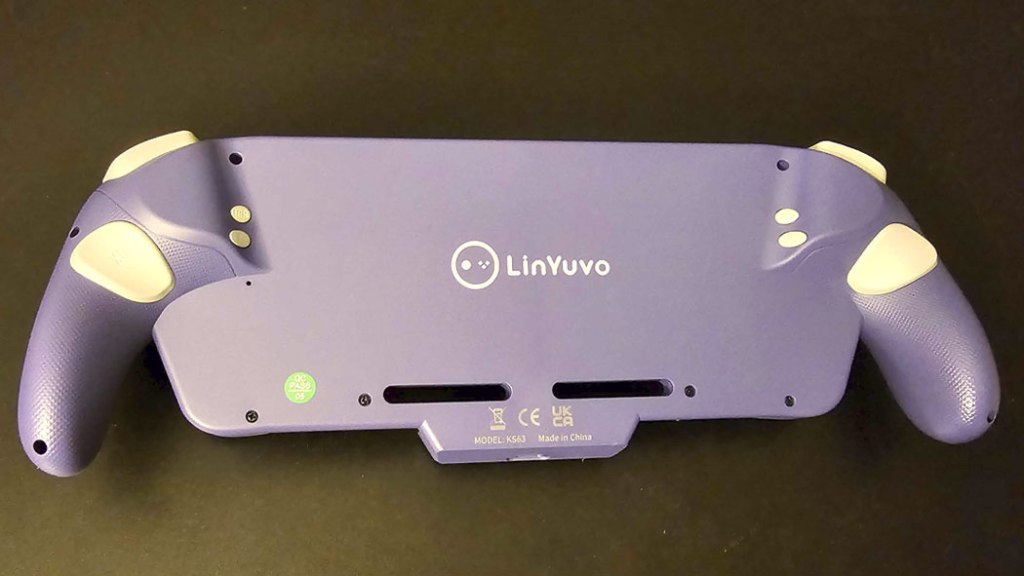
Turning the grip around to look at its backside, we see a large pair of macro buttons, and farther above and inward we see much smaller macro programming buttons and vibration adjustment buttons.
the macro buttons let players assign a button sequence to a single button (like a Street Fighter “hadouken”, and while this works, it doesn’t work very well. The macro buttons are small and hard to reach, and the controller isn’t clear about when it’s recording inputs and when it’s done recording. I had to make multiple attempts just to get the thing to recognize a simple series of inputs.
All of this is on top of the stuff that isn’t present here. This is just a grip, and won’t act as a controller independently, meaning that a Nintendo Switch (original model or OLED model) must be plugged in for it to do anything. Without this, it’s unpowered, and forgets all the macro inputs and other settings you entered in. What’s more, for some reason it takes a while for the Nintendo Switch to recognize the grip, even when the console is fully slid into the grip.
The grip does have a base to stand on if you want to play it in tabletop mode, and it has a passthrough USB-C port for charging, but it’s too thick to be docked, so if you want to play it on a TV you need to slide it out of the grip to do so.
Overall, I’m left with the question of who exactly this grip is for. Players wanting a replica of a GameCube controller in grip form will find themselves disappointed by the lack of the appropriate style on right analog stick to mimic the GameCube controller, as well as the lack of analog triggers (though this latter issue probably can’t be helped). Players just looking for a standard controller will be perplexed by the odd button layout. And everyone will be frustrated with the difficult-to-use macro buttons and the lack of the ability to dock. I wouldn’t call this a bad grip, and in fact it has some really nice features like the swappable analog sticks. But overall, it’s hard for me to give this one a recommendation.
tl;dr – The DongBlitz Switch Joycon Controller is a grip for the console clearly styled after the GameCube controller, and while it has some nice features like swappable analog sticks, there are other frustrations here, like cumbersome macro buttons that are difficult to set up, a lack of the ability to dock the Nintendo Switch while it’s in the grip, and this is on top of the fact that I don’t think this will fully satisfy GameCube controller fans or fans of typical controllers. I don’t think this is a bad grip, but it’s one that I would have difficulty giving a recommendation.
Grade: C
You can support eShopperReviews on Patreon! Please click HERE to become a Sponsor!
This month’s sponsors are Jamie and His Cats, Ben, Ilya Zverev, Andy Miller, Johannes, Jaka, Jared Wark, Gabriel Coronad-Medina, Francis Obst, Kristoffer Wulff, and Seth Christenfeld. Thank you for helping to keep the reviews coming!
 eShopperReviews
Leave a comment