
nPaint
Genre: Art Application
Players: 1
.
Review:
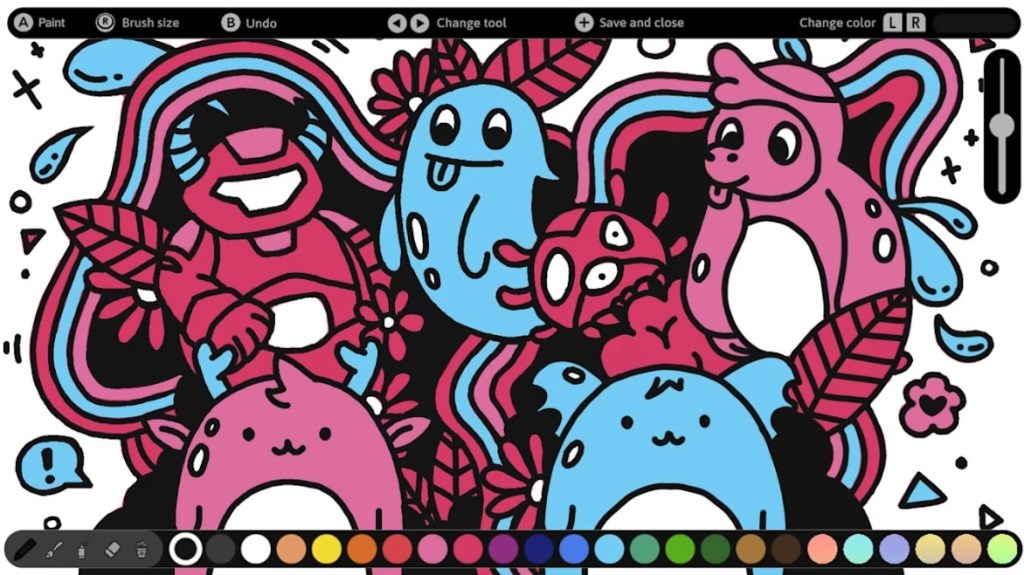
nPaint is an Art Application released on Nintendo Switch in 2023, where players can use an on-screen cursor or the touchscreen to create drawings.
As often tends to be the case with art games like this, there’s not much to say about the presentation. There aren’t any included graphics, there’s no music, and the sound is minimal – nothing to imitate the sound of a pencil or brush, only a few menu noises.
As such, let’s talk about features and content. And… there’s not much. While creating art, you can choose one of three brush types, an eraser, undo the last action, or wipe clean the entire image, along with the ability to change the color or brush size. There’s no way to fill an enclosed section, zoom, see a grid to use as a guideline, create straight lines or shapes, copy-paste, redo button, or many other common Art Application features. The color palette consists of 18 colors plus 6 shifting “rainbow” colors that change as you’re using them, but there’s no way to edit or make your own custom colors – what the game gives you is what you’re stuck with.
Those disappointed with the lack of options when creating art probably won’t be surprised to find a lack of options in the application itself. No way to copy a completed work, no way to transfer it to your PC aside from taking a screenshot and using Nintendo Switch’s cumbersome methods for getting screenshots off the platform. When it comes to features, nPaint is pretty bare bones.
And yet, with this being a RedDeer.Games release, this Application has been split into multiple free DLC modules so the publisher can justify releasing numerous versions to clog up the eShop. However, since it’s so lacking in content, they did this in the most pathetic, blatant way possible – they parceled out the save slots into free DLC expansions, with different bundles just including one or more of those save slots. Really, really pathetic. In any case, just know that if you decide to get nPaint, it doesn’t matter which version you get – all will work exactly the same after you download all the additional free DLC.
To put nPaint’s failure into context, we can look at other art applications on Nintendo Switch and see how they compare. The cream of the crop is Colors Live, which costs a bit more than nPaint, but has an absolute wealth of creation tools, supports a custom-made stylus pen that you can get bundled or purchase separately, and even has online contests within the software to test your drawings against others. At the other end of the spectrum, Coloring Book doesn’t have a huge selection of features, but it’s free and lets players use 89 different colors, and includes simple drawings you can fill in (though it has a blank page too).
With such better options on Nintendo Switch, why even bother with nPaint? And at $30, it’s an outright insult… although of course we all know by now that’s just a sleazy tactic to make it seem like a good deal when it’s inevitably discounted to $2 for a sale, just like releasing a dozen identical copies of the game is a sleazy tactic to make this appear as frequently as possible in the Nintendo Switch eShop. Do yourself a favor and ensure that this game doesn’t appear at all in your shopping cart.
tl;dr – nPaint is an Art Application that’s woefully lacking in features, and uses some pretty sleazy tactics to try to get you to buy it anyway. There are multiple better Art Applications on Nintendo Switch, buy one of those instead.
Grade: D
You can support eShopperReviews on Patreon! Please click HERE to become a Sponsor!
This month’s sponsors are Ben, Ilya Zverev, Andy Miller, Homer Simpin, Johannes, Francis Obst, Gabriel Coronado-Medina, Jared Wark, Kristoffer Wulff, and Seth Christenfeld. Thank you for helping to keep the reviews coming!


 eShopperReviews
Leave a reply to eShopperReviews Cancel reply