
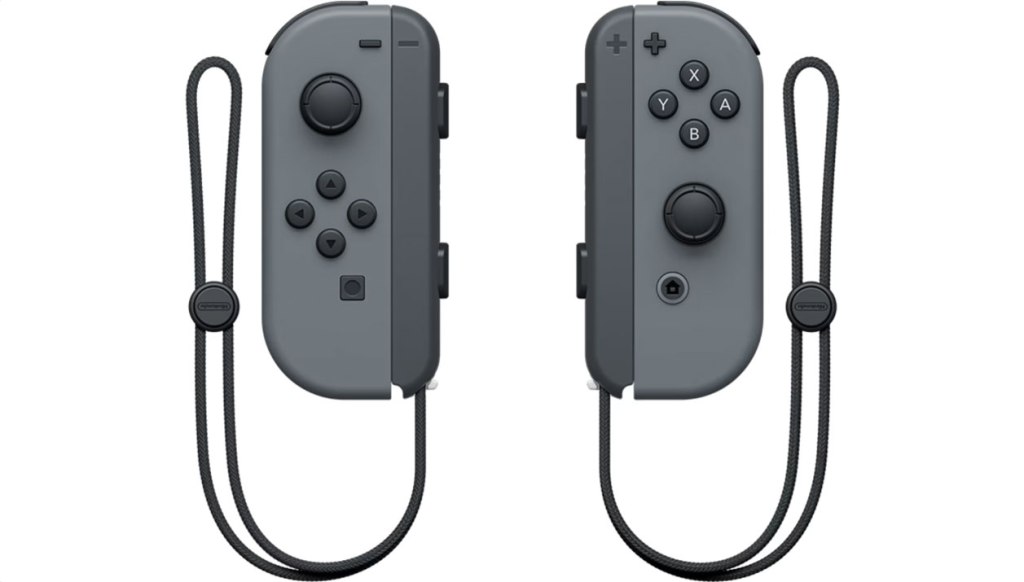
Nintendo Joy-Con Controllers (L/R)
Hardware Type: Controller
.
Review:
With the Nintendo Switch 2 releasing soon, I thought it would be a good idea to go back and review a few of the basic pieces of hardware associated with the original Nintendo Switch, eight years after the console first launched. How have they held up?
Perhaps the most iconic piece of hardware associated with the Nintendo Switch has been the Joy-Con controller, which are not just the most commonly-used controller for the Nintendo Switch, but they’re arguably a part of the hybrid console itself. Every Nintendo Switch comes with a pair packaged with the system, and they’re typically connected to either side of the Nintendo Switch, sliding on to the Nintendo Switch via a pair of rails connected to the side of the console, connecting to the top (or side, depending on how you view it) of the Joy-Con handhelds.
It’s hard not to see the Joy-Cons as an ingenious concept – connected to the Nintendo Switch, they enable it to act as a traditional Nintendo handheld. But they can also be detached and used together with each other or slid into a Joy-Con Grip to be used in the style of a standard Pro-style controller, or they can be held like a Wii remote and nunchuk for gyroscopic motion-sensing in games designed to use this feature, or each Joy-Con can act on its own, as its own separate controller held sideways like a Nintendo Entertainment System controller. Much like the Nintendo Switch itself, the Joy-Con controllers aim to be the epitome of versatility.
At least… in theory. In practice, it didn’t quite work out that way.
Since I have the benefit of hindsight in writing this review, I’ll start with the big, glaring elephant in the room: Joy-Con drift. While Joy-Cons and Nintendo’s Pro Controller are both susceptible to this problem, it’s the Joy-Cons that have been the biggest poster child for this issue, sometimes cropping up years after getting them, and in some cases even within months of using them. This problem causes the analog sticks to detect movement or directional input when none is being used, or to exaggerate input in one direction. This is part of the reason why hall effect analog sticks have become so popular in third-party Nintendo Switch controllers, and why the absence of hall effect sticks in Nintendo Switch 2’s Joy-Con 2 controllers is so worrisome.
Each of the two Joy-Con controllers has one of these analog sticks, which has a convex top (not my personal preference). When used as a pair, the left Joy-Con has a left analog stick, and the right Joy-Con has a right analog stick, and when turned sideways and used as individual controllers, each analog stick acts as a directional input for that Joy-Con.
This is less than ideal, for multiple reasons. Firstly, using solo Joy-Cons in this fashion means you won’t be able to use a D-Pad, which can be frustrating in games where you really need the precision a D-Pad offers. But additionally, because the Joy-Cons are asymmetrical, it means that the location of the analog sticks and face buttons in each is offset in a way that’s uncomfortable – too far to the left in the left Joy-Con, and too far to the right in the right Joy-Con. What’s more, the relatively small size of these individual Joy-Con compared to a more traditional controller makes them tiny and uncomfortable in the hands.
This also necessitates that neither Joy-Con has a D-Pad even when being used together – the left Joy-Con has a set of four separate buttons that can be used in place of a D-Pad when used in concert with the right Joy-Con, but it is, once again, far from ideal. These buttons do at least have a good feel to them, being roughly halfway between “squishy” and “clicky”.
Each Joy-Con has half of a pairing of shoulder buttons and trigger buttons. The shoulder buttons feel nice, and are clicky in a way that works well for this style of buttons. meanwhile, the trigger buttons are fully digital, which works well for some games but not others – most notably, Racing games would have really benefitted from analog triggers. It’s hard to say whether to blame the controller for this or the Nintendo Switch itself though, since the Nintendo Switch cannot recognize analog triggers (save for very specific circumstances, such as when using a GameCube controller connected via a USB GameCube controller adapter).
Each Joy-Con does have another set of shoulder buttons when used individually, the SL and SR buttons, placed on the edge of the controller that slides into the Nintendo Switch. These buttons… well, they’re functional, but that’s about the best compliment I can give them, because beyond basic functionality they are absolutely terrible. Tiny and difficult to use, and the shape of the edge of the Joy-Con makes them uncomfortable to wrap your fingers around. This in addition to the asymmetrical design, tiny size, and lack of a D-Pad are among the reasons that I would not recommend anyone to use Joy-Con controllers in this way unless they absolutely have to, either because a game requires them to, or because they cannot afford to buy a standard Pro-style controller.
Ah, but I’m not done talking about how terrible these controllers are when you attempt to use them individually, because now we need to talk about the secondary face buttons. Each Joy-Con has either a minus button (left Joy-Con) or a plus button (right Joy-Con), which compare to the traditional Nintendo “select” and “start” buttons. This placement isn’t bad, but the fact that each controller only has half of these paired functions leaves both incomplete. This same issue is also present with the screenshot (left Joy-Con) and home button (right Joy-Con), meaning that only one of the pair can access the important home button, and anyone holding the other may find themselves accidentally taking a screenshot when they instinctively try to use it.
There is one more feature exclusive to one Joy-Con and not the other, and that is the infrared sensor, located on the bottom of the right Joy-Con (or the left side, if held as a single controller). This may well be the least-used feature on the Nintendo Switch, with only a small handful of games making use of it. Ring Fit Adventure uses this sensor to measure your heart rate by placing a thumb over it, the Nintendo LABO games use this mainly to sense reflective tape placed in the cardboard constructions you build and house Joy-Con controllers within, and niche games like Night Vision use this as an actual night vision camera… albeit a very poor, low-quality, low-framerate camera. Suffice it to say, while this is an interesting feature, it is so seldom-used that it’s not really a selling point of the Joy-Con controllers.
The Joy-Con controllers also have motion controls built into each, including a gyroscope and accelerometer. These have been put to various uses, including in some games that really need the Joy-Con controllers to play, with uses ranging from pointer controls to imitating the motion of your hand swing in games, to odd uses in games like WarioWare: Move It!, including one “microgame” that requires you to drop the Joy-Con and have it catch on your wrists using attached Joy-Con straps.
Unfortunately, the Joy-Con controllers’ motion-control simply isn’t up to the quality we’ve come to expect from the Nintendo Wii remotes, and especially the Wii Remote Plus. This may be partly due to the reduced size and less natural way it feels to hold these in the “remote” style, but I would wager that the biggest culprit is the lack of the Wii’s sensor bar for the controller to track in real space, meaning that the controller can only guess its general location and orientation using the gyroscope and accelerometer. This means that games using pointer controls are laggy and often need to be frequently recalibrated as they drift away from where you’re actually pointing.
Each of the Joy-Con controllers also makes use of an enhanced rumble called HD Rumble, though… well, you’ll be hard-pressed to tell the difference between this and traditional rumble in most games. Probably the best use of this feature was in 1-2 Switch and the Nintendo LABO series of games, though again I think it’s fair to say that this feature ended up being somewhat niche, in that most players playing most games likely wouldn’t have noticed if the HD rumble was replaced with a standard rumble.
Beyond this, there are a lot of other features you see in third-party controllers that aren’t present in the Joy-Con controllers, such as turbo, macro buttons, and app support. However, there is one feature they’re capable of that I only recently learned about – Joy-Cons can be synced up with other platforms, such as Android mobile devices. The process to do so is pretty simple and straightforward too, just scanning for them like any Bluetooth controller. I would be surprised that Nintendo never mentions this feature, except that Nintendo doesn’t like to mention other game platforms that aren’t made by Nintendo themselves.
I should also take a moment to talk about the Joy-Con rails, which work, but are less than ideal. They can be damaged a bit too easily, they can feel a bit rickety at times. Like so many other elements of the Joy-Cons, they function, but not especially well. And if you’re absent-minded or have young kids who aren’t careful, you may well know the pain of dealing with a Joy-Con that’s been slipped onto the wrong rail. I should also mention the release button on the backside of the Joy-Con is tiny, inconvenient, and at times just a pain to press in a way that releases the Joy-Con.
Finally, let’s take a moment to talk about the Joy-Con straps. A pair of these comes with every set of Joy-Cons, though they can also be purchased separately. These slide over the Joy-Con rails and have an attached strap you can loop around your wrist. They have built-in button extenders for the SL and SR buttons, though I think these feel so loose that they’re not very practical. Personally, I only ever found two games where these straps felt necessary – Nintendo Switch Sports, the only Nintendo Switch game I’ve encountered that really has you flinging your hands around wildly enough that you might accidentally throw your Joy-Cons (something I actually did… while livestreaming, no less), and the aforementioned WarioWare: Move It!, thanks to the microgame I mentioned that has you dropping the Joy-Cons. Other than these two specific games, I always found these straps to be completely superfluous.
So, after eight years of use, what do I think of the Nintendo Joy-Con controllers? I think that they are a marvelous, incredible idea with a world of potential and theoretically massive versatility… that are let down in virtually every area by poor execution. In theory it’s amazing to have a pair of controllers that can split apart from the system, or be joined into one controller, but in practice individual Joy-Cons are extremely poorly suited to play in any sort of practical or comfortable way. Working in motion controls to continue the legacy of the Wii was a good idea… but the motion controls here simply aren’t as good as the Wii’s motion controls. And then there’s that infamous Joy-Con drift that will forever be seen as one of the worst problems on the Nintendo Switch.
Because of all of these problems, I cannot call the Joy-Cons a success, even if I do think they were a good idea. I can only hope that we see this good idea executed better in the Joy-Con 2 controllers on Nintendo Switch 2.
tl;dr – The Joy-Con controllers are an iconic part of the Nintendo Switch itself, and represent an immensely creative and ambitious idea to create a controller as versatile as the Nintendo Switch itself. Unfortunately, the execution is pretty bad in numerous ways, and while these controllers are still mostly functional, I think most players are better off leaving them attached to the Nintendo Switch and using a separate Pro-style controller when not playing the Nintendo Switch in portable mode.
Grade: C-
You can support eShopperReviews on Patreon! Please click HERE to become a Sponsor!
This month’s sponsors are Jamie and His Cats, Ben, Ilya Zverev, Andy Miller, Homer Simpin, Johannes, Francis Obst, Gabriel Coronado-Medina, Jared Wark, Kristoffer Wulff, and Seth Christenfeld. Thank you for helping to keep the reviews coming!

 eShopperReviews
Leave a reply to Jared Cancel reply