
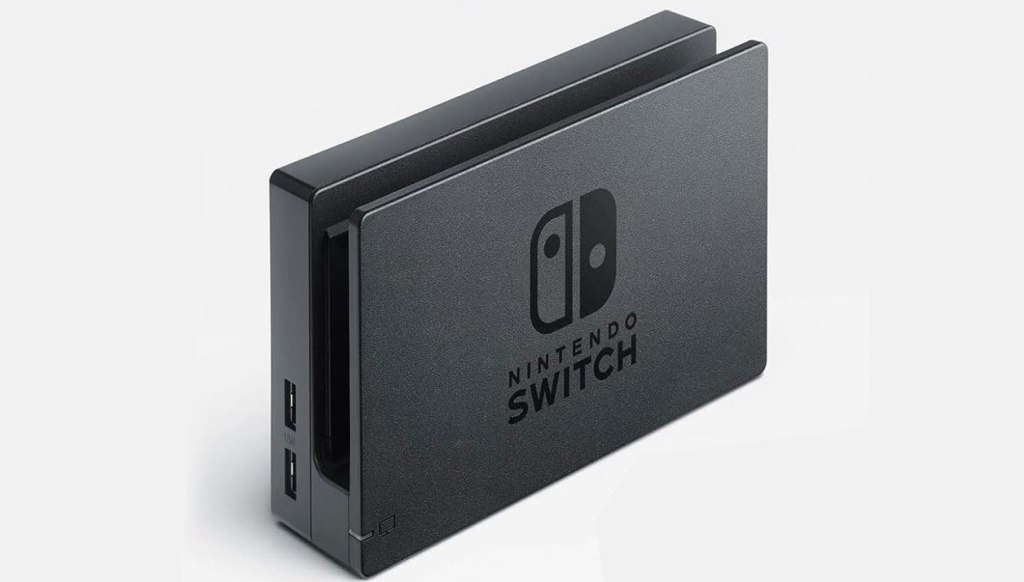
Nintendo Switch Dock
Hardware Type: Dock
.
Review:
With the Nintendo Switch 2 releasing soon, I thought it would be a good idea to go back and review a few of the basic pieces of hardware associated with the original Nintendo Switch, eight years after the console first launched. How have they held up?
Nintendo’s own Switch Dock, launched alongside the Nintendo Switch in 2017 and included with every standard model of Nintendo Switch sold, is a piece of hardware that’s easy to take for granted once you’ve become accustomed to it, even though it is directly related to the Nintendo Switch’s signature feature, the ability for the Nintendo Switch to “dock” and change from being a handheld system to being a game console connected to your TV. And it does this so elegantly that once you’ve become used to it, it feels like second-nature – slide the Nintendo Switch in, and you’re all set to play on your TV, and then when you want to take your Nintendo Switch on the go, slip it out again. Easy-peasy.
I don’t claim to be a hardware expert, so I can’t get into the tech of how the dock works, but the short version seems to be that by connecting the Nintendo Switch to a reliable power source and a TV screen capable of more detailed visuals than the screen built into the Nintendo Switch, the Nintendo Switch becomes better able to output visuals at higher resolution. This varies from game to game, and not every game will look better on your TV, but most will.
The standard Nintendo Switch dock has, in addition to a slot for the Nintendo Switch itself, two external USB ports, as well as a hinged slide flap that opens to reveal one additional USB port, as well as a USB-C port for a power adapter, and an HDMI port to bring the video and audio from the Nintendo Switch to your TV or monitor. On the docks that come with an OLED model Nintendo Switch, this internal USB port is replaced with an ethernet port.
The Nintendo Switch dock is great when you’re using the one that came with your Nintendo Switch, and when you don’t have issues with it, but the problem becomes when one of those two things isn’t the case.
First and foremost, it needs to be mentioned that the Nintendo Switch Dock will not work with the Nintendo Switch Lite, though this isn’t the fault of the dock itself, as the Switch Lite is designed to not be capable of connecting to a TV. Other than this, you can use either the original model Nintendo Switch or the OLED Nintendo Switch with either model of Nintendo Switch dock.
Before moving on to comparisons, we need to discuss some issues that early Nintendo Switch owners had with their docks. Some users found that the Nintendo Switch dock would scratch their Nintendo Switch’s screen. I haven’t had this issue myself, so I cannot comment on it firsthand, and thankfully reports of these issues seem to have died down after the first year or two.
Another issue is not one with Nintendo’s dock itself, but one that some players encountered with third-party docks, where using the dock would “brick” their Nintendo Switch, breaking it and making it unusable. This appears to be due to the specific power output of the Nintendo Switch’s AC adapter, and third-party adapters were putting out the wrong amount or type of power (again, I’m no tech guy). While this wasn’t an issue that affected owners of Nintendo’s dock, it’s hard not to wonder if Nintendo knew that this could be an issue with third-party docks, possibly even designing it this way with this in mind, because the result was that early on in the Nintendo Switch’s lifespan, users learned to be extremely wary of third-party Nintendo Switch docks, and even to this day many third-party docks are sold without power adapters, recommending that you use Nintendo’s AC adapter with their dock.
Of course, now we have plenty of third-party alternatives to the Nintendo Switch dock, and it brings into perspective some of the other issues that Nintendo’s dock has, because we see how others have done this better.
For one thing, despite the Nintendo Switch being marketed as a portable platform, the dock itself is not very portable. It is roughly two or three times the size of the Nintendo Switch itself, minus the Joy-Con controllers, and while you certainly can bring it with you, other docks have been released that reduce its functions down to the size of a cable adapter, like the Genki Covert Dock Mini and the Gmeaou Switch Dock. Others, like the Acasis Capture Card & Docking Station 2-in-1, add other features, such as the ability to use the device not only with Nintendo Switch, but with laptops and Android devices as well. And players who still prefer to slide their Nintendo Switch into a dock rather than plugging in a cable have options like the Funlab Lumindock, which offers similar functionality with arguably a bit more style.
Well, and there’s one other thing too. All of the above docks that I just named are less expensive than Nintendo’s dock, sometimes enormously so. Prices on Nintendo’s dock have fluctuated over the years, but the dock kit that includes the necessary AC adapter has ranged from $60 to a whopping $90, new, and this kit isn’t even always available at all. In fact, as I write this, it appears that the only sellers I can find offering this kit are selling it used, and to buy a new dock and AC adapter from Nintendo will still set you back $80.
By contrast, the Genki Covert Dock Mini currently sells for $40. The Acasis Capture Card & Docking Station 2-in-1 doesn’t come with an AC adapter, but it currently sells for $37, so even if you buy Nintendo’s AC adapter you’ll still be spending less than if you buy Nintendo’s dock. The same holds true for the Funlab Lumindock, which can be purchased for $36.
This may not mean much if you’re getting a Nintendo Switch and feel just fine using the dock that comes in the box with the hybrid console. But if you want a second dock for an additional TV, or if you need to replace your dock because you lost or damaged yours, you’ll be paying through the nose if you go with Nintendo’s own dock as the replacement.
Because of this, it becomes much more difficult to recommend Nintendo’s own dock. Yes, when it was first released it was a really wonderful and ingenious piece of hardware, but it has since been eclipsed by numerous competitors that offer more features at a lower price. And while Nintendo’s own Nintendo Switch Dock still remains the standard that other docks are judged against, it’s harder to recommend that standard if you’re looking to buy a dock on its own.
tl;dr – While it had some early issues, overall Nintendo’s own Nintendo Switch Dock is elegant, functional, and works well. But it’s also feature-poor compared to other docks on the market, and ridiculously expensive. If you’re just using the dock that came with your Nintendo Switch, it should serve you well, but if you ever need to get an additional dock, you have much better options.
Grade: B-
You can support eShopperReviews on Patreon! Please click HERE to become a Sponsor!
This month’s sponsors are Jamie and His Cats, Ben, Ilya Zverev, Andy Miller, Homer Simpin, Johannes, Francis Obst, Gabriel Coronado-Medina, Jared Wark, Kristoffer Wulff, and Seth Christenfeld. Thank you for helping to keep the reviews coming!

 eShopperReviews
Leave a reply to Jared Cancel reply