
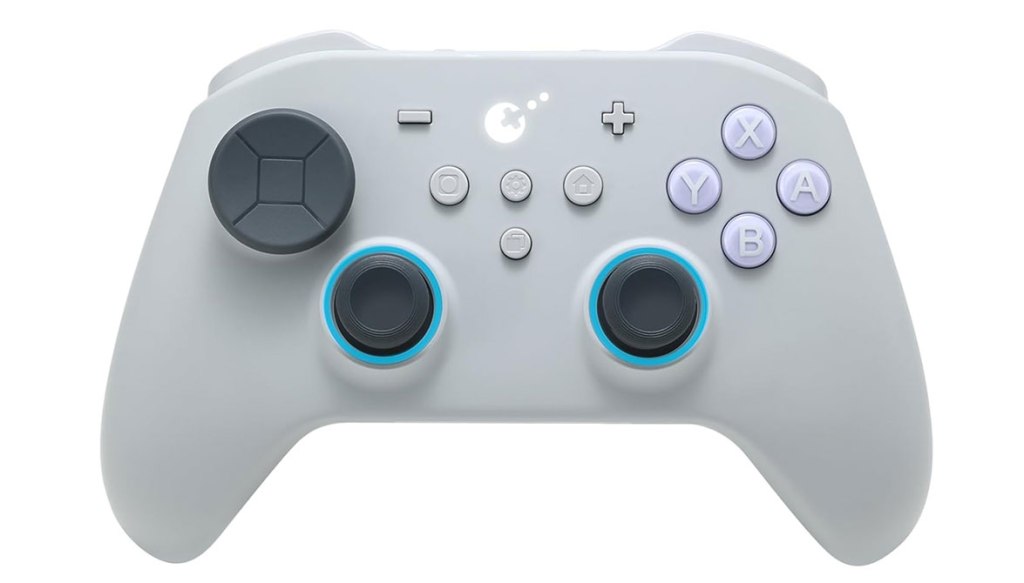
GuliKit TT MAX Bluetooth Gaming Controller
Hardware Type: Controller
.
Review:
(Note: This product was received at no cost for review via the Amazon Vine program.)
I’ve had some mixed results with GuliKit’s controllers in the past. On the one hand, I found both the GuliKit KK3 Wireless Controller and GuliKit KK2 T Wireless Controller to be pretty good mid-rage controllers, while the GuliKit Elves 2 Bluetooth Game Controller was an absolute disaster of a low-end controller. So of course I have to wonder, how does GuliKit fare in the high-end side of the controller market?
Priced at $70, you would expect a good number of bells and whistles for a controller this pricey (or you’d expect Nintendo to be the manufacturer. Ha.), and indeed, the GuliKit TT Max (sometimes referred to as the TT Max / Pro) has an interesting selection of features to boast. So the question is, are they worth the expense?
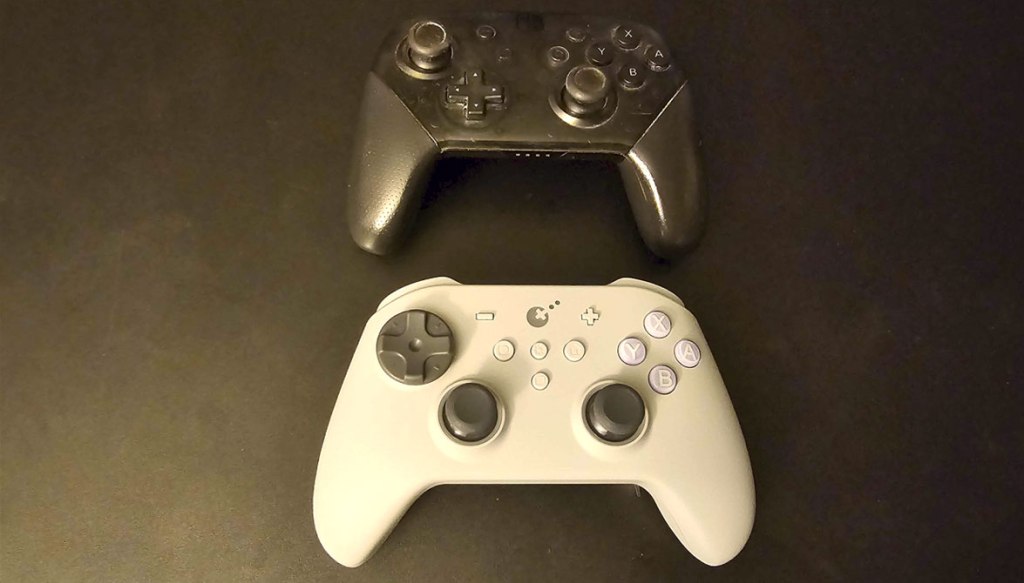
The TT Max controller is roughly the same size and shape of Nintendo’s own Nintendo Switch Pro Controller, though unlike Nintendo’s controller GuliKit has opted here for a symmetrical analog stick layout. Some Nintendo Switch players might dislike this, but I think it’s really a matter of preference.
These analog sticks are TMR stick, a high-quality type of analog stick designed in a way that shouldn’t suffer from “drift”, and what’s more the controller comes with two extra sets of analog sticks of different heights you can swap out to match your preference. In addition, you can use an included tool that looks like a black guitar pick to adjust the sticks’ resistance, making them looker or firmer as you desire. Overall, this is fantastic, and while I wish there were better instructions for this (I had to figure out how to do all of the swapping and adjusting on my own), the result is some of the best analog sticks I’ve yet encountered on a Nintendo Switch controller.
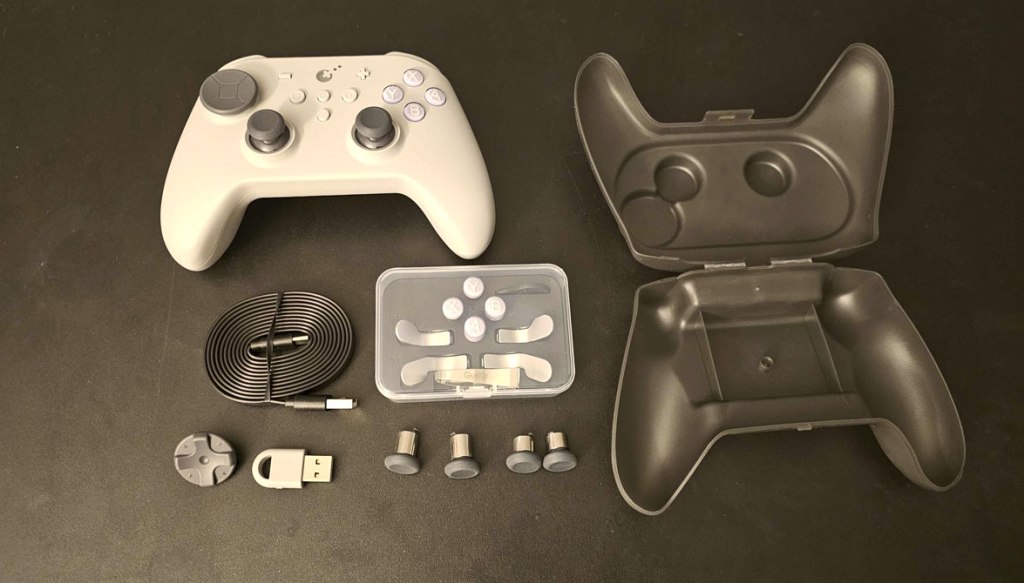
The analog sticks aren’t the only things that are adjustable here. You also have an additional standard plus-shaped D-Pad to swap with the default disc-shaped D-Pad if you like, as well as an additional set of taller face buttons that jut out more from the controller. I found these buttons to be a good mix of squishy and clicky, and they felt very responsive. All-around good stuff!
The backside of the grips are textured in a way that felt nice, and the controller overall feels pretty comfortable in the hands, though to some extent this will change a bit depending on whether or not you have the back paddles installed… but more on that later.
Moving on to the rest of the standard features, on the top of the controller, we have a pair of clicky L and R bumper buttons, as well as a pair of ZL and ZR triggers that can go from clicky digital triggers to analog triggers with the flick of switches on the back of the controller, which is ideal since Nintendo Switch only detects digital inputs, but if you’re using this controller with other platforms you may prefer to use the analog inputs, especially for things like Racing games.
Getting back to the controller’s face, the secondary face buttons are all present in their usual spots, plus we have two new buttons in the center, a settings button, and an “APG” button, with “APG” being the term GuliKit is using here for “macro”, apparently.
Honestly, this is where they kinda’ lose me. I don’t see any good reason these two functions couldn’t have been consolidated to one button, and indeed plenty of other controllers manage just fine doing both of these functions with a single programming button.
In any case, let’s start with the good stuff. The settings button can be used for a turbo feature, which works in a standard way. In addition, you can use it for an “aim assist” function that lets you use L or ZL for gyroscopic aiming even in games that don’t make use of gyroscopic aiming. You can adjust the dead zone on the analog sticks, swap the AXBY buttons to Nintendo’s layout or a Microsoft layout, adjust vibration strength and vibration mode (and on that note, the vibration on this controller is quite good). You can also adjust the analog stick sensitivity, and swap between 8-directional and 4-directional D-Pad modes, and adjust the lighting around the analog sticks. It’s quite an impressive and extensive list.
When it comes to the other standard features of Nintendo Switch controllers, this controller does include the ability to wirelessly wake the Nintendo Switch from sleep mode, as well as some smooth gyroscopic motion control. However, there’s no ability to scan Amiibo figurines… something I usually forgive as it’s not a common feature, but here it’s an unusual omission as GuliKit’s KK2 T controller scans Amiibo figures just fine.
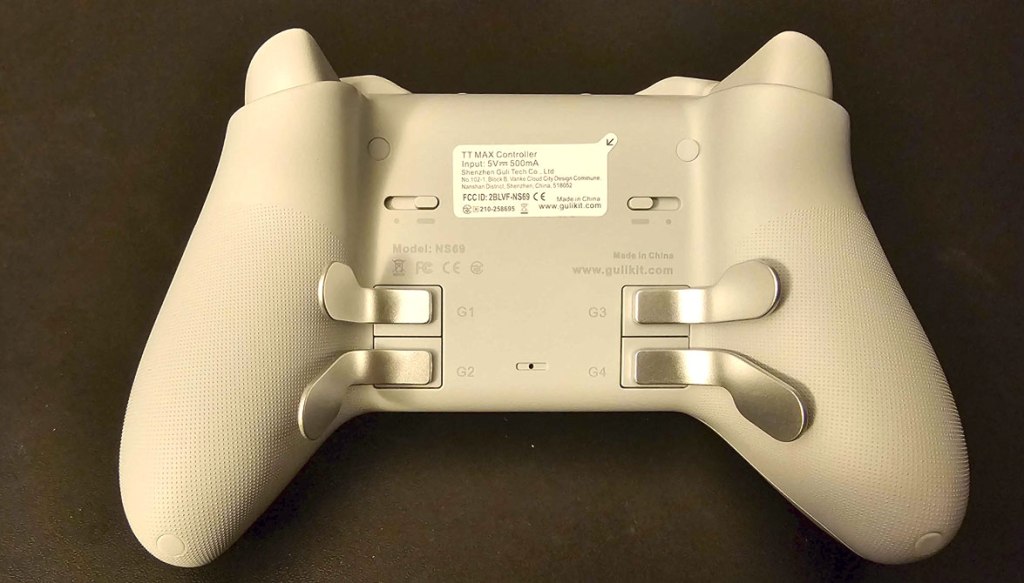
Flipping the controller over to look at its underside, you can see above the aforementioned switches near the top to swap between analog and digital triggers. They’re a bit on the small side, but they’re still relatively easy to use and work well enough. Then there’s the four detachable paddles.
Okay, firstly, I can’t help but feel like the only reason these paddles are detachable is so this controller can fit in the included controller case, as it’s too big to fit with them attached. I suppose in theory you could swap the top and bottom paddles, or leave them removed entirely, but this seems far from ergonomic or outright removes functionality from the controller. Also, I have to say, for a controller that comes with so many swappable parts, it seems odd that this one only comes with these paddles, especially when some players prefer more traditional back buttons.
You can use the settings button to set up these back buttons as additional inputs mirroring the buttons on the front, but for most players this is where you look for a macro feature, and while the TT Max does have this (via the APG button), it’s executed in a way that makes this feature pretty much worthless, making the controller mirror your inputs from the moment you press the APG button combined with the corresponding back button. This means that unless you can contort your hand to immediately press the button sequence you want when you press these buttons, there will always be a delay when you press the back button to replay the sequence. In a Fighting game where you’d want to use this feature to remember an input sequence like a Street Fighter “hadouken”, having a pause like this is simply unacceptable.
Making things more bizarre, the TT Max includes a feature where you can save and export your “APG” inputs for later use… a feature that might be worth something if the APG feature wasn’t already fundamentally broken.
Moving on, let’s talk compatibility. First, the Amazon listing for this controller says it can wake the Nintendo Switch 2 from sleep mode. It can’t, I tried. This is a Nintendo Switch controller, and while it works on Nintendo Switch 2 via backwards-compatibility, don’t expect any Nintendo Switch 2-specific features, including the ability to wake the console.
Things are thankfully much better on the other supported platforms: Windows, Android, and iOS. While I couldn’t test the iOS functionality, the controller worked just fine on Windows with the included USB dongle, and connected just fine to Android as well, once swapped to the appropriate mode by double-tapping the mode selection button. There was no noticeable lag or any issues – all of this worked great.
So, now to get down to it… is this controller worth the $70 price tag? Ehh, that’s a tough call, but I’m going to say “almost but not quite”. Unlike what it claims, it can’t wake the Nintendo Switch 2 from sleep mode, it lacks Amiibo functionality despite a less expensive controller from GuliKit including the feature, there’s no app support, and the macro function is straight-up busted. On the other hand, there’s a pretty healthy selection of features here, including some you won’t find on other controllers – the analog sticks are outstanding, the basic controls all work great, the swappable analog/digital triggers are a must on high-end Nintendo Switch controllers and work great here, the selection of swappable parts is very nice (though it doesn’t go as far as I’d like), and the various settings and features like controller-enabled gyroscopic aiming is wonderful.
I guess I just wish that this controller addressed its flaws while keeping its many benefits. This feels like it falls just short of a truly great controller, including some bonehead moves that make it in some ways worse than other much less pricey controllers, including a few of GuliKit’s own controllers! Perhaps in the future we’ll see these issues addressed in a better controller that keeps the good stuff and fixes the bad stuff, but for now what we have in the TT Max is a promising controller that doesn’t quite fulfill that promise. It’s still in many ways a very good controller, but the flaws keep it from true greatness.
tl;dr – The GuliKit TT MAX Bluetooth Gaming Controller is a high-end Pro-style controller for Nintendo Switch that has some very good features, along with some frustrating flaws. Among the good features are excellent adjustable and swappable TMR analog sticks, digital/analog adjustable triggers, and a long list of adjustable settings and swappable parts. On the bad side of things, this lacks Amiibo scanning, can’t wake Nintendo Switch 2 from sleep mode despite advertising it can, has no app support, and has completely broken macro buttons. On balance, this is still a good controller and it could have been a great one, but its flaws keep it from reaching that greatness.
Grade: B
.
You can support eShopperReviews on Patreon! Please click HERE to become a Sponsor!
This month’s sponsors are Jamie and His Cats, Ben, Ilya Zverev, Andy Miller, Johannes, Jaka, Jared Wark, Gabriel Coronad-Medina, Francis Obst, Kristoffer Wulff, Seth Christenfeld, and Vince Verrinoldi. Thank you for helping to keep the reviews coming!
 eShopperReviews
Leave a comment