
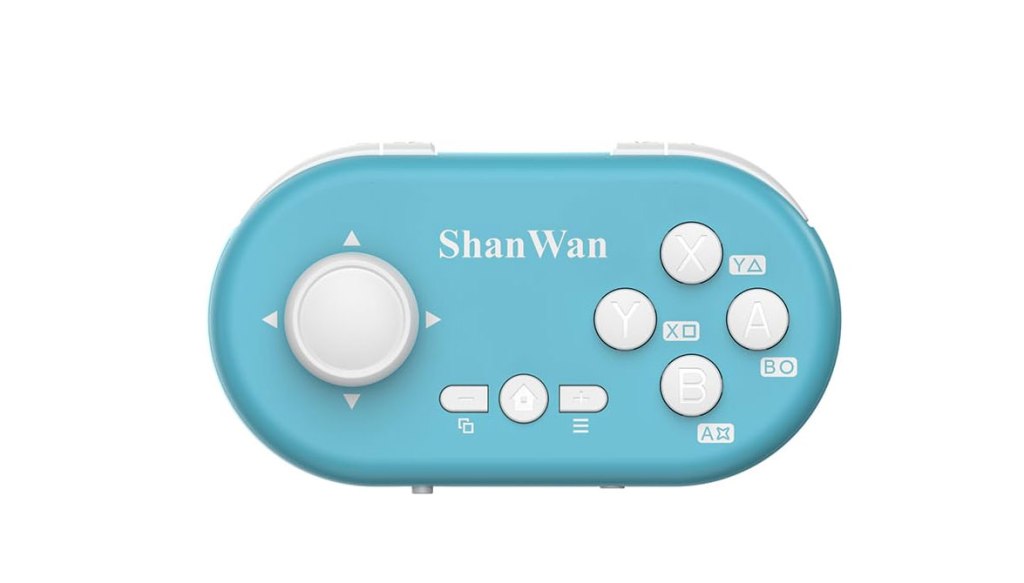
ShanWan Q36Pro XKV Mini Bluetooth Controller
Hardware Type: Controller
.
Review:
(Note: This product was received at no cost for review via the Amazon Vine program.)
A few years ago, I reviewed the ShanWan Q36XSP Bluetooth Gamepad Keychain Sized Mini Controller. It was a controller that, while pretty terrible for general usage, ended up being phenomenal within its specific niche – it was in my opinion the absolute best controller for playing Visual Novel games and other games requiring a very simple input method, due to its low cost, its extremely small size, and the comfort of holding it in one hand.
Now, I’m looking at the upgraded version of the controller, the Q36Pro XKV, which replaces the D-Pad with an analog stick and some other added features. So, do these improvements make for an even better controller? Let’s have a look…
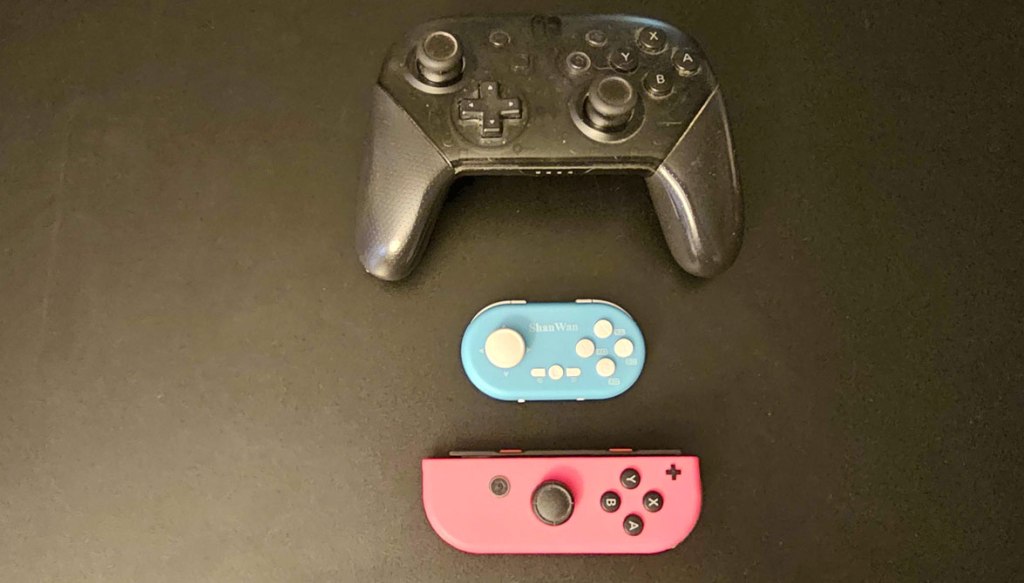
Much like the Q36XSP before it, the Q36Pro XKV is absolutely dwarfed by Nintendo’s own Nintendo Switch Pro Controller, and in fact it is only about 2/3 the size of one of Nintendo’s Joy-Con controllers. This thing is tiny, to the point where the included purple strap seems like more than just a suggestion. And like the Q36XSP, if you were so inclined, you could absolutely fit this controller on a keychain via the little niche you fit the strap through, although I suspect this would make it more cumbersome to use.
Once again, this tiny size naturally comes with significant drawbacks. First and foremost, you only have one analog stick here, not two, which has a severe impact on which games this controller can even be used to play. To give credit where it’s due, the one analog stick this controller does include is a hall effect stick, meaning it shouldn’t suffer from “drift”. Also, with a button combination (press in the L3 button via the analog stick and while you’re doing that tap the home button), you can swap the controls so the analog stick simulates a D-Pad input, which is vital since some Visual Novel games don’t recognize analog stick inputs for making choices.
The screenshot button is also gone, which is somewhat less bothersome. And this controller also lacks rumble functionality and Amiibo scanning that you get in Nintendo’s Pro controller.
And yeah, to absolutely no one’s surprise, this controller feels extremely cramped to hold. It’s doable, but this thing definitely wasn’t made for comfort or precision. My larger hands kept bumping into face buttons I wasn’t trying to hit, repeatedly hit the plus and minus buttons on the center-left and center-right when I was trying to press the home button in the center, and you have to reach over the L and R buttons to reach the tiny ZL and ZR buttons. You might think that a controller lacking the analog sticks would still work well for retro games and Fighting games, but anything requiring skill and precise button presses is not going to go well with this controller.
Okay, so what is this controller good for, then? Well, primarily, any games that don’t require full use of the controller, and don’t require precise or complex button presses. Simple retro games and single-button Arcade-style games, retro-style RPGs, Graphic Adventure games and Visual Novels, Turn-Based Strategy and Strategy-RPG games, Simulation games… when it comes to games like these, this controller shines, and I may actually find it preferable to standard-size controllers in some cases.
In a recent Visual Novel game I played, I spent hours mostly just pressing a single button to progress the text. And it is so much easier to do that when the controller easily fits into my hand. A niche use? Absolutely, very much so! But for those who play a lot of simple and slower-paced games, the Q36Pro XKV may make it easier to do so.
It also isn’t without its own surprising features. Despite its small size, it has gyroscopic motion control that works quite well. I’m not sure how many games support gyroscopic motion control but don’t also use analog sticks, but this will work for them. It also wakes the Nintendo Switch from sleep with a button press, which is nice. Also like its predecessor, it works flawlessly on both Nintendo Switch and PlayStation 4, both wired and wirelessly. It also works fine wirelessly on Android, and it works fine on PC using a USB-C wired connection… though it worked so inconsistently when using it connected to a PC via bluetooth that made it pretty much unusable.
Speaking of features this controller claims to have, but didn’t work, the instruction manual claims that this controller can connect to the Nintendo Switch in place of a single Joy-Con, but try as I might I could not get the controller to do it.
So now we ask the question how the Q36Pro XKV compares to its predecessor, and here’s where I think its biggest problem is, because in its one niche, it comes up short next to its predecessor in multiple ways. The first is most obvious, the price. The Q36Pro XKV is only $5 more expensive, but that’s still a higher price, and one that puts it in line with multiple other low-end Nintendo Switch controllers that boast a standard array of features.
Secondly, while this controller does advertise button mapping, this requires downloading the Gamepad Space app to a smartphone, syncing the controller to the phone, and then updating the firmware. In addition, while this controller advertises being extra-useful for reading and watching media on your phone, I found this not to be the case, and to the contrary the Q36Pro XKV wasn’t very useful at all for this use.
And in the end, while the analog stick may potentially open up some possibilities for play in various games, they’re largely games you wouldn’t want to use this controller to play anyway, and even though you can use a button combination to swap to D-Pad mode, this is far less convenient than simply having a D-Pad on the controller.
For these reasons, while I do still think the Q36Pro XKV is generally good for simple games like Visual Novels, retro turn-based RPGs and other simple games that don’t require precise timed inputs or full controller use, it’s not as good at this particular niche as its less-expensive predecessor, the Q36XSP. And while the added features here are nice in theory, all of them either don’t pan out or take the place of other features that were a better fit for this controller’s main use. Add in a higher price tag, and while I think the Q36Pro XKV isn’t a terrible choice for its niche, if you’re looking for a controller for that specific niche, you’re much better off getting the Q36XSP.
tl;dr – The Q36Pro XKV is a controller that is only 2/3 the size of a Joy-Con, can be cramped to hold, won’t work for any games that require dual analog sticks, and not all of its advertised features work. It is on the other hand pretty ideal for simple games like Visual Novels and retro-style Turn-Based RPGs… but not as ideal as its predecessor, the Q36XSP. Either way, while this controller does have its niche uses, I think you have better options.
Grade: C+
.
You can support eShopperReviews on Patreon! Please click HERE to become a Sponsor!
This month’s sponsors are Jamie and His Cats, Ben, Ilya Zverev, Andy Miller, Johannes, Jaka, Jared Wark, Gabriel Coronad-Medina, Francis Obst, Kristoffer Wulff, Seth Christenfeld, and Vince Verrinoldi. Thank you for helping to keep the reviews coming!
 eShopperReviews
Leave a comment