
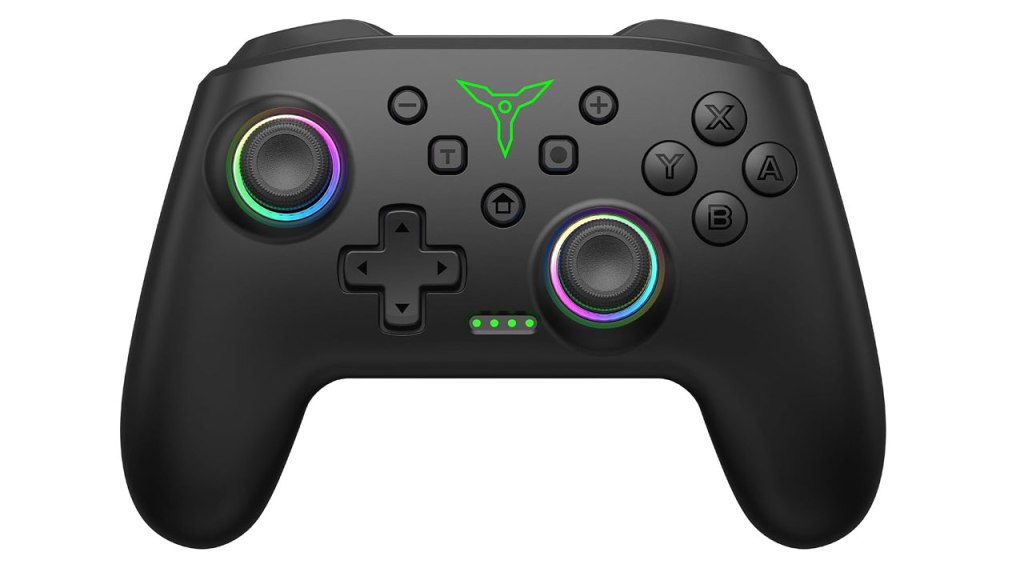
Gigeekny Switch Controller
Hardware Type: Controller
.
Review:
(Note: This product was received at no cost for review via the Amazon Vine program.)
I’ve reviewed quite a lot of Pro-style Nintendo Switch controllers by this point, and it has gotten to the point where there are so many good quality controllers on the platform that with new controller reviews, I look for something extraordinary to set it apart – does it have unique features? Does it do anything especially well? Is it a good value?
With this mindset, I took a look at the Gigeekny Switch Controller, which seemed to be a fairly typical third-party Pro-style controller. But I try to give a chance to every controller I get my hands on. So go ahead, Gigeekny, show me what you’ve got.

The Gigeekny Switch Controller is roughly the same size and shape of Nintendo’s own Nintendo Switch Pro Controller, with untextured grips and an asymmetrical analog stick layout with concave sticks. As far as I can tell, these are traditional analog sticks, not Hall Effect or TMR, which means these analog sticks could potentially suffer from “drift” over time. Not a great start.
In addition, this has a standard plus-shaped D-Pad and face buttons that have a feel that’s good mix of squishy and clicky, and was generally responsive, though it did feel like it was sticking just a little.
Moving on to the rest of the standard features, on the top of the controller, we have a pair of clicky L and R bumper buttons, as well as a pair of analog ZL and ZR triggers, which is preferable for playing on non-Nintendo platforms in some games that make use of this feature, but a detriment to playing on Nintendo Switch, which doesn’t detect the nuance in analog trigger inputs, and as a result you won’t have the same precision as digital triggers on Nintendo Switch. Not a deal-breaker, but not preferable either.
Getting back to the controller’s face, the secondary face buttons are all present, but they’ve been moved around here – the plus and minus buttons are in roughly the same place, but the home button has been shifted down to the middle, the screenshot button is now where the home button usually is, and a new turbo button is where the screenshot button used to be. This is mostly fine, but it will frustrate folks who have muscle memory of the home button’s usual spot, causing them to take unintended screenshots. The turbo button works fine, and acts in much the same way as most controllers which use this sort of button.
When it comes to the other standard features of Nintendo Switch controllers, this controller does include the ability to wirelessly wake the Nintendo Switch from sleep mode, as well as some smooth gyroscopic motion control. There’s no ability to scan Amiibo figurines, which is easily forgiven as it’s not a common feature in third-party controllers.
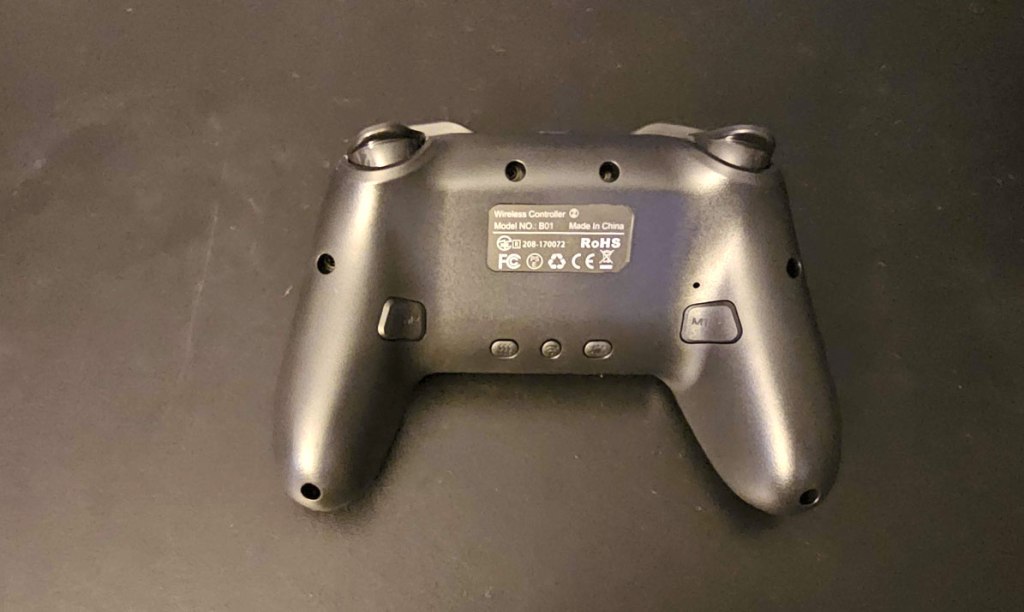
Flipping the controller over to look at its underside, on the bottom-middle of the controller you have a sync button in the center, a vibration-adjust button on one side, and a lighting-adjust button on the other side. Then near the grips, you have M1 and M2 programmable buttons.
For the most part, I think these buttons work fine, but the way you set them up is a bit frustrating. To do so, you hold the minus button (for single-input) or plus button (for multi-button macros like a Street Fighter-style “hadouken”) and press the M button you want to set up, press the desired input(s) to memorize, then press that M button again to finish the setup. My issue with this is that the game is still detecting the plus or minus input when you press it, making it harder to program a complex move if the game is pausing midway or bringing up a menu because of that first button press.
Moving on to compatibility, in addition to Nintendo Switch, this controller supports play on PC, Android, and iOS. I wasn’t able to test iOS, but the controller worked fine on Android. Play on PC worked too… eventually. It took some messing around with connecting and disconnecting the controller via USB to get it to detect wirelessly, but once it did, it worked fine, without any noticeable delay, and without a need for a dongle receiver.
Overall, I don’t think the Gigeekny Switch Controller suffers from any massive flaws, but it does have its share of more minor frustrations – namely the sub-par analog sticks, buttons that have the slightest bit of stick to them, frustrating home/screenshot button placement, and awkward macro button setup. Even with all of these issues, this is still a relatively decent controller except… well, at $30, it’s priced higher than multiple other controllers I’ve reviewed that have more features, or at least don’t have the same problems this controller has. And while Gigeekny Switch Controller isn’t bad, I can’t really recommend it when you can do better for the same price.
tl;dr – Gigeekny Switch Controller is a Pro-style controller that’s mostly decent, but has multiple small issues – traditional analog sticks that are susceptible to drift, macro buttons that are awkward to set up, frustrating screenshot/home button placement, and a few other issues that don’t make this a bad controller, but do keep it from being quite as good as multiple other controllers priced comparatively or lower than this. In short, this is a decent controller, but you can do better at this price.
Grade: C
.
You can support eShopperReviews on Patreon! Please click HERE to become a Sponsor!
This month’s sponsors are Jamie and His Cats, Ben, Ilya Zverev, Andy Miller, Johannes, Jaka, Jared Wark, Gabriel Coronad-Medina, Francis Obst, Kristoffer Wulff, Seth Christenfeld, and Vince Verrinoldi. Thank you for helping to keep the reviews coming!


Leave a comment