
RollerCoaster Tycoon Classic
Genre: Management Simulation
Players: 1
The Nintendo Switch 2 Difference
.
Review:
RollerCoaster Tycoon Classic is a Management Simulation game released in 2016 on mobile devices, ported to PC and Mac OS in 2017, then to Nintendo Switch in 2024, then PlayStation 4 and 5, Xbox One and Xbox Series X|S, and Nintendo Switch 2 in 2026. This game as an amalgamation of the 1999 and 2002 PC games RollerCoaster Tycoon and RollerCoaster Tycoon 2, which both purportedly used the same game engine making mashing them together into one combined game seem to be a sensible choice. This release comes with all expansions for the first game included, and with the second game’s expansions are available as paid DLC. Anyway, for those unfamiliar with this series, or who cannot infer from its title, the RollerCoaster Tycoon games are Management Simulations that have players managing and controlling the layout of their own amusement park, with a focus on players being able to custom-design their own roller coasters.
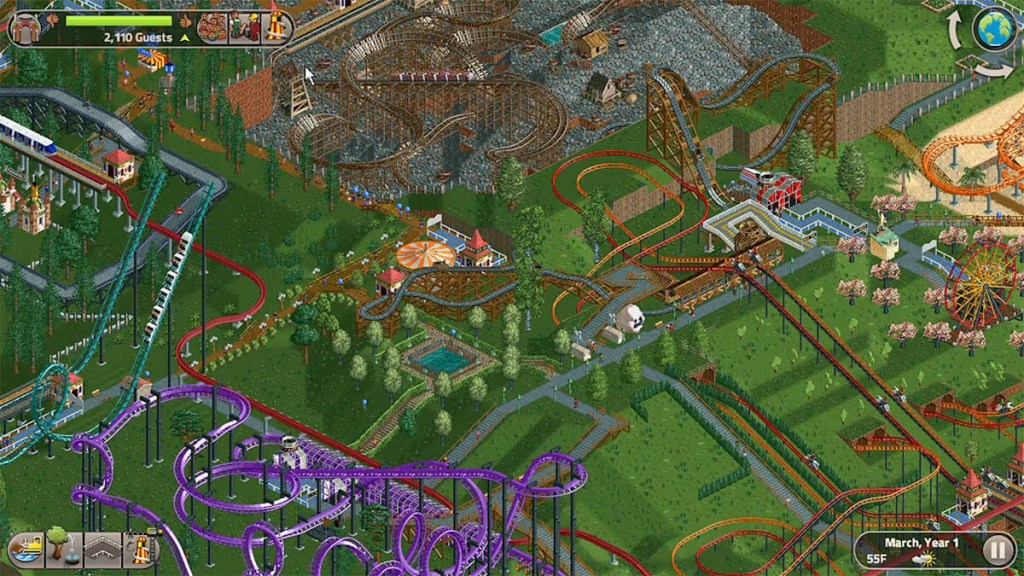
Given the age of these games, presentation is understandably quaint, but charming all the same, with detailed 2D pixel art that looks rough in places, and in particular the ability to only see things from four cardinal isometric angles is restrictive by today’s standards, and the framerates are surprisingly low given how old and lacking in detail this game is, but on the bright side it’s nice to be able to see all the little people wandering around your park, crowding into queues, and partaking in the rides, and to be able to clock at a glance how popular one ride is compared to another. Likewise, the sound design seems a bit rough and garish, but it’s nice to get little details like crowd noises as you’re moving around designing and managing your park.
While we can view the presentation as adorably quaint, unfortunately the same cannot be said for this game’s interface and controls. The original PC releases of RollerCoaster Tycoon 1 & 2 were designed for PC with a mouse and keyboard in mind, and it seems like a bare minimum of effort has been made to transition this to gamepad controls. The game treats menus as pop-up windows that need to be clicked on with the in-game cursor to be removed, and while there is a shortcut to exit out of a window by pressing B, it only works inconsistently.
I should note that the Nintendo Switch release of the game does support the use of touchscreen controls in handheld mode, and this does improve the controls somewhat, but oddly you can’t use them to control the camera, so you’re still stuck partly using the less-than-ideal gamepad controls.
In addition to this, RollerCoaster Tycoon shows its age with clunky mechanics and a lack of quality-of-life features we’ve come to expect from modern entries in the genre. I couldn’t seem to find any way to move a facility after placing it without just completely destroying it and starting over, adjusting the altitude of landscaping is awkward and takes some getting used to, and the camera controls require a button combination just to zoom or rotate the camera. Honestly, sometimes it seems like this release was designed by someone who hasn’t played a game in the genre over the last two decades.
It also doesn’t help that this game’s tutorial is woefully unhelpful, only giving passive information about menus and features as you click on them, and then leaving the window up often without any way to dismiss it beyond waiting for it to time out. And certainly don’t expect anything as helpful as a guided or interactive tutorial here.
And yet, as frustrated, dated, and clunky as RollerCoaster Tycoon Classic is… it’s hard not to still have a fondness for this game, the wonderful attention to detail, the ability to adjust all sorts of small details about your park and its attractions. Underneath all the clunky interface issues and dated game design, there’s still an exceptional game here. And while the RollerCoaster Tycoon games may not have aged well, they’re still worth playing even today. I would just recommend that those without particularly powerful rose-tinted nostalgia goggles enter this venue with a lot of patience to deal with the frustrations caused by its age.
tl;dr – RollerCoaster Tycoon Classic is a Management Simulation that combines the original two RollerCoaster Tycoon games into one experience, letting you manage and design your own theme park. The gameplay here has aged poorly in some places, and the controls and interface design are poorly-adapted to gamepad controls. However, despite these issues, the core game still shines through with some great detail and control over the operation of your park. If you’re a fan of this genre, this game may still be worth playing, but you’ll want to have a lot of patience for its problems if you do.
Grade: B-
.
The Nintendo Switch 2 Difference
RollerCoaster Tycoon Classic – Nintendo Switch 2 Edition
Genre: Management Simulation
Players: 1
.
Review:
It’s a bit odd that we’re getting a Nintendo Switch 2 upgrade for a game that is, at its core, 27 years old. Yet here we are, and for $5 players can upgrade the Nintendo Switch game to a Nintendo Switch 2 Edition, and I think any fan of the series can anticipate the one feature that this game desperately needs that the Nintendo Switch 2 can bring to the table.
Yes, this version of the game adds Mouse Mode support, and it’s… good. I don’t really know what else to add here – this is a game that was made with a mouse in mind, and it plays better with a mouse. The menus are still a bit clunky even with Mouse Mode, but regardless this is still absolutely a better way to play this game than with a gamepad or even touchscreen.
The other enhancement this game’s eShop page boasts is enhanced resolution, but I have to be honest – I did not see any noticeable difference there. Surprisingly, one area that wasn’t mentioned but does seem enhanced is improved framerates, making for much smoother scrolling.
Finally, as I always do, I looked at loading times, and the difference here was minimal. On Nintendo Switch, It took 14 seconds to load to the title screen and another 1 second to load a game save, while on Nintendo Switch 2 it took 11 seconds and 1 second, respectively. Not a huge improvement.
No, overall, the main feature this $5 upgrade adds is Mouse Mode, with a nice extra bonus being improved framerates. Is that worth $5? Well, it’s not adding much to the game, but even though it’s a small addition, it’s an addition that makes a huge difference, and I would argue that if you’re going to be playing this game on Nintendo Switch 2, it’s probably worth it to pay the extra to play this game the way it was intended.
tl;dr – RollerCoaster Tycoon Classic is a Management Simulation that combines the original two RollerCoaster Tycoon games into one experience, letting you manage and design your own theme park. The gameplay here has aged poorly in some places, and the controls and interface design are poorly-adapted to gamepad controls, though thankfully the Nintendo Switch 2 Edition includes superior Mouse Mode controls. In any case, the core game still shines through with some great detail and control over the operation of your park. If you’re a fan of this genre, this game may still be worth playing, but you’ll want to have a lot of patience for its problems if you do.
Grade: B-
.
You can support eShopperReviews on Patreon! Please click HERE to become a Sponsor!
This month’s sponsors are Jamie and His Cats, Ben, Ilya Zverev, Andy Miller, Johannes, Jaka, Jared Wark, Gabriel Coronad-Medina, Francis Obst, Kristoffer Wulff, Seth Christenfeld, and Vince Verrinoldi. Thank you for helping to keep the reviews coming!


Leave a Reply