
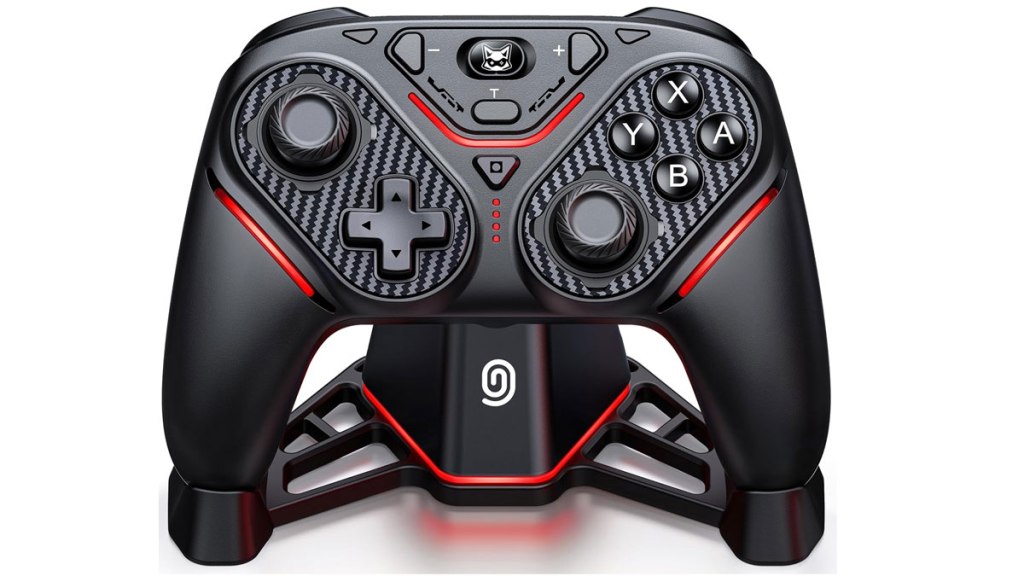
ExtremeCool NC400 Controller
Hardware Type: Controller
.
Review:
(Note: This product was received at no cost for review via the Amazon Vine program.)
Before I get into this review proper, I have to clear the air on something here. I honestly wasn’t sure what to call this thing, because between the Amazon listing for this controller and what’s printed on the box and controller itself, it has a blend of multiple brand names and product names. Amazon’s listing says this controller is being sold by Svetaecho, but both the controller and the box say the controller is made by ExtremeCool, with the logo on the front of the controller being ExtremeCool’s logo. Neither company’s website lists the controller among its products. So having said all of that, I’m going with ExtremeCool NC400, and throughout the rest of the review that’s what I’ll refer to it as, but for all I know Svetacho may be valid.
I also need to mention that even though the controller’s shape, layout, and overall look is quite different from the ExtremeCool NC800, its list of features is surprisingly similar, so I’ll be reusing the text from my review of that controller here and changing it where pertinent.
The NC400 advertises something that I haven’t seen often, and have only seen done well just one time: it claims to be both a Nintendo Switch controller and a Nintendo Switch 2 controller (in addition to other platforms). And by this I mean it doesn’t just connect to the Nintendo Switch 2 via backwards-compatibility with Nintendo Switch hardware and accessories, but also makes use of at least one of the Nintendo Switch 2’s unique features – namely, the ability to wake the Nintendo Switch 2 from sleep mode, which most Nintendo Switch controllers cannot do. You may recall, the last time I found a controller that truly backed up this claim, the EasySMX S10 Controller, I gave that controller the eShopperReviews 2025 Game Award for Best Hardware. So the NC400 is aiming pretty high, and has big shoes to fill.
I won’t bury the lead here: the NC400 is indeed capable of waking both the Nintendo Switch and Nintendo Switch 2 from sleep mode, and on Nintendo Switch 2 it does this the exact same way as EasySMX’s controller: you sync it to the Nintendo Switch 2 like normal, and then while still in the controller menu, you detach and reattach the right Joy-Con 2 controller from the console. It’s an oddity I don’t quite understand, but for whatever reason this seems to be a loophole that enables the wake function on this controller for Nintendo Switch 2.
Well, okay then. That’s the tough part out of the way right at the start. So then the question becomes, how well does the rest of the controller hold up? Let’s have a look…
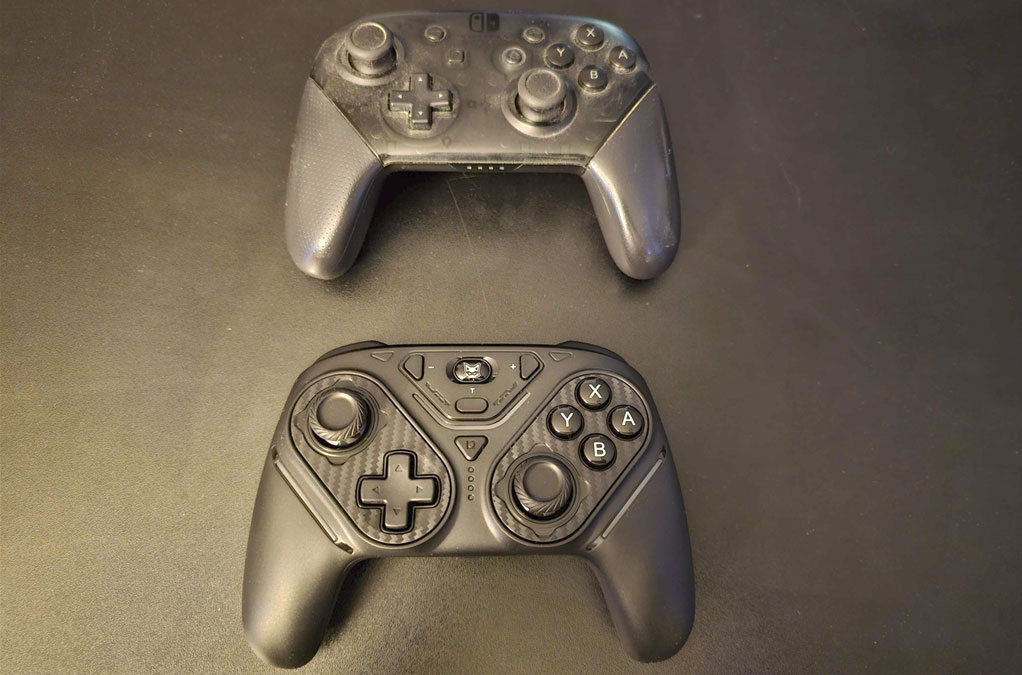
Like many of the Pro-style controllers released for Nintendo Switch, the NC400 replicates the general size, shape, and layout of Nintendo’s own Nintendo Switch Pro Controller, with asymmetrical analog sticks with a concave top, along with standard face buttons and D-Pad in the usual places. Overall I felt this controller was very comfortable to hold. It’s not nearly as comfortable to hold as the Nintendo Switch 2 Pro Controller, but it’s surprisingly close, which I consider quite an accomplishment.
Both the D-Pad and standard face buttons feel about halfway between the “clicky” and “squishy” sides of the “squishy/clicky” spectrum, and feel very responsive and control well in-game. As for the analog sticks, the NC400’s Amazon page claims that these are high-end TMR sticks, while the packaging claims they’re the less-advanced but still-good Hall Effect sticks. My guess is this mixed messaging is due to a reused packaging template and the analog sticks are probably the better TMR sticks, but it’s not the sort of thing I would be able to tell without tearing the controller open and checking its guts. In any case, no matter which is used, this should ensure that this controller won’t suffer from “drift”, and the analog sticks worked well enough when I tested them.
Moving on to the rest of the standard features, on the top of the controller, we have a pair of clicky L and R bumper buttons, as well as a pair of ZL and ZR triggers with switches that change them from analog to… well, let’s say “faux digital” – they still have a little give, but not much. The analog triggers are important for playing on non-Nintendo platforms that can make use of them, but for play on Nintendo Switch and Nintendo Switch 2, it’s nice to be able to swap to the more-responsive digital(-ish) triggers since the Nintendo Switch line of hybrid consoles don’t use analog triggers in their Pro-style controllers, meaning that feature would be wasted here and just result in less-responsive triggers. All of this is to say that having switches to allow for both types of trigger is an excellent feature.
Getting back to the controller’s face, the secondary face buttons are all present, but swapped around a bit. The home button is now the large oval ExtremeCool logo button at the center-top, plus and minus are roughly the same place they usually are, and the screenshot button is now dead-center on the controller – an odd choice, but I suppose it works. In the center of the controller between the home and screenshot buttons, there’s also a turbo button that works in the standard way this sort of button usually does. For those wondering, this controller does not have Nintendo Switch 2’s “C” button, nor its headphone jack.
When it comes to the other standard features of Nintendo Switch controllers, this controller includes decent gyroscopic motion control. And while it doesn’t have HD Rumble or HD Rumble 2, it does have adjustable rumble, which is a decent enough tradeoff. However, it does completely lack Amiibo-scanning functionality.
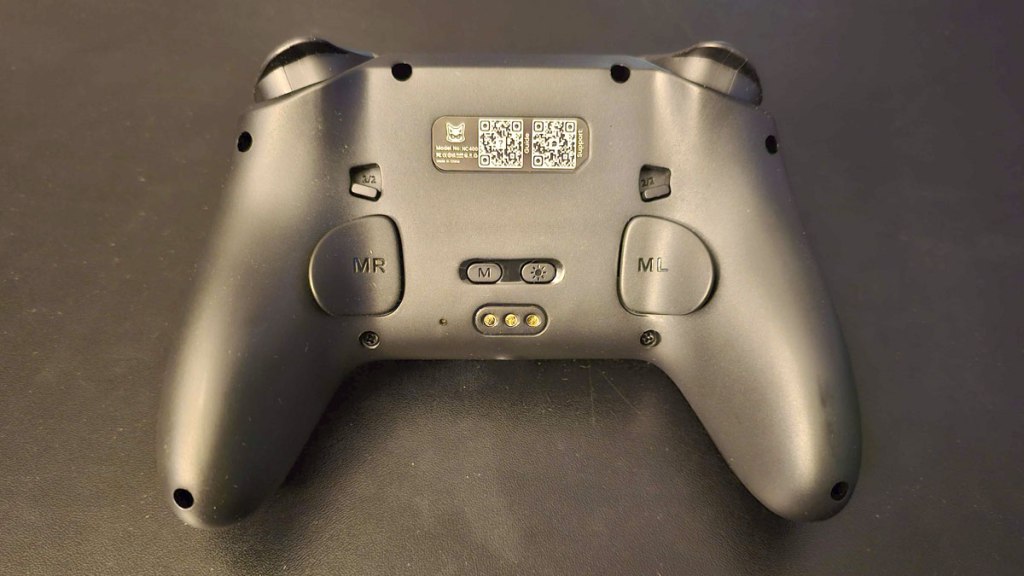
Flipping the controller over to look at its underside, we see the aforementioned trigger switches to either side near the top, and then farther down there are a pair of macro buttons that can be assigned to a button or a sequence of commands, like a Street Fighter-style “hadouken”. This is done using the macro settings button in the middle of the back off to one side. Finally, just to the side of that macro button is a lighting adjust button to change the color of the LED lights on the front of the controller.
While this controller doesn’t advertise compatibility with platforms other than the Nintendo Switch and Nintendo Switch 2, this controller does work with both Android and Windows platforms, though unfortunately I could not get it to work wirelessly with PC – it only worked when plugged in wired via USB-C.
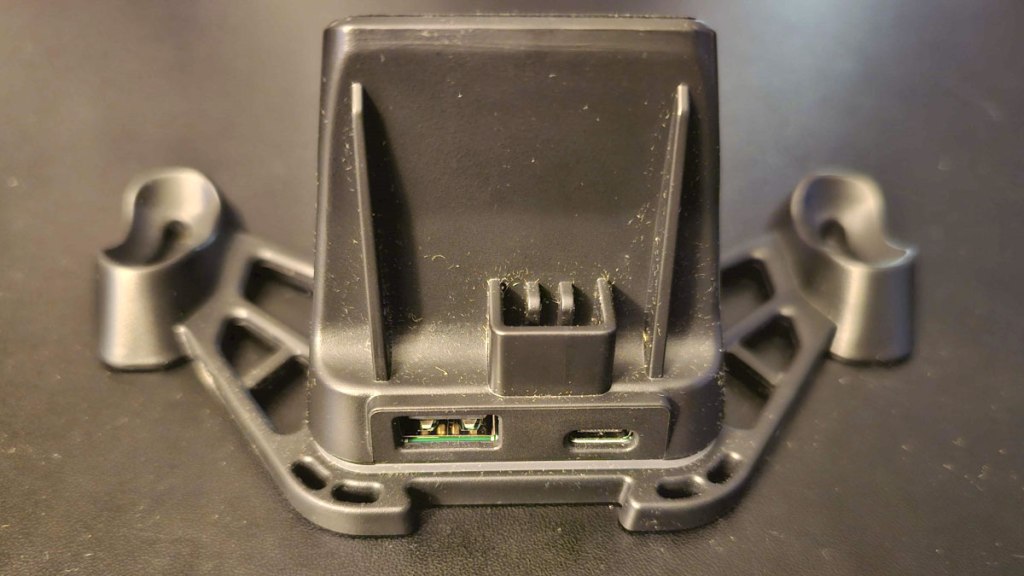
Also, I should talk about the controller dock for a moment. Whether or not you like this will be a matter of personal preference. Personally, I prefer to just plug in my controllers the old-fashioned way, because a USB-C plug is interchangeable and not specific to this controller, and not having one of these devices in the package means I’m not spending money on it. On the other hand, if you don’t have a lot of controllers you’re swapping in and out, I could see how you’d appreciate the convenience this thing adds. Like I said, personal preference, so I don’t consider the inclusion of one of these things as a mark for or against the controller, I’m just letting you know it’s in here, and you can choose to use it, or not.
There’s one more major feature here worth mentioning – the NC400 is compatible with the KeyLinker Android app, enabling players to quickly change button assignments, turbo settings, vibration strength, and other options all without disconnecting from the platform the controller is synced to. This is always a welcome feature, and I’m glad it was included here.
When it comes to downsides, I need to start with one that seems unique to the NC400, that was not only a problem the NC800 didn’t have, but one that I haven’t encountered in any other controller – when it was connected to my Nintendo Switch’s dock via USB-C cable, the Nintendo Switch oddly chose to see it as a USB headphone set, causing the Nintendo Switch’s sound to be muted when playing it docked. It’s odd and frustrating, and as a result I recommend charging it plugged into a wall and not plugged into your Nintendo Switch dock.
And since the prior controller it’s most directly competing against is the EasySMX S10 Controller, I’ll mention features that controller has that the NC400 doesn’t – as mentioned before, it lacks Amiibo-scanning capability, it lacks wireless connection on PC, it doesn’t have that controller’s interchangeable D-Pads, changeable faceplate, or weird jerry-rigged “C” button. And like EasySMX’s controller, it only has two macro buttons, lacks Nintendo Switch 2 Pro Controller’s HD Rumble, game-specific GL and GR buttons, and headphone jack.
In addition, even its sibling controller, the NC800, has a few advantages over the NC800 – it does connect to PC wirelessly (albeit poorly), costs a few bucks less, and doesn’t have that weird sound issue I mentioned.
That said, there are a few things going in NC400’s favor over the others. Compared to the S10 and Nintendo’s controller, the ability to swap between analog triggers and faux-digital triggers is a big one, and of course there’s the controller dock, but the biggest thing the NC400 has going for it over both the S10 and Nintendo Switch 2 Pro Controller is its price – at $43, it’s just over 2/3rds the price of the S10, and less than half the price of Nintendo’s controller. Given how competitive the NC400’s list of features is with these more high-end controllers, its comfortably mid-range price makes it an absolute steal. Also, compared to the NC800, its biggest advantage is its TMR analog sticks.
Having said all of that, I think the NC800 just barely edges out the NC800 when it comes to my pick for the “Best Bang For Your Buck Nintendo Switch/Nintendo Switch 2 Controller”, mainly due to the lack of wireless PC compatibility and that odd sound issue. However, it’s a close call, and I could easily see someone preferring this controller due to its TMR analog sticks. In any case, this is still one of the best controllers I’ve used on Nintendo Switch and Nintendo Switch 2, even if I wouldn’t put it quite at the top.
tl;dr – The ExtremeCool NC400 Controller (which also sells under the brand name Svetaecho), is a Pro-style controller that works on both Nintendo Switch and Nintendo Switch 2 (including the ability to wake both from sleep mode), and is one of the “Best Bang For Your Buck” controllers for both platforms. It has its flaws – it can’t scan Amiibo figurines, can’t connect wirelessly to PC, and causes an odd sound issue when connected via USB-C to the Nintendo Switch. However, at only $43 and with a list of features that makes it competitive with some high-end controllers, this is a fine choice for players looking to get more for less on either platform, and I absolutely recommend it.
Grade: A-
.
You can support eShopperReviews on Patreon! Please click HERE to become a Sponsor!
This month’s sponsors are Jamie and His Cats, Ben, Ilya Zverev, Andy Miller, Johannes, Jaka, Jared Wark, Gabriel Coronad-Medina, Francis Obst, Kristoffer Wulff, Seth Christenfeld, and Vince Verrinoldi. Thank you for helping to keep the reviews coming!


Leave a comment