
Cozy Pages: Comfy Coloring for All Ages – Paint, Draw & Relax
Genre: Art Application
Players: 1
.
Review:
Cozy Pages is a family-friendly Art Application released on Nintendo Switch in 2026. Or, to put it more simply, this is a digital coloring book. This release is technically free-to-play, but that may be a bit misleading, as it acts as a free sample, only offering a limited selection of 2 color palettes, 33 coloring pages to fill in, and 4 3D models (but more on those in a moment), with additional content available as paid DLC. We’ve seen a similar formula used elsewhere on Nintendo Switch before – Coloring Book does much the same thing, and up until this point I would argue this is a great free activity for young kids that had yet to be surpassed on Nintendo Switch. Does this surpass it? Let’s have a look!
Oddly, the button to start the game only seems to respond to touchscreen input, even though the game can be played in docked mode using a jingle Joy-Con controller with gyroscopic motion control. However, touch input does seem more precise, with pinch-zoom and two-finger dragging, and I would argue that’s the preferable way to play the application.
The sort of styles of drawings to fill out that are available here are pretty varied, from simple cartoony designs to intricate mandalas to color in. And as mentioned a moment ago, there are also 3D models, with some of those being “voxel” models and some being surprisingly detailed 3D models that are almost like painting a large porcelain statuette. And as you’re painting, everything will be backed by some pleasant, relaxing music that works quite well for the application.
Upon starting, you’ll be given a short… almost personality quiz to help narrow down the sort of art you’ll likely gravitate toward, based both on style and topic matter. If you’re only playing using the free content, you’ll get a tiny bit of everything so you can try out a wide range of different art styles. The one thing you won’t find in the free content are blank canvases to create your own original art on – those are reserved for paid DLC.
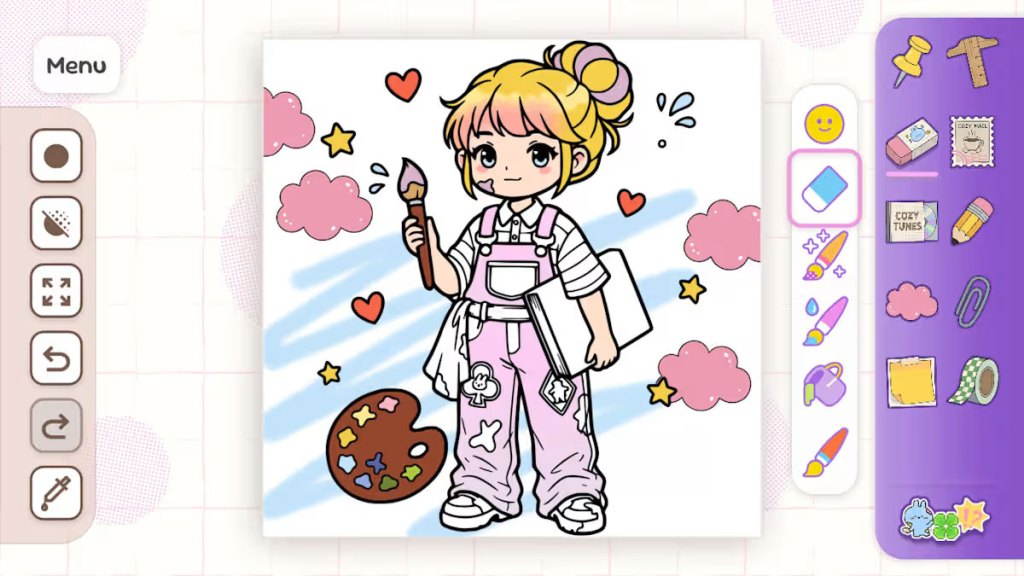
When filling in art, you’ll have a few different options for brushes – there’s brushes to simulate oil and watercolor paint, as well as a “glitter paint” brush, a paint bucket to fill in within lines, an eraser, and a selection of stickers you can stamp into the art. You’ll also have a button to turn on/off restrictions on painting outside the lines, different brush sizes, an undo button, and an eye dropper tool if you want to reproduce a color elsewhere. Finally, as mentioned before, you have the option to zoom or drag around the zoomed-in image.
This is a pretty good selection of tools for a free-to-play coloring book game, but there are definitely things that are missing, some because they’re being withheld for paid DLC content, such as the blank canvases and added color palettes. You’re also lacking a wider variety of brush styles, including no pens, pencils, or crayons, not to mention line tools. No one is going to mistake this for a professional art application. It also lacks the multiplayer found in Coloring Book.
That said, the 3D painting content here is surprising, and I don’t think there’s really anything else quite like it on the Nintendo Switch, or at least certainly not for free. The impression that you’re getting to paint a little model is really great, and I think that helps to put Cozy Pages above other similar free programs on Nintendo Switch.
Is Cozy Pages a truly great Art Application? Well, no, I’ve already said it’s lacking numerous tools you’d be looking for in a more professional application. But it’s also not pretending to be anything like that. If you’re looking for something simpler, particularly for younger children, I think this is going to be a solid choice. Just be ready when they try to pressure you to buy the DLC so they have more in-game pages to color.
tl;dr – Cozy Pages is a family-friendly free-to-play Art Application that provides players with a digital coloring book they can fill out using the touchscreen in handheld mode or the Joy-Con controllers’ gyroscopic motion control, as well as some 3D models to color in like you’re hand-painting them. This application lacks a lot of tools you would look for in this sort of thing, and the free content is clearly here just to try to convince you to buy the paid DLC. However, despite these issues, this is a solid free coloring application that I think young kids in particular are likely to enjoy.
Grade: B
You can support eShopperReviews on Patreon! Please click HERE to become a Sponsor!
This month’s sponsors are Jamie and His Cats, Ben, Ilya Zverev, Andy Miller, Johannes, Jaka, Jared Wark, Gabriel Coronad-Medina, Francis Obst, Kristoffer Wulff, Seth Christenfeld, and Vince Verrinoldi. Thank you for helping to keep the reviews coming!


Leave a comment